

Forte! Import
Forte Audio S.r.l. · Voice & Language
Forte! Import is an AI DAW co-pilot that automates audio file organization in Pro Tools, sorting tracks and prepping sessions before you mix.
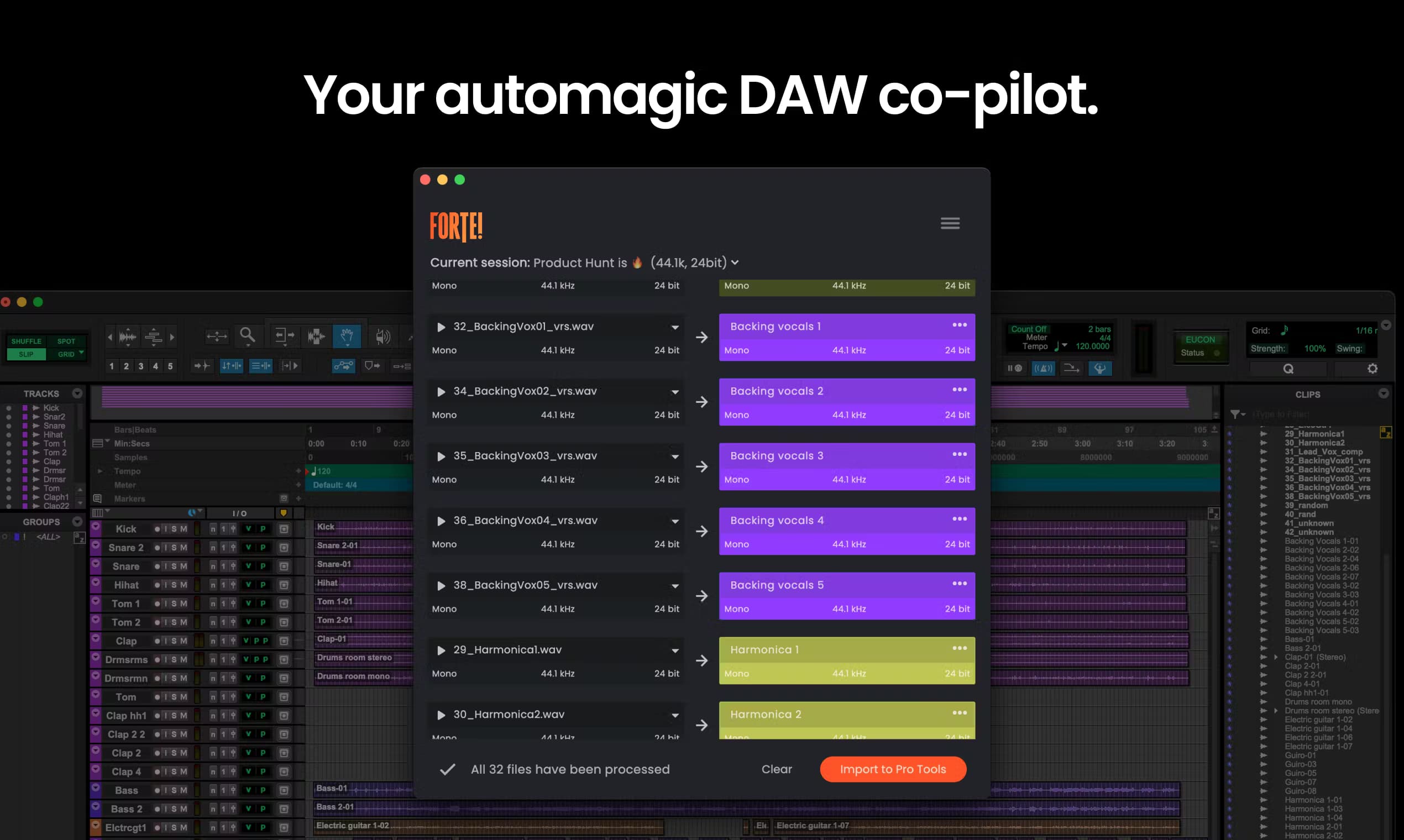
About Forte! Import
What Is Forte! Import
Forte! Import is the import and organization module inside Forte, a Mac app built for audio professionals who work in Pro Tools and Logic Pro. Think of it as a Pro Tools session organizer and an audio file organizer in one. Its job is the prep work nobody wants: dragging an AAF in, watching tracks land unnamed and unordered on the timeline, then spending the next hour renaming, coloring, and routing by hand. Forte! Import reads the file, figures out what each track actually is, and hands back a session organized to your template.
The recognition side is what sets it apart. A built-in on-device AI audio engine listens to the content and classifies tracks by instrument or role, so drum buses, lead vocals, and dialogue stems land in the right groups on their own. It runs entirely on your Mac, which means your sessions never leave the machine. For studios juggling NDAs or unreleased material, that's not a small detail.
The main limitation is scope. Forte! Import works inside specific tools. On the Pro Tools side it needs version 2024.3 or newer, and the Logic Pro edition is a separate, one-time purchase. Did you switch to Windows last year? Then this one won't run. It also lives on macOS 13+ only, so Windows users are out of luck. If your workflow lives somewhere else, this isn't the tool for you.
Getting Started
- Download the Mac app from the Forte site and sign in to start the 7-day free trial, no card needed.
- Open Pro Tools, then load your mix template or pick a track preset so Forte! Import knows the structure you want.
- Drop an AAF into the app, or open an existing PTX session that needs reorganizing.
- Review the detected tracks and categories in the Visualizer before anything touches your timeline.
- Confirm the import, then open the newly organized session in Pro Tools and start mixing.
Product Information
A quick look at Forte! Import's pricing, supported platforms, and performance.
Best for
The users, tasks, and scenarios where this tool fits best.
Users
- Mix engineers
- Audio post teams
- Music producers
- Privacy-conscious studios
Tasks
- AAF import
- Session reorganization
- Stem export
- Content detection
Scenarios
- Daily episode turnovers
- Multi-session batch runs
- Air-gapped stages
Key features
On-Device Instrument Recognition
Forte! Import listens to what's in the file and classifies tracks automatically, grouping drums, vocals, and other instruments the way you'd sort them yourself. Everything runs locally, so nothing gets uploaded to a server to make the call. The result is a session that lands pre-sorted instead of a flat list of unnamed regions.
AAF Import with Intact Metadata
Drop in an AAF from Media Composer, DaVinci Resolve, Premiere Pro, or Pro Tools, and the clips, fades, gains, automation, and timecode come through clean. The app flags anything that can't survive the import before it reaches your timeline, which saves you from hunting for missing pieces later. It reads deep metadata too, like channel name, scene, take, and source timecode.
Template Matching
Forte! Import connects to the mix template you already use, so there's no new structure to adopt. You teach it your naming, colors, and routing once, and every project after that lands organized your way. Call it mix prep automation that remembers your habits. That consistency matters when multiple editors touch the same show.
PTX Session Reorganization
It doesn't only handle new imports. Point it at an existing Pro Tools session, including ones that came in from another editor, and it reorganizes the tracks to your setup. This turns messy handoff sessions into something you can actually start mixing.
Batch Processing Audio
Imports and exports can run together in one mixed queue, so you can fire off a run of jobs and walk away. This batch processing for audio is part of the suite tier, aimed at rooms where one project at a time isn't realistic. Set the queue and let it run.
Split by Category
With the suite tier, a single AAF can split into separate sessions for dialogue, music, and effects, each named and routed to your template. It's the difference between handing one editor a wall of tracks and handing three editors exactly what each one needs.
Fully Offline Operation
The whole thing runs on your Mac with no connection required, and the suite tier keeps working air-gapped. For facilities that keep sensitive work off any network, that's the feature that makes the rest usable.
Pros and cons
Pros
- Recognition and organization happen on-device, so confidential audio never leaves the machine.
- Works inside Pro Tools and Logic Pro rather than forcing a separate app into your workflow.
- Template matching means no new folder structure to learn, it adapts to how you already work.
- Batch queue handles imports and exports together, cutting babysitting time on busy days.
- 7-day trial with no credit card makes it easy to test on a real project first.
Cons
- macOS only. Windows-based studios can't run it at all.
- Needs Pro Tools 2024.3+ or Logic Pro 11.1+, and older versions won't work.
- The full split-by-category and batch features sit behind the pricier suite tiers, not the basic plan.
- Logic Pro support is a separate one-time purchase rather than included in the main subscription.
Frequently asked questions
It automates the prep work before a mix. You drop in an AAF or open a Pro Tools session, and it recognizes the content, matches your template, and hands back an organized session with tracks named, colored, and routed. The point is to get you to mixing faster instead of doing setup by hand.
Related content
Explore related tools, skills, and articles for Forte! Import.
Forte! Import Alternatives

Foley
Hanamori Labs, LLC · Voice & Language · Productivity · AI AssistantFoley is a voice to-do list that turns a spoken sentence into a filed task, complete with project, date and time, then helps you plan the day around what is already there.

HireKey
HireKey · Voice & Language · Productivity · LeaningHireKey is an AI job search copilot built by a former tech recruiter. It checks role fit, tailors resumes, runs interview practice and tracks every application.

Fluence
Yay Software (Yannick Huchard) · Writing · Voice & Language · ProductivityFluence is an Android app that reads PDFs, EPUBs, Word files and web articles aloud, follows each sentence as it speaks, and answers questions about the text on the phone itself.