
FotoAI Keyboard Themes & Fonts
FotoAI · Writing · Marketing
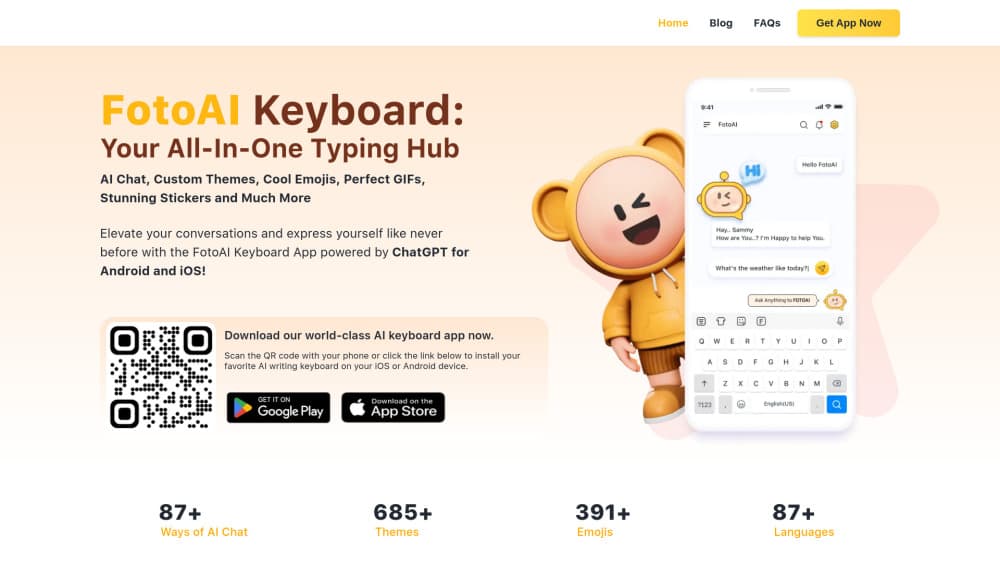
FotoAI Keyboard Themes & Fonts is a custom keyboard app for Android and iOS that adds AI chat help, themes, fonts, emojis, and GIFs to everyday typing.
About FotoAI Keyboard Themes & Fonts
What Is FotoAI Keyboard Themes & Fonts
FotoAI Keyboard Themes & Fonts, usually shortened to FotoAI, is a custom keyboard app for Android and iOS. It replaces the keyboard you open in messaging apps with one that carries themes, fonts, emojis, GIFs, stickers, and an AI chat helper built on ChatGPT. The pitch is simple. Instead of switching between apps to find a reaction GIF or fix a sentence, you keep typing and the tools sit inside the board.
The keyboard is aimed at people who live in chat apps. So who's it really for? Anyone who spends their day bouncing between WhatsApp, Instagram, TikTok, and iMessage, sending reactions, replies, and captions until their thumbs ache. It handles the cosmetic side (themes and fonts to change how the board looks) and the practical side (AI replies and text generation).
The main catch is privacy, and it's a big one. Keyboards see everything you type, including passwords and private messages, so you should check what FotoAI does with that data before you switch, because once a keyboard has full access it can log far more than the emoji you were looking for. Treat any third-party keyboard as a trust decision, not just a visual upgrade.
Getting Started
- Download FotoAI Keyboard Themes & Fonts from Google Play or the App Store.
- Open the app and follow the setup prompt to add it as a system keyboard.
- In your phone settings, enable FotoAI and give it full access if you want the AI features to work.
- Pick a theme, font, and emoji style from the in-app library.
- Switch to the FotoAI board in any chat app and start typing.
Product Information
A quick look at FotoAI Keyboard Themes & Fonts's pricing, supported platforms, and performance.
Best for
The users, tasks, and scenarios where this tool fits best.
Users
- Social media regulars
- Non-native English speakers
- Chat-heavy teams and friend groups
Tasks
- Rewriting a message before sending
- Finding a reaction GIF fast
- Dressing up a bio or caption
Scenarios
- Replying in a busy group chat
- Posting to Instagram or TikTok
- Typing on a phone one-handed
Key features
AI Chat and Text Generation
FotoAI runs on ChatGPT, so the keyboard can draft replies, rewrite a sentence, or generate text on the spot. You stay inside whatever app you're using instead of copying a prompt into a separate chatbot, which means the help arrives the moment you need it rather than after you've left the conversation and lost your train of thought. Sounds trivial. It isn't. The help matters most when you know what you want to say but not how to phrase it.
Custom Themes and Fonts
The app ships with a large theme library and a range of fonts you can apply to the board itself. Switching looks takes a couple of taps. The styles carry into the layout, too, rather than just recoloring the keys, which is why themes and fonts sit at the center of the whole product. For people who treat their phone as an extension of their personality, this is the headline feature. Skin deep? Maybe. It's also why most people download the app in the first place.
Emojis, GIFs, and Stickers
Emoji, GIF, and sticker panels sit right on the board, so it doubles as an emoji keyboard and a GIF keyboard in one. You can search for a reaction and send it without opening a separate app. That's the friction FotoAI is trying to remove, and given how often most people break off mid-chat to hunt down the right reaction image in some other app, it's a friction worth killing. The GIF library leans on common providers, so results feel familiar.
Multilingual Support
FotoAI covers a long list of languages, which matters if you chat with people across regions. The AI text tools work across those languages too. So you can get help phrasing a message in a language you don't speak fluently. Typing fluently in a second language is hard. This lowers the bar.
Saved Replies and Quick Text
You can stash frequently used phrases and drop them in with a tap. Small feature. Real payoff in work chats where you repeat the same answers all day.
Pros and cons
Pros
- Packs themes, fonts, emojis, GIFs, and AI text help into one keyboard.
- AI chat works inside other apps, so you don't break your flow.
- Broad language coverage suits people who chat across regions.
- Free tier lets you test the basics before paying.
Cons
- Full access to a keyboard means it can see everything you type, so the privacy tradeoff is real.
- AI features depend on a paid tier, which limits what free users get.
- Custom keyboards can feel slower than the stock board on older phones.
Frequently asked questions
There's a free plan that covers the basic keyboard, themes, and emojis. The AI chat and text generation features sit behind a paid subscription.
Related content
Explore related tools, skills, and articles for FotoAI Keyboard Themes & Fonts.
FotoAI Keyboard Themes & Fonts Alternatives

Google EmbeddingGemma 2
Google DeepMind · Writing · Image · CodingGoogle EmbeddingGemma 2 is a 740M-parameter open model that turns text, code, images, audio, and video frames into vectors in one 768-dimension space, running on phones and laptops.

MePersona
MePersona, Inc. · Writing · Productivity · MarketingMePersona is an AI unified inbox for creators. It learns your voice, drafts replies to fan messages from 12 platforms, and sends only what you approve.

Fluence
Yay Software (Yannick Huchard) · Writing · Voice & Language · ProductivityFluence is an Android app that reads PDFs, EPUBs, Word files and web articles aloud, follows each sentence as it speaks, and answers questions about the text on the phone itself.