
FotoExamen
FotoExamen · Writing · Leaning
FotoExamen is a homework help app that turns a photo of your exam into step-by-step answers. It's a study assistant for students.
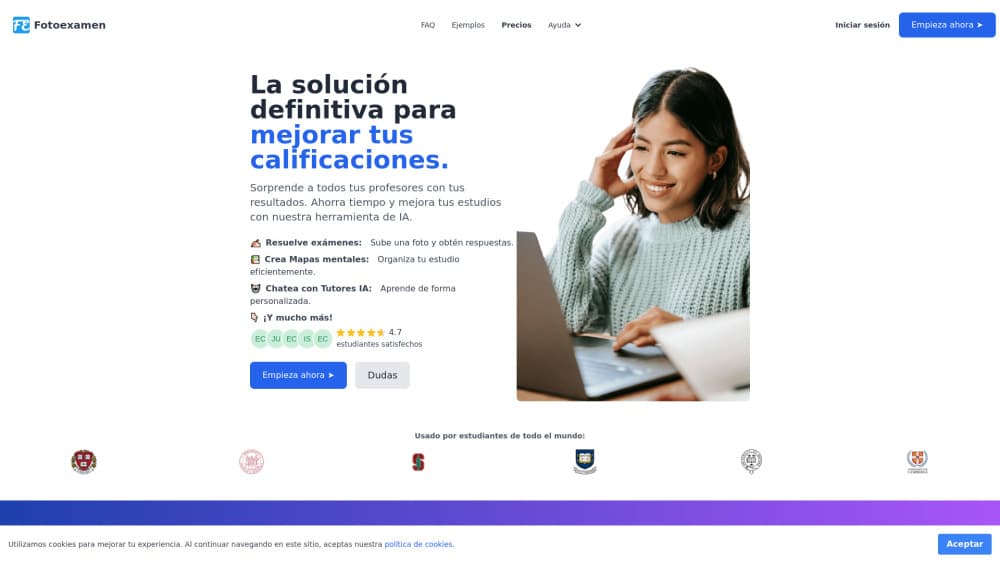
About FotoExamen
What Is FotoExamen
FotoExamen is a study platform built around one simple idea: point your camera at a question and get a worked answer back. Students photograph an exam page, a worksheet, or a PDF, upload it, and the AI reads the problem and explains how to solve it. It works as an AI exam solver before it's anything else. The pitch is aimed at high schoolers, university students, and teachers who want faster feedback than a textbook or a classmate can give, without waiting on office hours or a study group to form.
It handles more than a single question type. Multiple choice, short essay prompts, fill-in-the-blank lines, and math problems all work. The site says the tool reads the language of your exam rather than forcing one. Alongside the solver, there's a small set of study tools: concept maps, interactive quizzes, AI tutors, and text summaries. There's also note-taking that converts class audio into structured notes. That combination is what makes it more than a one-trick answer machine.
The catch is that this is a Spanish-first product. The marketing, support, and primary audience all sit in Spain and Latin America, so an English speaker may find less community material around it. It's also a subscription, not a free utility. You get 3 days without a card, then a monthly plan. No mobile app download on Google Play, either.
That last point matters more than it sounds, because most students expect to install a study app on their phone rather than open a browser tab.
Getting Started
- Create an account at app.fotoexamen.com and start the 3-day free trial.
- Take a clear photo of the exam or homework page, or upload a PDF if you already have the file.
- Let the AI read the image and generate the answer with a step-by-step explanation.
- Use the extra tools, like quizzes or summaries, if you want to practice the same topic again.
- Upgrade to a paid plan if the trial works for you, or cancel before it ends.
Product Information
A quick look at FotoExamen's pricing, supported platforms, and performance.
Best for
The users, tasks, and scenarios where this tool fits best.
Users
- High school and university students
- Teachers
Tasks
- Solving exam and homework questions
- Summarizing long texts
- Building practice quizzes
- Creating concept maps
Scenarios
- Late-night study sessions
- Catching up after a missed class
- Language-proof homework
Key features
Photo to Answer
The core feature is exactly what the name says. You point your camera at an exam or homework page, upload the shot, and the AI analyzes the image. Then it returns an answer with a step-by-step explanation. It's the fastest path in the product, and it's the reason most people look it up in the first place. Taking the photo is the easy part, since the whole flow was designed so that nothing stands between a student and a worked answer except the camera in their hand. Want to solve exams with AI without typing questions by hand? This is where that starts.
Broad Question Format Support
FotoExamen claims it can read a range of formats: multiple choice, long-form written answers, fill-in-the-blank sentences, and math problems. That range matters because a plain calculator app or a chatbot often stumbles once the question is handwritten or mixed with diagrams, which is exactly the situation a photo solver is built to handle. Handwriting is hard. Diagrams are harder.
Multi-Language Exams
The platform says it supports multiple languages, so you can upload a worksheet in a language you don't fully speak and still get an explanation. For exchange students or anyone studying abroad, that removes a real barrier that has nothing to do with the actual subject. A quiz generator that misreads the prompt is useless. This one reads the exam first, which means the language of the question stops being the thing that decides whether you can study the topic at all.
AI Tutors
Beyond the one-shot solver, there are AI tutors you can chat with to work through doubts as they come up. This is the difference between getting an answer and understanding the method behind it, and it's the feature a student would lean on before an exam rather than during one. Ask a follow-up. Get a real explanation. That loop is what turns a solver into a study assistant.
Summaries and Note-Taking
You can generate automatic summaries of any document or text, and the Pro tier adds AI note-taking that converts class audio into structured notes. Both target the same problem: too much material and not enough time to condense it by hand. Students summarize texts before a test. This just does it faster, and it keeps the original structure intact so a summary doesn't lose the argument the chapter was actually making.
Quizzes and Concept Maps
The tool generates interactive quizzes from your notes and builds concept maps that lay out how ideas connect. That's a real quiz generator, not a static flashcard deck. These are the study-oriented features, and they matter most for subjects where memorizing isolated facts won't get you far, because the map shows you which ideas depend on which others instead of leaving them as a flat list.
Pros and cons
Pros
- Answers arrive with step-by-step explanations, not just a final result, which helps you learn the method.
- Reads the language of the exam, so a worksheet in Spanish or another supported language still works.
- Bundles solving, quizzes, summaries, and tutors into one subscription instead of four separate tools.
- Unlimited use on every tier, so you aren't counting how many questions you've asked.
- A 3-day free trial without a credit card makes it easy to test before paying.
Cons
- There's no Google Play or App Store download, so it runs in the browser or as a Chrome extension only.
- Pricing is set in euros (from €9 to €30 per month), and an English-speaking audience gets less localized support material.
- Because answers depend on the quality of your photo, a blurry or badly lit shot can produce a weaker explanation.
- The website publishes limited detail on its data policy, so students handling sensitive school material should read the terms first.
Frequently asked questions
It reads a photo or PDF of an exam or homework and returns an answer with a step-by-step explanation. You can also generate quizzes, summaries, and concept maps from your own notes.
Related content
Explore related tools, skills, and articles for FotoExamen.
FotoExamen Alternatives

Google EmbeddingGemma 2
Google DeepMind · Writing · Image · CodingGoogle EmbeddingGemma 2 is a 740M-parameter open model that turns text, code, images, audio, and video frames into vectors in one 768-dimension space, running on phones and laptops.

MePersona
MePersona, Inc. · Writing · Productivity · MarketingMePersona is an AI unified inbox for creators. It learns your voice, drafts replies to fan messages from 12 platforms, and sends only what you approve.

Fluence
Yay Software (Yannick Huchard) · Writing · Voice & Language · ProductivityFluence is an Android app that reads PDFs, EPUBs, Word files and web articles aloud, follows each sentence as it speaks, and answers questions about the text on the phone itself.