

fullmoon
Mainframe · Other · Chatbot
fullmoon is a free iOS, iPadOS and macOS app that chats with local language models. Models run on device, so it works offline and keeps your history private.
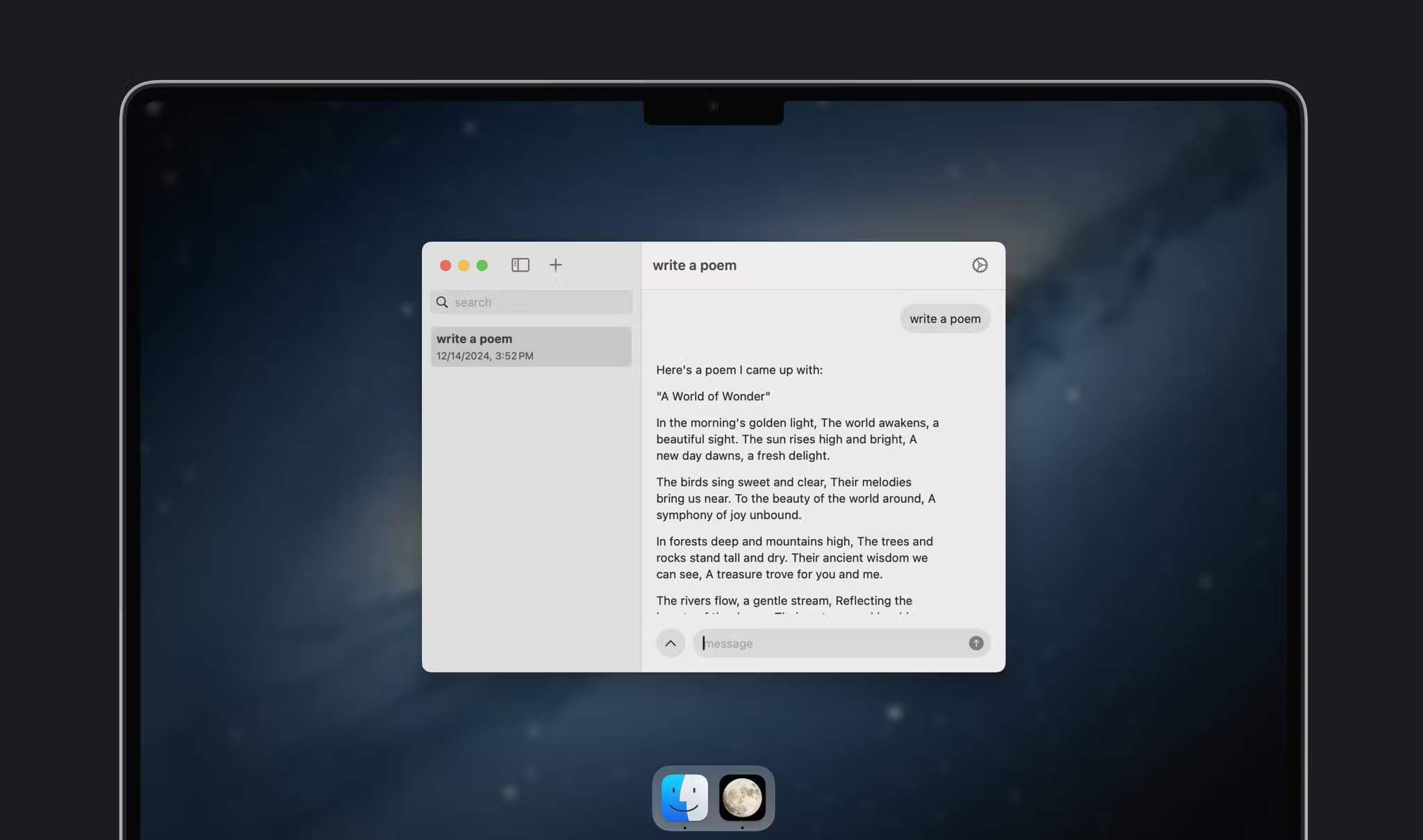
About fullmoon
What Is fullmoon
fullmoon is an app from Mainframe that runs large language models on your own Apple device instead of a company server. You install it, pick a model, and start a chat. It sits in the growing group of local AI apps that trade the biggest models for privacy and offline use. Nothing gets sent to the cloud, because there is no cloud step in the loop. The model lives on the chip in your pocket.
This fullmoon review covers what the app actually does and who it fits. The pitch is simple: the shortest path to a private chatbot. Most AI apps ask you to sign in, hand over a conversation and trust a provider's policy. fullmoon skips all of that. It has no account, no sign-up and no telemetry pulling your prompts back to a server. Chat history stays in local storage on the device, and you can delete it whenever you want.
Two details decide whether it works for you. It needs an Apple silicon device, so older iPhones and Intel Macs are out. And the models it runs are small, in the 1B to 3B range, which means they handle quick questions, drafts and summaries well but not the deepest reasoning you'd get from a frontier model online.
Getting Started
- Install fullmoon from the App Store, then open it and let it download your first model
- Pick a model from the list, from a small 0.7 GB Llama build up to a larger DeepSeek distill
- Adjust the theme, font and system prompt so the replies match the tone you want
- Open a chat, ask something, and check the model info panel if you want to see how the weights are stored
Product Information
A quick look at fullmoon's pricing, supported platforms, and performance.
Best for
The users, tasks, and scenarios where this tool fits best.
Users
- Privacy-focused iPhone owners
- Travellers and commuters
- Developers and tinkerers
- Writers and note-takers
Tasks
- Offline question answering
- Drafting and rewriting
- Summarizing
- Ideas and brainstorming
- Learning prompts
Scenarios
- A long flight with no Wi-Fi
- Sensitive notes you don't want uploaded
- Spotty coverage in a rural area
- Trying models without a bill
- A quick draft before a meeting
Key features
On-Device Models With No Cloud Step
fullmoon is, in plain terms, an on-device LLM client. There is no cloud step in the loop, and every prompt runs on the device itself. Every prompt runs on the device itself. fullmoon uses Apple's MLX Swift framework, which is built for machine learning work on Apple silicon, so the model sits in unified memory and answers without a network call. That's the core of the app: the private part isn't a setting you turn on, it's how the thing is wired.
Works Fully Offline
Turn off Wi-Fi and cellular and fullmoon still works. Models are stored on the device after the first download, so a plane, a subway or a dead zone is fine. There's no queue, no spinner waiting on a remote server, and no error when the connection drops mid-conversation.
A Small Model Library You Can Swap
The app ships with a few quantized models ready to run, including a Llama 3.2 1B build at about 0.7 GB and a Llama 3.2 3B build near 1.8 GB, plus DeepSeek-R1 distills in 4-bit and 8-bit. You download what fits your storage and switch between them from inside the app. Smaller models answer faster and are easier on battery; bigger ones reason a bit further.
Appearance and System Prompt Controls
fullmoon lets you change the theme, the fonts and the system prompt. The theme controls keep the interface out of the way, and the system prompt sets how the model behaves, whether you want short answers, a certain tone or a role. It's the difference between a fixed assistant and one you tune to your own habits.
Chat History Kept on Device
Conversations save locally, so you scroll back through past chats without a login. History lives on your hardware, and clearing it is your call. Nothing syncs to an account you had to create, because there's no account in the first place.
Free, Open Source and Cross-Platform
fullmoon is free to download and its source is public on GitHub under the fullmoon-ios repository. It runs across iOS, iPadOS, macOS and visionOS from one codebase, so the phone in your pocket and the Mac on your desk use the same app. A TestFlight build gives early access to new models and features.
Pros and cons
Pros
- Runs entirely on device, so conversations never leave your phone or your Mac
- Works with no internet at all, which cloud chat apps can't match
- Free with no account, no sign-up and no per-message charge
- Open source, so the privacy claims can be checked in the code
- Small model list is a quick download and easy to switch between
Cons
- Needs Apple silicon, so older iPhones and Intel Macs won't run it
- On-device models are small and weaker than the big cloud models on hard reasoning
- Model downloads take real storage, from under a gigabyte up to several
- No API and no sync, so you can't call it from other apps or share chats across devices
Frequently asked questions
fullmoon is an app by Mainframe that runs language models on your own Apple device. You chat with a model that lives on the phone or Mac, so it works offline and never sends your messages to a server. It's free and open source.
Related content
Explore related tools, skills, and articles for fullmoon.
fullmoon Alternatives
BinkBink
BinkBink · OtherBinkBink is a free online game platform and AI game maker that lets anyone turn a short text description into a playable browser game. You can jump into hundreds of community-made games. Or describe your own idea and play it in seconds, then share it with friends. Want to create your own game? You don't need to code. No engine setup, no download, no hassle.

Audiogen
Audiogen Inc. · OtherAudiogen is an AI music generator built by Audiogen Inc., a small research team that spent about 2.5 years training its own generative music model and designing a web interface around it. Instead of a plain text box, this AI music tool turns the timeline into a beginner-friendly Generative Audio Workstation, or GAW, where inpainting, extending, remixing and stem editing work more like painting on a canvas. The product is still in beta, so access runs through a waitlist or an invite. Paid plans aren't published yet.

Aiml API
AIMLAPI OÜ · OtherAiml API is a unified AI model API that puts more than 1000 models from OpenAI, Google, Anthropic, and others behind one endpoint and one bill. You write code against a single OpenAI-compatible schema, then switch between chat, image, video, and audio models by changing a model string. It suits developers and small teams who want multi-model access without juggling a dozen separate provider accounts, and it removes the usual billing headache that comes with testing several vendors. One key covers it all.