

GA4 Auditor - Google Analytics 4 Audit Tool
Optimization Up · Marketing · Business
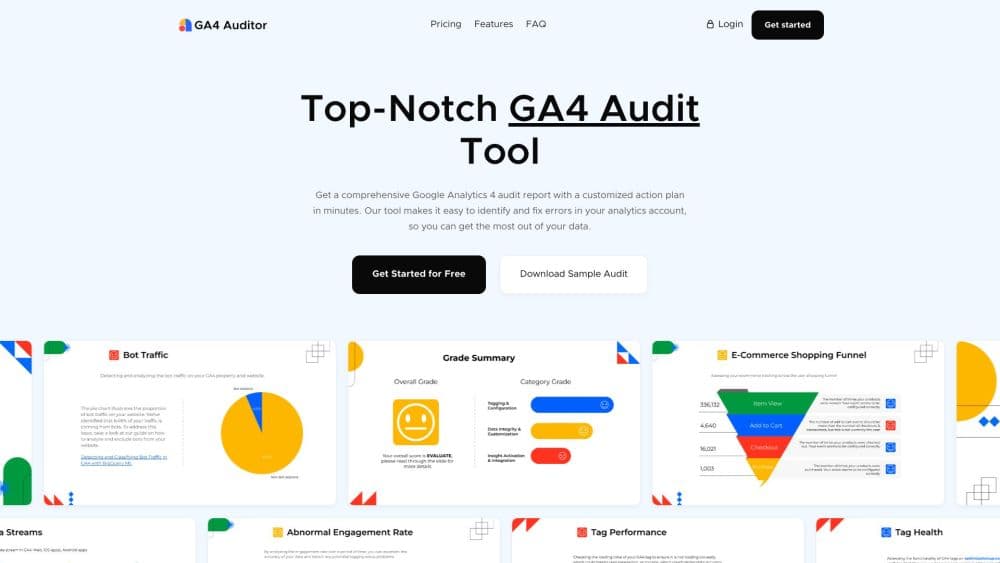
GA4 Auditor is a Google Analytics 4 audit tool that scans more than 100 checkpoints in a property, then returns a 40 page report and a prioritized fix plan you can hand to a client.
About GA4 Auditor - Google Analytics 4 Audit Tool
What Is GA4 Auditor
GA4 Auditor is an audit tool built for Google Analytics 4 properties. It comes from Optimization Up, a small marketing technology studio run by Ahmed Ali out of Dubai. You sign in with a Google account, authorize the analytics property you want checked, and the tool scans the setup for you. A few minutes later you get a report that runs past 40 pages and lists what is broken, what is risky, and what to fix first.
The reason the tool exists is simple. GA4 rarely fails loudly. An event fires twice, a tag loads after the page has already rendered, an internal traffic filter misses a whole office subnet, or bot traffic pads a campaign report. The dashboard still draws a line. Nothing turns red. Those gaps only surface when a budget decision rests on numbers that were never clean, and by then the quarter is gone.
There are limits worth knowing before you pay. Each run is a snapshot, so it tells you what the property looked like on the day you ran the audit, not what happens next month. Reports are produced in English today, with Spanish and French listed as coming soon. The product has no public API, and you need access to the analytics property before anything can be scanned.
Getting Started
- Create an account at app.ga4auditor.com with Google sign in or an email address.
- Authorize the Google account that holds the property, then pick the GA4 property you want to audit.
- Choose the report options you need: language, theme, and file format.
- Run the audit, then download the finished report as a PDF, a PowerPoint file, or a Google Slides deck and start on the action plan.
Product Information
A quick look at GA4 Auditor - Google Analytics 4 Audit Tool's pricing, supported platforms, and performance.
Best for
The users, tasks, and scenarios where this tool fits best.
Users
- In-house marketers who inherited a GA4 property
- Agencies that sell analytics work
- Analytics consultants running a first assessment
Tasks
- Auditing a new GA4 implementation
- Vetting a property before a paid campaign
- Producing a client facing analytics audit
Scenarios
- The week before a campaign launch
- After a replatform or site migration
- When GA4 numbers disagree with Ads or Shopify
Key features
Tag Health and Firing Order
The tool crawls the site and checks whether GA4 tags fire at all, whether they fire in the right order, and whether the same event fires twice. It also measures load time for the tags it finds. That matters because a tag that fires after the page renders can miss clicks, and a duplicate tag doubles every conversion it touches.
Data Quality Checks
The audit looks for missing data, duplicated records, discrepancies between reports, bot traffic, spam referrals, filter mistakes, and sampling errors. Each item comes with a note on what it does to the numbers, so you can judge whether a gap is cosmetic or enough to distort a monthly report.
Implementation Review Against GA4 Best Practices
Beyond broken tags, the scan reviews how the property is configured. Event naming, key event setup, conversion tracking, and account structure get compared against standard GA4 practice. Properties built in a rush during a Google Analytics 4 migration tend to show the same pattern: events copied straight from Universal Analytics, no key events marked, and one catch all conversion. The output is a list of settings that work but will cause trouble later, which is the part a manual review usually misses.
Action Plan With Prioritized Fixes
Every issue in the report is paired with a suggested fix and a priority, so the document reads as a work queue rather than a wall of warnings. A developer can take the tag items, a marketer can take the configuration items, and both can see which ones block accurate reporting.
White Label Reports for Agencies
Agency plans let you swap in your own logo and theme, so a full GA4 implementation audit carries your studio's name instead of the tool's. Combined with the Google Slides export, that turns an audit into a client deliverable you can present, annotate, and leave behind after the call.
Export Formats and Themes
Reports come out as PDF, PowerPoint, or Google Slides, with more than one visual theme to choose from. Slides are the useful option for client work, since you can edit a page before presenting it. PDF suits a permanent record, and PowerPoint fits teams that already work in Office.
Pros and cons
Pros
- Flat price per audit: $99 for a single report undercuts the day rate of most consultants, and the agency plan brings the cost per audit down further.
- The report is client ready: 40 plus pages, multiple themes, and white label branding mean the output can go out without a redesign.
- Checks reach past the dashboard: tag firing order, duplicate tags, and bot traffic are the failures that normal GA4 reports never show.
- Fixes are ranked, not just listed: the action plan separates what breaks reporting from what is merely untidy, which saves an argument with the developer.
- No script to install: the audit runs from the browser against the property you authorize, and the audit files stay private to your login.
Cons
- No free trial: you can download a sample audit, but you can't run your own property before paying, so the $99 is a blind purchase.
- One snapshot at a time: there's no scheduled audit or alerting, which means tracking can break a week after a clean report and nobody gets told.
- English only for now: Spanish and French are listed as upcoming, so teams that report in other languages have to translate the findings themselves.
- No public API: agencies with dozens of properties can't automate runs or push results into their own dashboards.
Frequently asked questions
It checks tag health, including firing order, duplicates, and load times, plus data quality issues such as missing data, duplication, bot traffic, spam, filter errors, and sampling. It also reviews the property against GA4 implementation best practices and returns a prioritized fix plan.
Related content
Explore related tools, skills, and articles for GA4 Auditor - Google Analytics 4 Audit Tool.
GA4 Auditor - Google Analytics 4 Audit Tool Alternatives

ngram 2.0
ngram · Video · Marketingngram 2.0 is an AI video generator for teams. It turns a prompt, a screen recording, or a product URL into a narrated explainer, product demo, or AI avatar video, and every scene stays editable.

shippedit.me
Krawlup · Marketing · Businessshippedit.me now redirects to Krawlup, a web platform that audits SEO, AEO and page speed every week, then hands the fixes to AI coding agents over MCP.

MePersona
MePersona, Inc. · Writing · Productivity · MarketingMePersona is an AI unified inbox for creators. It learns your voice, drafts replies to fan messages from 12 platforms, and sends only what you approve.