

Genesis
Genesis AI · Other
Genesis is a Python-based robotics simulation platform for researchers and engineers building embodied AI, combining multi-physics, photorealistic rendering, and GPU scaling.
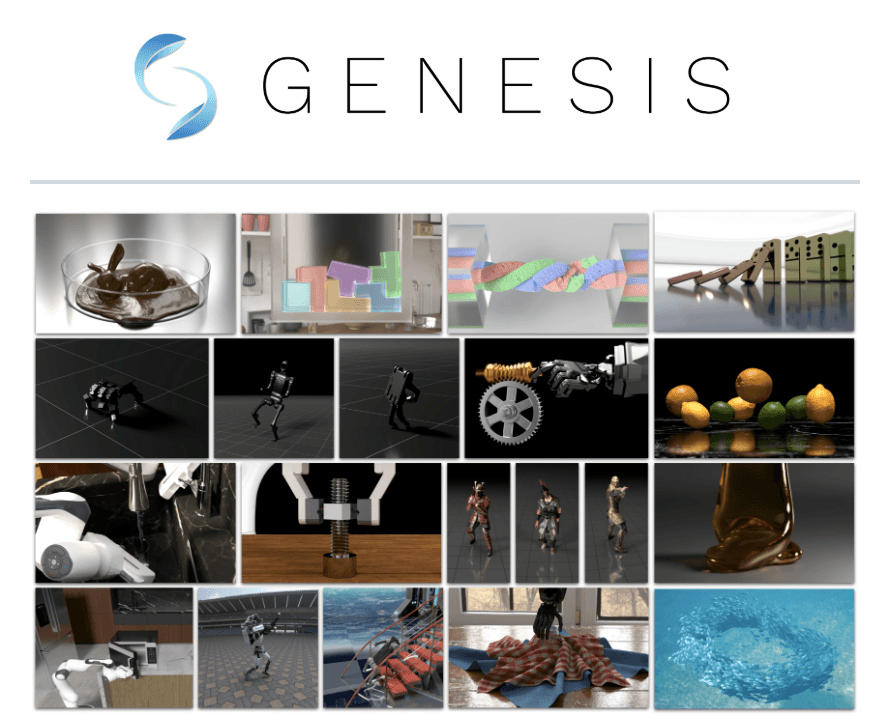
About Genesis
What Is Genesis
Genesis is an open source simulation platform for physical AI development. Think of it as a robot training simulator you drive from Python. You build robots and environments in a single scene, run rigid bodies, soft bodies, fluids, and cloth through one unified physics engine, and render the results with a camera sensor that plugs straight into your training loop.
The project started in December 2024 as an academic effort and now ships as Genesis World, backed by Genesis AI. The pitch is simple: one API, one scene, one state. That way you don't stitch together three separate simulators just to model a robot that touches a rigid table and a soft cloth. It runs from a laptop CPU up to datacenter GPUs, and because it's Python, you can read and extend the code instead of treating it as a black box.
The main limit is that it's built for people who code. There's a GUI for inspecting scenes, but if you want a drag-and-drop world builder aimed at non-programmers, this isn't it. Not even close. Hardware and driver setup also matter, since GPU-accelerated workloads assume a modern NVIDIA card.
Getting Started
So how do you actually get a robot running? The flow is short.
- Install PyTorch by following the official PyTorch instructions for your platform.
- Install the package with
pip install genesis-worldand confirm pip is current first. - Load a scene and an asset (URDF, MJCF, OBJ, GLB, or USD) through the Python API.
- Add controllers and sensors, then step the simulation and collect your data.
- Scale the same scene across parallel environments to generate training data or run reinforcement learning.
Product Information
A quick look at Genesis's pricing, supported platforms, and performance.
Best for
The users, tasks, and scenarios where this tool fits best.
Users
- Robotics researchers
- Reinforcement learning engineers
- Graphics and simulation developers
Tasks
- Robot manipulation training
- Synthetic data generation
- Soft-body and fluid modeling
Scenarios
- Early research prototypes
- Benchmarking control policies
- Teaching and coursework
Key features
Unified Multi-Physics Engine
Rigid bodies, finite element methods, material point method, particle solvers, and fluid simulation all live in one scene with shared state. A robot arm can knock over a rigid block, drag a soft cloth, and spill liquid in the same run. No moving data between separate tools. Coupling different material types is where most simulators get painful, and Genesis treats it as the default case rather than a special mode you have to configure, which saves the hours you'd otherwise spend shuttling state between separate physics tools that each expect their own scene format.
Photorealistic Rendering With Nyx
Genesis ships its own renderer, Nyx, built for robotics rather than film. You attach it as a camera sensor, so rendered frames flow into your training pipeline like any other observation. No export step. Luisa and Pyrender are also available as alternatives when you need a raytracer or a lightweight rasterizer.
Cross-Platform GPU Scaling
The Quadrants compiler lowers Python kernel code to CUDA, AMD ROCm, Apple Metal, Vulkan, x86, and ARM64. You write Python. The same scene then runs on a laptop kernel or spreads across datacenter GPUs, which is what turns simulation into a practical way to generate training data at scale.
Pythonic Simulation Interface
The whole stack is Python, including asset parsing for URDF, MJCF, OBJ, GLB, and USD files. In practice it works as a Python robotics simulator: you get entity accessors, controllers, sensors, and parallel heterogeneous environments through one API. Reading and patching the source is the norm, not an afterthought, because the entire engine ships as readable code you can extend whenever the built-in behavior doesn't match your experiment.
Built-In Scene GUI
A GUI lets you inspect scenes and check what's happening without writing visualization code for every debugging pass. It's a diagnostic tool, not a full environment editor, so expect to define most of your world in Python. Handy for spot checks. Not a replacement for code. Handy for spot checks. Not a replacement for code.
Parallel and Heterogeneous Environments
You can run many environments at once and mix different scene configurations in a single simulation, which means a reinforcement learning loop can pull experience from dozens of slightly different variants of the same task without you restarting anything between runs. For reinforcement learning, that means more experience per second and less babysitting of individual runs. It adds up fast.
Pros and cons
Pros
- One engine handles rigid, soft, fluid, and particle physics, which removes the usual glue code between simulators.
- Fully open source under Apache 2.0, so you can inspect and modify every layer.
- Scales from laptop CPU to multi-GPU clusters without rewriting your scene.
- Readable Python API makes it easy to embed in existing research code and experiments.
Cons
- It's a researcher's tool, so non-programmers will find the Python-first workflow steep, especially if they're used to drag-and-drop editors that hide the scene graph behind a point-and-click interface.
- GPU acceleration assumes a reasonably modern NVIDIA card, which rules out older laptops for heavy workloads.
- Documentation and examples are still maturing, so you'll occasionally read source to figure out an edge case.
- There's no hosted cloud or managed service, meaning you handle your own environment and hardware.
Frequently asked questions
Genesis is a simulation platform for robot learning and physical AI research. You model robots and their surroundings, then run physics and rendering to train control policies or generate synthetic data without touching real hardware. That last part matters when a failed grasp would wreck an expensive robot.
Related content
Explore related tools, skills, and articles for Genesis.
Genesis Alternatives

Odyssey 3
Odyssey · OtherOdyssey-3 is Odyssey's foundation world model. It simulates physics in real time, turns a prompt into an interactive environment, and adapts to robots, cars and games.

JarvisCore
Prescott Data · Coding · Productivity · OtherJarvisCore is an open source Python runtime where AI agents work as equal peers on an agent mesh, claim tasks from a shared ledger, and reach external services through a zero-trust broker.
Clef
Cloudflare · Business · OtherClef is Cloudflare's open-source decision model for Workers AI. It returns calibrated probabilities for typed questions, not generated text, so agents can classify, route, and act fast.