

GetBeel
GetBeel · Business
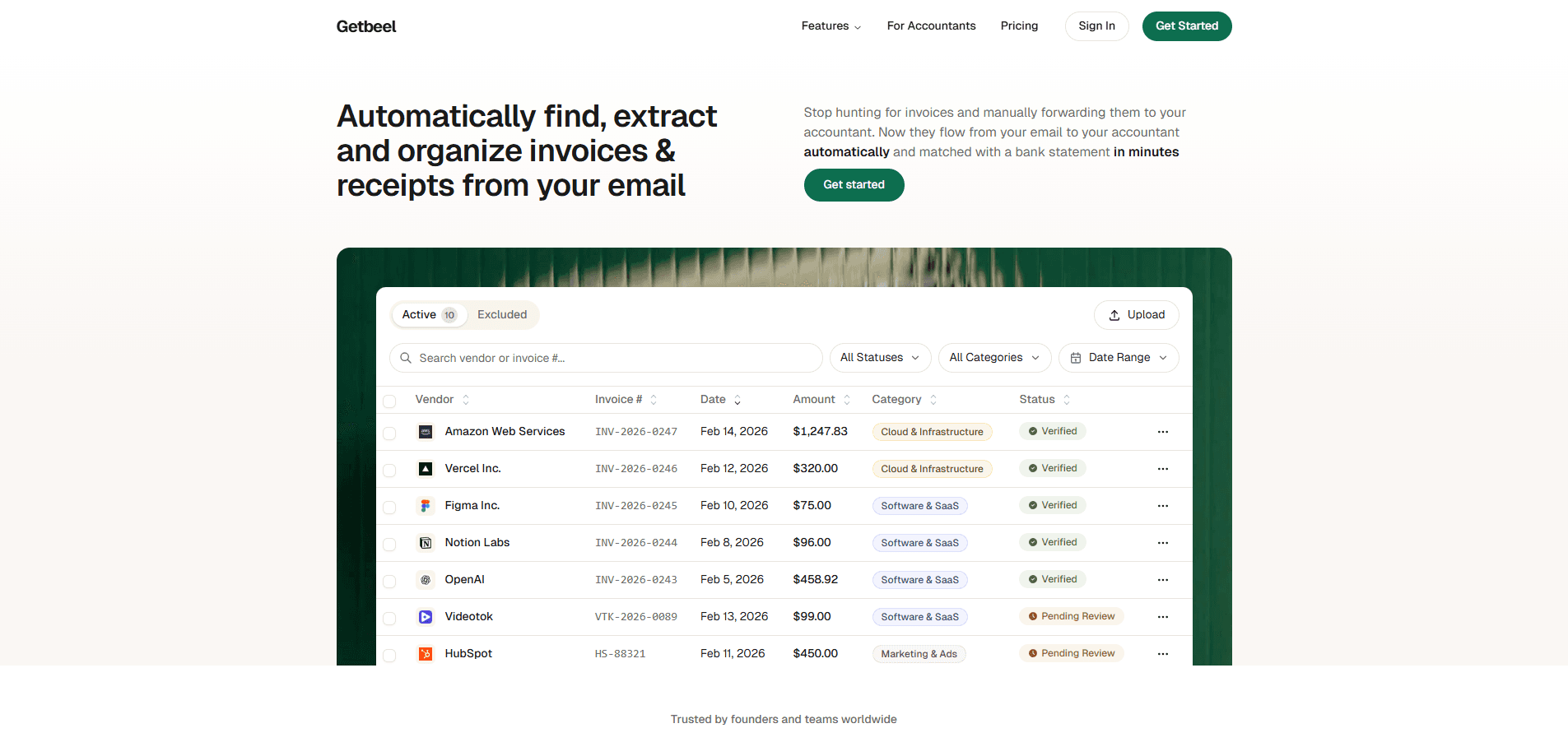
GetBeel is an AI invoice management platform that hooks into your business email and pulls out every invoice and receipt it finds. No forwarding by hand. No filing pile. It runs in the background 24/7, extracts the vendor, amount, date, and category from each document, then matches those invoices against an uploaded bank statement so you can see what was paid and what's still open. The whole point is to kill the monthly scramble of digging through inboxes and spreadsheets. It's built for freelancers, small teams, and bookkeepers who'd rather have invoices arrive organized than hunt for them. In short, it's invoice automation that does the filing for you.
About GetBeel
What Is GetBeel
GetBeel is a web-based invoice collection tool from a team that got tired of chasing invoices across inboxes and folders. It connects to your email account, watches for anything that looks like an invoice or receipt, and extracts the data with AI. Instead of a manual filing system, you get a dashboard where every invoice shows up already sorted, searchable, and downloadable as a PDF. It's a quiet kind of automation.
The problem it solves is dull but expensive: small businesses lose hours every month on accounts payable busywork. Getting invoices from an inbox into an accountant's hands usually means downloading files, renaming them, and matching them to payments in a spreadsheet. Sound familiar? GetBeel automates the collection and the matching, and it keeps historical invoices reachable with retroactive search, so pulling last year's records isn't a research project. The trade-off is that it lives in email, so it only captures what actually arrives there, and it isn't a full accounting suite.
Getting Started
- Sign up with your business email, then connect the inbox you want GetBeel to monitor. It only reads what's needed to find invoices.
- Let the platform scan. It starts detecting invoices and receipts and organizes them in your dashboard automatically.
- Review what it pulled, download the invoice PDFs you need, or search past quarters and years when something is missing.
- Upload a bank statement and run the matching. GetBeel pairs each transaction with an invoice as exact, fuzzy, or unmatched.
- Flag the unmatched items for review, then export or share the organized records with your accountant.
Product Information
A quick look at GetBeel's pricing, supported platforms, and performance.
Best for
The users, tasks, and scenarios where this tool fits best.
Users
- Freelancers and solo founders
- Small business owners
- Bookkeepers and accountants
Tasks
- Collecting invoices from a business inbox
- Reconciling invoices with bank statements
- Tracking spending by vendor and category
Scenarios
- Closing the books each month without forwarding a single invoice by hand.
- Chasing a receipt for a transaction that posted months ago, using retroactive search instead of scrolling email.
- Preparing records for an accountant who wants everything in one place before tax season.
Key features
Automatic Invoice Collection From Email
GetBeel connects to your business inbox and monitors it around the clock, extracting invoices and receipts in real time as they arrive. You don't forward anything or set up rules; the platform recognizes invoice-shaped mail and files it into your dashboard on its own. No rules to write. The result is that collection stops being a chore you remember to do and becomes something that just happens. Inbox access is the trade-off, since it needs to read your mail to find the documents you'd otherwise sort by hand.
Invoice-to-Bank-Statement Matching
The matching engine is where GetBeel earns its keep. Upload a bank statement and it lines every transaction up against your invoices. Results come back as exact, fuzzy, or unmatched. Each one is flagged for review, so you see instantly where an invoice is missing. That's invoice bank reconciliation without the spreadsheet. It's the difference between knowing your books are complete and hoping they're complete, which is the usual state of affairs otherwise.
Vendor and Category Extraction
Every invoice gets its vendor, invoice number, date, amount, and category pulled out by AI. That structure is what makes the archive useful later, because you can filter and search instead of opening PDFs one by one. It's a receipt organizer built from what already lands in your inbox. Categories cover the common buckets like cloud and infrastructure, software and SaaS, and marketing. It can't guess a category it's never been shown, so oddball vendors may need a manual touch. Not a dealbreaker.
Retroactive Search and PDF Access
Old invoices don't disappear into a void. GetBeel keeps them organized by quarter and year, so you can search back through past periods and download the original PDF straight from the platform. When an auditor or a client asks for a document from two years ago, you pull it in seconds rather than digging through email archives. Simple as that. Storage grows over time, which is the cost of keeping history on hand.
Spending Insights
Because the invoice data is structured, GetBeel can turn it into a view of your spending: monthly trends, vendor breakdowns, and category totals. It won't replace a dedicated finance tool, but it answers the everyday question of where the money actually went without you building a pivot table. Good enough for most small teams. The insights are only as good as what arrives in the connected inbox, which means the picture stays partial if some spending never generates an email invoice.
Compliance-Minded Handling
The team advertises GDPR compliance, SSL encryption, and encryption at rest, which matters because invoice data is sensitive business information. The site also carries a set of free tools for Italian VAT and FatturaPA electronic invoices, including XML reading and validation, an autofattura calculator, and a VIES VAT checker. If you deal with Italian e-invoicing, those extras save a separate trip to a compliance service. Worth knowing.
Pros and cons
Pros
- Collects invoices from email automatically, so there's no manual forwarding or filing.
- Matches invoices to bank statements and flags unmatched items, which catches gaps fast.
- Retroactive search lets you pull past invoices by quarter or year on demand.
- Encryption at rest, SSL, and GDPR compliance address the security side of handling financial documents.
- Free standalone tools for Italian VAT and FatturaPA invoices add value beyond the core product.
Cons
- It depends on email, so invoices that arrive through other channels won't be captured.
- Matching works from an uploaded statement, so it isn't a live, real-time bank feed.
- It's a focused collection and matching tool, not a full accounting or bookkeeping suite.
Frequently asked questions
GetBeel connects to your email, finds invoices and receipts automatically, extracts their key data with AI, and organizes them in a dashboard. You can then match those invoices against a bank statement to see what's paid and what's outstanding. Think of it as an automated inbox-to-archive pipeline for accounts payable. So who needs that? Anyone who'd rather not spend the first week of every month tracking down paperwork.
Related content
Explore related tools, skills, and articles for GetBeel.
GetBeel Alternatives

Knocket
Knocket (Tencent RTC team) · Productivity · Business · ChatbotKnocket is a free live chat and contact page tool that lets visitors message you from your website, app, or a shareable link, with every reply handled from Telegram or one inbox.

shippedit.me
Krawlup · Marketing · Businessshippedit.me now redirects to Krawlup, a web platform that audits SEO, AEO and page speed every week, then hands the fixes to AI coding agents over MCP.

Ayven
Alknoma · Productivity · BusinessAyven is an AI control centre by Alknoma that turns a plain-language goal into a dated plan, hands the work to your people and AI agents, and asks for your approval only when the call is yours.