

GetMimic
Mimic (GetMimic) · Writing · Chatbot
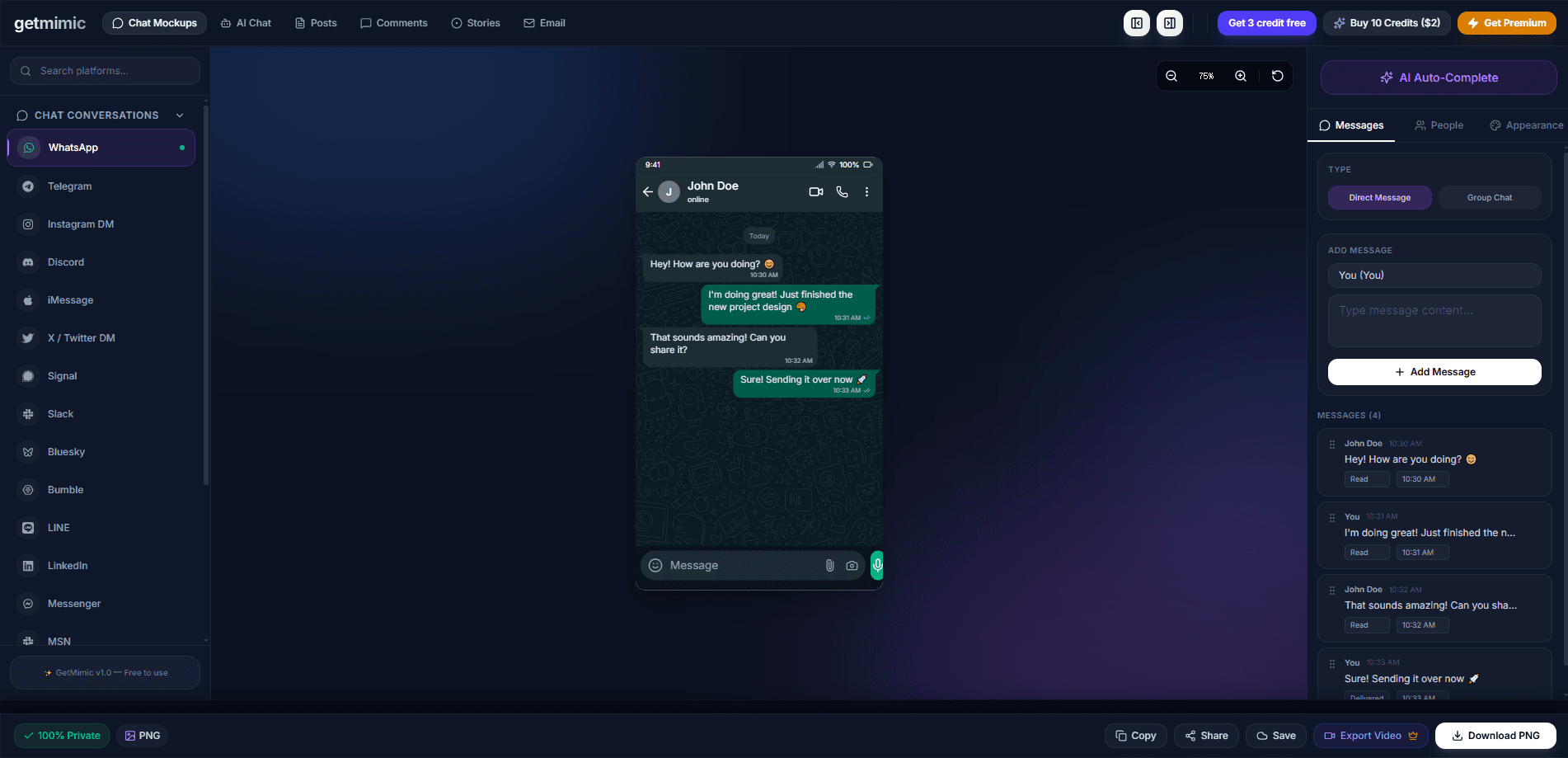
GetMimic is a free online fake chat generator that builds realistic messaging screenshots for WhatsApp, Telegram, Instagram DM and iMessage. You type the conversation, pick a theme, and export a clean image for memes, storyboards, ad mockups or classroom examples. Everything runs inside your browser, so your text and pictures never leave your device, and the exported images come out with no watermark stamped across them at all.
About GetMimic
What Is GetMimic
GetMimic, also branded simply as Mimic, is a web app for creating fake conversations that look like they came straight off a phone. You set the contact name, avatar, timestamps and messages, then export a screenshot that matches the real chat layout of each platform. It targets creators who need a convincing visual fast and don't want to learn a design suite. Who is this actually for? Meme makers, ad people and teachers, mostly. That's the core audience.
The tool solves a specific annoyance: making a chat mockup usually means opening Photoshop, hunting down phone frame assets, and manually lining up bubbles. GetMimic skips all of that. The workflow is browser-only, and the team says the processing happens on your device, not on their servers. No upload. No account. No waiting.
The biggest constraint is also its selling point. Because it runs locally, GetMimic isn't built for real-time collaboration, cloud sync or shared project libraries, so if a teammate needs to edit the same mockup in the cloud, this isn't the tool for that. These images are mockups too, not real message logs, and they shouldn't be passed off as authentic conversations; treating a generated screenshot as evidence of something that never happened is a bad idea on every level.
Getting Started
- Open getmimic.lol in any modern browser and pick a generator, such as WhatsApp or Instagram.
- Set the chat header: contact name, avatar and online status.
- Add your messages one by one, choosing whether each comes from you or the other side, and set the timestamps.
- Adjust the phone theme, colors and layout until the preview looks right.
- Export the image as a PNG and save it to your device.
Product Information
A quick look at GetMimic's pricing, supported platforms, and performance.
Best for
The users, tasks, and scenarios where this tool fits best.
Users
- Social media creators
- Marketers and ad teams
- Teachers and students
Tasks
- Making a fake WhatsApp or iMessage screenshot for a meme or viral post.
- Drafting an Instagram DM ad concept to pitch to a client.
- Building a Telegram or WhatsApp chat lookalike for a video storyboard.
- Testing a fake conversation generator idea before it goes into a paid creative.
Scenarios
- Late-night meme-making, when you want a result in a couple of minutes and not hours.
- Early campaign planning, where a rough chat mockup helps a team agree on direction.
- Sensitive projects, where you don't want message text leaving your machine.
- Quick classroom demos, where a staged chat beats a wall of text.
Key features
Multi-platform chat generators
GetMimic covers the messaging apps people actually use: WhatsApp, Telegram, Instagram DM and iMessage. Each one has its own layout and bubble style, so the Telegram chat maker looks like Telegram and the iMessage mockup looks like iMessage, which is exactly what you'd expect from a chat mockup tool that takes platform fidelity seriously instead of slapping one generic template on every app. That matters when a screenshot has to pass as the real thing at a glance. Pick the platform first, and the header, colors and spacing come out looking native instead of generic.
Browser-based, private by design
The whole generator runs in your browser. According to the team, photos and messages are processed on your device and never uploaded to their servers. That's a real difference from tools that quietly store your content in the cloud. For anyone mocking up a sensitive conversation, it matters. Worth checking for yourself, honestly.
No watermarks, no paywall
Exports come out clean. No logo stamped across the image. No hidden fee to get past before you download. The company keeps server costs low because the work happens client-side, so you get the finished PNG without a subscription nag. That's rare for a free tool.
Custom chat header and profile
You control the contact name, avatar, online status and signal or battery bar shown at the top of the screen. Small details like these are what make a fake chat generator screenshot read as convincing, and GetMimic hands you every one of them without hiding the good stuff behind a paid upgrade. Nice, and rare.
Message timing and typing indicators
Timestamps, delivered ticks and typing bubbles can be set to match the pacing you want. A chat where every reply lands one minute apart looks staged, and anyone who has spent time in these apps will spot the pattern almost instantly. Tuning the timing is a quick way to make the fake conversation generator output feel natural, and it takes seconds. Skip it and the whole thing reads as a mockup.
Instant PNG export
Once the preview looks right, you download a PNG straight to your device. No rendering queue. No account step. The loop from idea to finished image stays short, which is the whole point of a tool like this, and it means you can test three or four different chat layouts in the time it used to take to open a design app and set up a single artboard.
Pros and cons
Pros
- Completely free, with the core features staying free over time.
- Works entirely in the browser, so nothing is installed and nothing is uploaded.
- Exports have no watermark, which keeps images usable in real posts.
- Covers the main chat platforms instead of just one.
- Fast enough that you can build a convincing mockup in a couple of minutes.
Cons
- No cloud sync or team collaboration, so you can't share an editable project with a coworker.
- No public API, which rules it out for automated or bulk generation.
- The library's category field is empty, so the platform context is thinner than most product pages.
Frequently asked questions
GetMimic builds fake chat screenshots for memes, social posts, ad mockups and storytelling. You recreate a conversation in the style of WhatsApp, Telegram, Instagram DM or iMessage, then export it as an image.
Related content
Explore related tools, skills, and articles for GetMimic.
GetMimic Alternatives

Google EmbeddingGemma 2
Google DeepMind · Writing · Image · CodingGoogle EmbeddingGemma 2 is a 740M-parameter open model that turns text, code, images, audio, and video frames into vectors in one 768-dimension space, running on phones and laptops.

MePersona
MePersona, Inc. · Writing · Productivity · MarketingMePersona is an AI unified inbox for creators. It learns your voice, drafts replies to fan messages from 12 platforms, and sends only what you approve.

Fluence
Yay Software (Yannick Huchard) · Writing · Voice & Language · ProductivityFluence is an Android app that reads PDFs, EPUBs, Word files and web articles aloud, follows each sentence as it speaks, and answers questions about the text on the phone itself.