

GistReader
Aron Rotteveel · Other
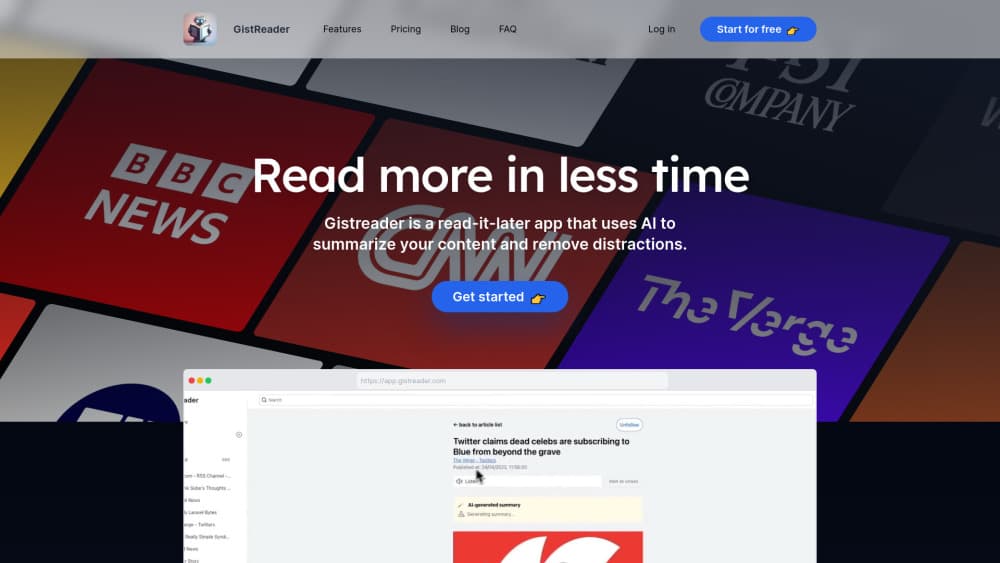
GistReader is an AI RSS reader and read-it-later app that strips ads from pages and summarizes each article in seconds. It runs in the browser on any device, and paid plans start at $5/mo.
About GistReader
What Is GistReader
GistReader is an RSS reader with AI summaries, built by independent developer Aron Rotteveel. It handles the two jobs people usually split between apps, following feeds and saving pages for later, and keeps both in one list. Every article that lands there gets cleaned up and summarized, so a quick scan tells you whether the full piece deserves your time.
The cleaning part matters as much as the summary. GistReader pulls the article body out of the page and drops ads, sidebars and newsletter popups. That's the difference between reading on a phone and fighting a page.
There are limits worth knowing before you commit. The interface is English only, and AI summaries currently come in English, Dutch and Mandarin Chinese, so readers working in other languages get less out of the summary layer. There's also no native mobile app. You use the web app in a browser, which works fine, but it isn't the same as an installed app with offline reading and push alerts.
Getting Started
- Create an account at gistreader.com. The 14 day trial doesn't ask for payment details.
- Add feeds one at a time, paste a single article URL, or import your existing subscriptions with OPML.
- Set your reading preferences, then work through the list. Keyboard shortcuts and dark mode live in settings.
- Read the summary first, open the full article when it earns it, and archive or send it to Pocket when you're done.
Product Information
A quick look at GistReader's pricing, supported platforms, and performance.
Best for
The users, tasks, and scenarios where this tool fits best.
Users
- Heavy feed subscribers
- Readers who save long articles for later
- People reading English, Dutch or Mandarin tech coverage
- Budget-conscious readers
Tasks
- Triaging a daily news list
- Catching up after a week away
- Reading on a commute
- Moving from another reader
Scenarios
- A morning scan before work
- Research for a writing project
- Following video channels and blogs in one place
Key features
Reader View That Cuts the Clutter
Every page goes through the same cleanup before you see it: article text stays, ads and navigation go. The result is a distraction-free reader view that makes long features readable on a phone screen without pinch zooming or closing popups. It's the feature you'll notice least and use most.
AI Summaries on Every Article
GistReader summarizes articles automatically as they arrive, no button to press. A summary gives you the gist in seconds, and the original stays one click away when the details matter. The summary is a triage tool, not a replacement for careful reading, and for anything you'll quote or act on you still want the source.
Feeds and Single Pages in One List
You can subscribe to a site's RSS feed or drop in one article you found somewhere else. Both land in the same queue with the same reader view and the same summary treatment. That's handy for newsletters and one-off links that never had a feed in the first place.
AI Podcasts for Listening Instead of Reading
Paid plans include a monthly AI podcast allowance: 5 on Bronze, 10 on Silver and 30 on Gold. The point is to move part of your list into audio for commutes and chores. If you never listen to anything, the quota is dead weight, so check the Silver and Gold pricing against how much you'd actually use.
Sync Across Devices in the Browser
Your feeds, read state and preferences follow your account, so you can start on a laptop and finish on a phone. Because it's a web app, there's nothing to install and nothing to update. The tradeoff is no offline reading and no push notifications.
Pocket Integration and OPML Import
Pocket integration pushes saved items into the read-it-later app you may already use, and OPML import pulls your subscriptions out of whatever feed reader you're leaving. Neither is glamorous, and both decide whether switching is a ten minute job or an afternoon.
YouTube Links Alongside Written Posts
YouTube links are supported, so video channels you follow show up in the same list as blogs. You still watch in YouTube, but you stop checking three places to see what's new.
Dark Mode and a Keyboard-First Interface
Keyboard shortcuts cover the main actions, which makes clearing a list much faster once the muscle memory kicks in. Dark mode is there for night reading. Small things, and the kind you miss when a reader doesn't have them.
Pros and cons
Pros
- Automatic summaries on every article, with no manual trigger and no extra credits to think about.
- Clean reader view that makes long features readable on a phone.
- Cheap entry point: $5/mo for Bronze, with a free tier and a 14 day trial that needs no card.
- Pocket integration, OPML import and YouTube support cover the switching costs that usually keep people in an old reader.
- Sync works across devices through the browser, so there's nothing to install on each machine.
Cons
- English-only interface, and AI summaries cover just English, Dutch and Mandarin, which limits the value for most non-English readers.
- No native mobile app means no offline reading and no push notifications, so you have to remember to open it.
- Quotas bite on the low tiers: Bronze allows 100 feeds and 100 summaries a month, which a busy reader can burn through in a week.
- Built and run by one developer, so support speed and the roadmap depend on one person's time.
- No documented public API, which rules out wiring GistReader into your own scripts or automations.
Frequently asked questions
Yes, with a caveat. It reads RSS feeds, but it also accepts single article URLs and cleans up any page you throw at it, so it works more like a web reader with feed support built in.
Related content
Explore related tools, skills, and articles for GistReader.
GistReader Alternatives
BinkBink
BinkBink · OtherBinkBink is a free online game platform and AI game maker that lets anyone turn a short text description into a playable browser game. You can jump into hundreds of community-made games. Or describe your own idea and play it in seconds, then share it with friends. Want to create your own game? You don't need to code. No engine setup, no download, no hassle.

Audiogen
Audiogen Inc. · OtherAudiogen is an AI music generator built by Audiogen Inc., a small research team that spent about 2.5 years training its own generative music model and designing a web interface around it. Instead of a plain text box, this AI music tool turns the timeline into a beginner-friendly Generative Audio Workstation, or GAW, where inpainting, extending, remixing and stem editing work more like painting on a canvas. The product is still in beta, so access runs through a waitlist or an invite. Paid plans aren't published yet.

Aiml API
AIMLAPI OÜ · OtherAiml API is a unified AI model API that puts more than 1000 models from OpenAI, Google, Anthropic, and others behind one endpoint and one bill. You write code against a single OpenAI-compatible schema, then switch between chat, image, video, and audio models by changing a model string. It suits developers and small teams who want multi-model access without juggling a dozen separate provider accounts, and it removes the usual billing headache that comes with testing several vendors. One key covers it all.