

Global Sites AI
Global Sites (independent developer) · Coding
Global Sites AI is a TypeScript boilerplate for building static sites that ship in 20+ languages, with AI translation, per-language URLs, and automatic sitemaps.
About Global Sites AI
What Is Global Sites AI
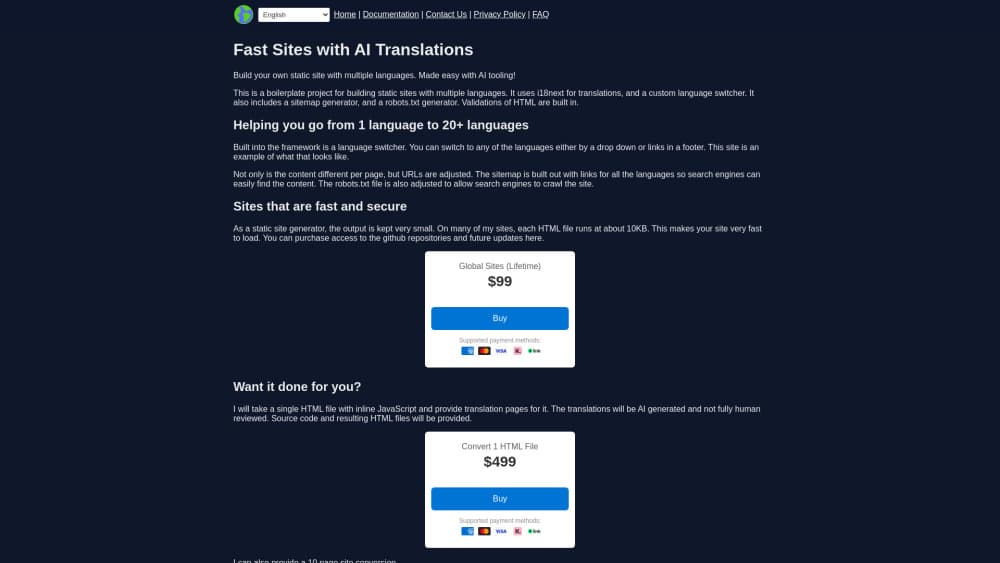
Global Sites AI is a static site boilerplate for developers who want a multilingual site without running a CMS or a JavaScript framework. You get a set of TypeScript build scripts that render each page once per language, plus a translation layer built on i18next and a Google Translate source in the sample build file.
The problem it solves is mundane and expensive. Translating a site by hand costs money per page, and bolting a plugin onto WordPress or Webflow usually leaves you with messy URLs and a sitemap that search engines struggle to read. This multilingual static site generator handles the boring parts: it writes one HTML file per language into its own directory, wires up a language switcher, and regenerates sitemap.xml and robots.txt so crawlers find every version.
The limits matter as much as the features. It isn't React or Next.js, so anyone expecting component libraries or server rendering will need to adjust. Output is static HTML, which means no logins, no checkout, and no per-user content. Access is granted manually to a GitHub repository, and the seller states that refunds aren't possible because repo access can't be revoked.
The translation itself is machine output. The done-for-you service page says plainly that AI translations "may not be fully reviewed by humans." For a support page or a product description, that's usually fine. For legal text or brand copy, budget for a human pass.
Getting Started
- Buy the lifetime license and wait for the manual GitHub invite, which the seller says usually lands within one business day.
- Clone the repository, install the Node dependencies, and run the build once to confirm the sample pages compile.
- Replace the sample content in the page files, keeping the string keys used by i18next so the language files stay in sync.
- Set your base URL and language list in the build config, then run the full build to generate every locale folder, the sitemap, and robots.txt.
Product Information
A quick look at Global Sites AI's pricing, supported platforms, and performance.
Best for
The users, tasks, and scenarios where this tool fits best.
Users
- Solo developers and indie builders
- Technical SEO consultants
- Small agencies shipping brochure sites
Tasks
- Turning a single English landing page into a set of localized pages
- Adding a language dropdown to an existing static site
- Generating a multilingual sitemap and robots file
- Catching broken internal links before deploy
Scenarios
- Launching a niche affiliate site aimed at readers in several countries
- Shipping a documentation or help center in many languages
- Rebuilding a slow WordPress site as flat files
Key features
AI Translation Pipeline With 20+ Languages
The build script passes your English strings through a translation source, and the sample config uses Google Translate. Every page is rendered once per language, and the resulting files sit in their own directory, so a Spanish visitor gets a Spanish URL rather than a query string. Strings live in i18next keys, which means one edit to the source text flows to every locale on the next build.
Per-Language URLs and a Working Language Switcher
Each locale gets its own path, and the switcher moves readers between the same page in different languages instead of dumping them on the homepage. It ships as a dropdown and as footer links, and you can use either or both. For multilingual SEO, that structure is the part that matters, because search engines can index and rank each language version separately.
Automatic Sitemap and robots.txt Generation
Both files are produced during the build and include every language variant, so you don't hand-edit XML after adding a page. Skip rules for the sitemap itself, robots.txt, and the 404 folder are set in the config. This is the feature that saves the most tedious work on a site with more than a handful of pages.
Built-In HTML and Internal Link Validation
The build checks that the generated HTML is valid and that no internal link points to a missing file. In the sample run shown on the site, it verified 10 HTML files and reported no internal URL errors, finishing 94 files in under half a second. Broken links surface before deploy instead of after a customer finds them.
Small Static Output
Pages come out around 20KB each, according to the seller, because the build emits plain HTML with no framework runtime. That keeps hosting cheap and first paint quick on slow phones. It also means the site works on any static host, including object storage and CDN-backed buckets.
Done-For-You Conversion Service
If you'd rather not touch the code, the seller offers to take a single HTML file with inline JavaScript and return translated pages plus the source. A 10-page site conversion is available as a separate job. Translations in that service come from AI, and the seller notes they may not get a full human review.
Pros and cons
Pros
- Output is plain static HTML, so hosting costs stay near zero and there's no server to patch.
- Per-language URLs and a generated multilingual sitemap give search engines a clean structure to crawl.
- The build catches invalid HTML and broken internal links, which is rare in template kits at this price.
- Lifetime access includes repository updates, so fixes arrive without another purchase.
- Code is short and readable TypeScript, so adapting the templates to your own markup takes hours, not weeks.
Cons
- No React or Next.js support means no component model and no server-side rendering if you need dynamic pages.
- Repository access is granted by hand, so you may wait up to a business day before you can start.
- Refunds aren't offered, and you can't test the code before paying.
- Translation quality depends on machine output, so any page with legal, medical, or brand-sensitive language needs a human editor.
Frequently asked questions
A boilerplate set of TypeScript files for building multilingual static sites, plus ongoing access to the GitHub repository for updates and support. There's no hosted dashboard and no subscription.
Related content
Explore related tools, skills, and articles for Global Sites AI.
Global Sites AI Alternatives

Base Code
Base44 (Wix) · Coding · ProductivityBase Code is a shared cloud development environment from Base44. Teammates describe changes to an existing GitHub codebase in chat, preview them live and send them back as pull requests.

Google EmbeddingGemma 2
Google DeepMind · Writing · Image · CodingGoogle EmbeddingGemma 2 is a 740M-parameter open model that turns text, code, images, audio, and video frames into vectors in one 768-dimension space, running on phones and laptops.

GitGlow
GitGlow · Coding · ProductivityGitGlow is a local-first desktop Git client that lets independent developers review their own code and their AI agents' changes in one place before shipping.