

Globe Explorer
Globe · Coding · Business · Other
Globe Explorer is an AI discovery engine that turns one query into a structured, Wikipedia-style page with sections, images, and clickable sources.
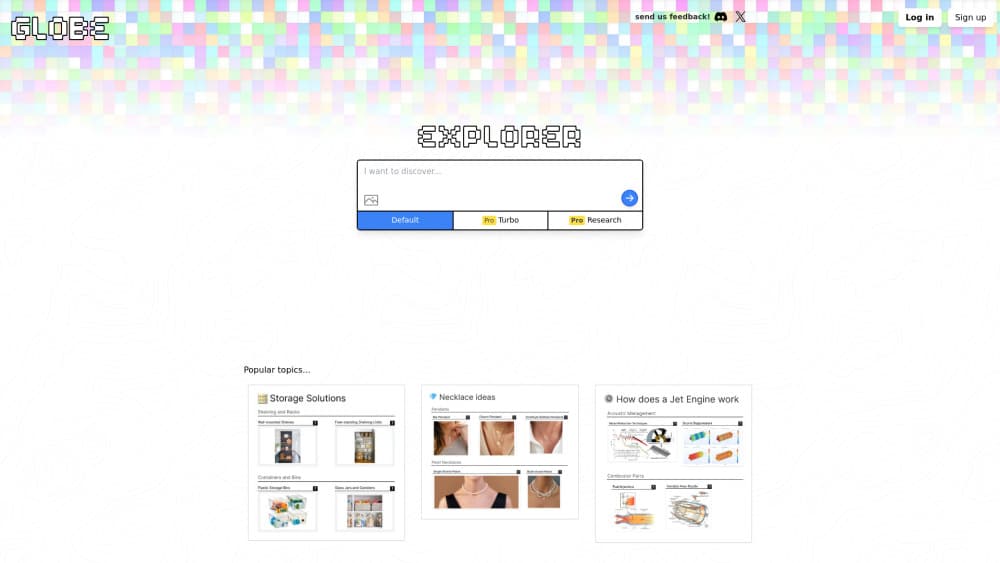
About Globe Explorer
What Is Globe Explorer
Globe Explorer is an AI search engine built for orientation. You type a topic, and it assembles a page the way an encyclopedia would: a main outline, smaller subtopics under each branch, pictures, and source cards that link back to the pages it pulled from. The result is a knowledge map you can click through instead of a list of ten blue links.
The product targets a specific gap. A normal search gives you fragments, and a chat assistant gives you one long answer that's hard to skim. Globe sits between them. It's useful when you need the shape of an unfamiliar field, the vocabulary people use in it, and a set of leads worth checking.
The limits matter as much as the format. A tidy layout can make thin sourcing look solid. The company doesn't publish details about which models run each mode, how sources get ranked, or how fresh the index is, so treat the page as a starting point and read the cited material before you rely on any claim.
Getting Started
- Open explorer.globe.engineer in a browser or the iOS app and sign in if you want search history and the Pro trial.
- Type a topic with a clear scope, such as "history of subway construction in Tokyo" instead of just "subway".
- Pick a mode: Default for a free overview, Turbo for faster Pro exploration, or Research when the subject is technical.
- Expand the sections that matter, open the source cards, and ask a follow-up from the same page.
- Share the page by link or export it as a PDF when you need to keep the outline.
Product Information
A quick look at Globe Explorer's pricing, supported platforms, and performance.
Best for
The users, tasks, and scenarios where this tool fits best.
Users
- Students starting a subject
- Teachers and trainers
- Writers and content researchers
- Analysts new to a market
Tasks
- Mapping an unfamiliar field
- Building a research outline
- Comparing subfields
- Preparing a lesson or workshop
Scenarios
- A late-night curiosity dive
- Early client work in a new industry
- Fact checking a claim you saw on social media
Key features
Structured topic pages
Every query becomes a page with a main heading, nested sections, and short summaries under each one. This is the core of the product: it organizes before it explains. The format suits topics with natural branches, like a scientific field or a historical period, and feels padded on narrow questions with one obvious answer.
Three search modes
Default mode is free and produces a standard overview. Turbo mode is a Pro option pitched at speed, and Research mode is the higher-quality Pro tier for technical subjects. Signed-in users get five Pro searches to try both before paying. Each Pro search counts against the allowance, so a vague query can eat a trial without giving you much.
Source cards
Sections carry links to the pages the model drew from, and you can leave the generated text to read them. This is the feature that keeps the tool honest, provided you use it. A page with no source card under a claim is a signal to slow down.
Interactive branches and follow-ups
You can expand any section, jump into a subtopic, and ask a new question without starting over. The structure stays intact as you go deeper. In practice, one focused follow-up usually beats regenerating the whole page.
Image, camera, and voice input
Results mix text with pictures, and the interface includes controls for how much visual weight images get. The mobile experience adds camera and voice input, which helps when you want to search something you're looking at rather than describe it.
Sharing and PDF export
Any generated page can be shared by URL, and there's a PDF export path for offline reading or for handing an outline to someone else. Shared pages keep their branch structure, so a colleague can open the parts they care about.
Pros and cons
Pros
- The outline format makes a large topic feel navigable in a way a chat answer doesn't.
- Source cards sit next to the claims, which makes verification a two-click habit rather than a separate task.
- The free Default mode is enough to judge whether the format works for you.
- Mobile camera and voice input fit how people actually look things up on a phone.
Cons
- Presentation can outrun accuracy. A clean page with weak sources still looks authoritative, and readers who skip the links get a false sense of coverage.
- The company shares little about model providers, ranking, or index freshness, so you can't judge reliability from documentation.
- Narrow factual questions are slower here than in a conventional AI search engine, since you wait for a whole page to generate.
- Pro searches are metered, and a poorly scoped query burns part of your allowance.
Frequently asked questions
Yes. Default mode costs nothing and needs no subscription. Pro modes run on a metered allowance: signed-in accounts get five trial searches, then Turbo and Research require a paid plan.
Related content
Explore related tools, skills, and articles for Globe Explorer.
Globe Explorer Alternatives

Base Code
Base44 (Wix) · Coding · ProductivityBase Code is a shared cloud development environment from Base44. Teammates describe changes to an existing GitHub codebase in chat, preview them live and send them back as pull requests.

Google EmbeddingGemma 2
Google DeepMind · Writing · Image · CodingGoogle EmbeddingGemma 2 is a 740M-parameter open model that turns text, code, images, audio, and video frames into vectors in one 768-dimension space, running on phones and laptops.

GitGlow
GitGlow · Coding · ProductivityGitGlow is a local-first desktop Git client that lets independent developers review their own code and their AI agents' changes in one place before shipping.