

GoodSocials
Pavel Kucherbaev · Writing · Productivity · Marketing
GoodSocials is an AI social media manager for LinkedIn that drafts weekday posts from market research or your own Stripe, GitHub and PostHog numbers, then waits for approval.
About GoodSocials
What Is GoodSocials
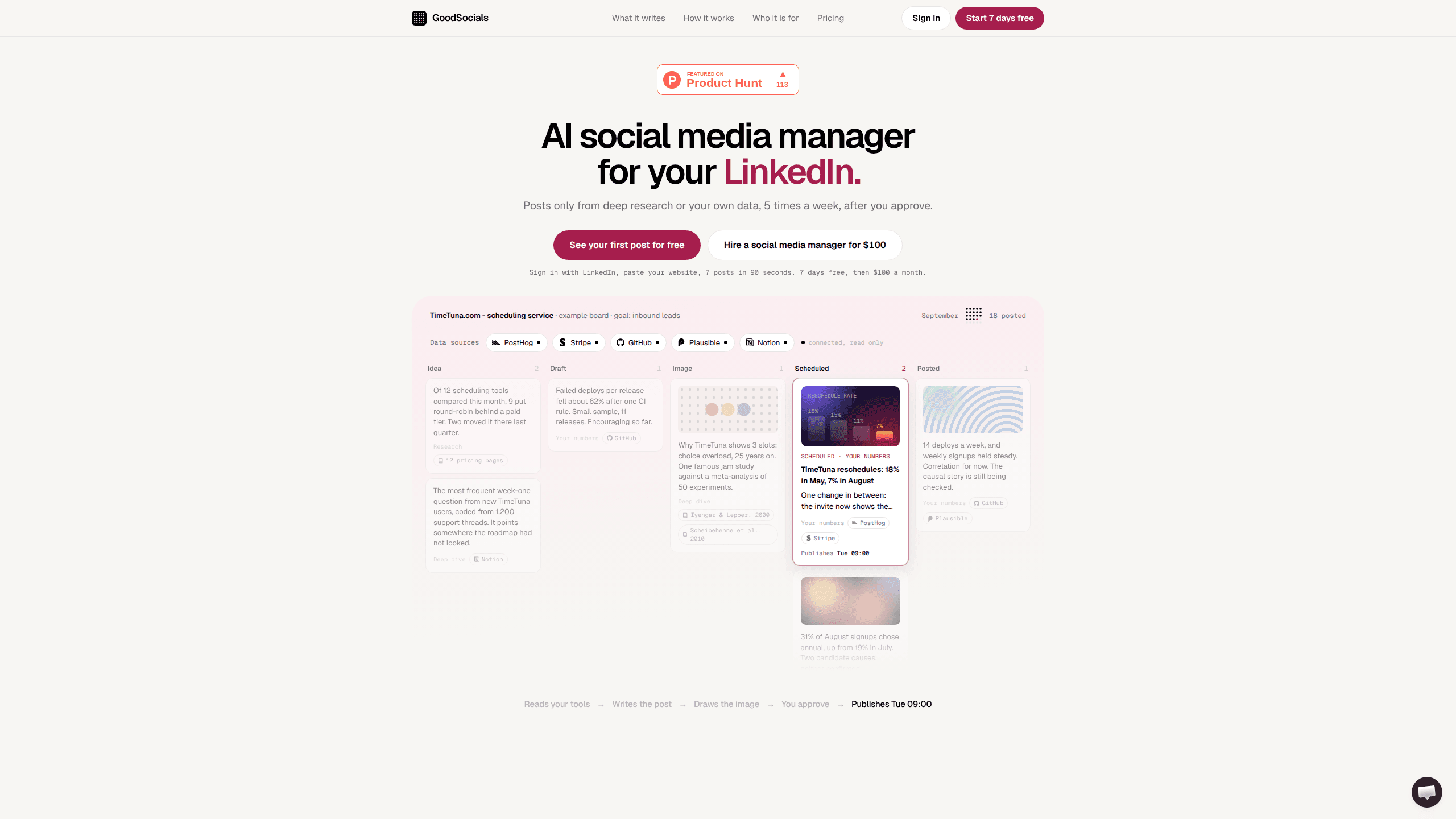
GoodSocials is a web app that writes LinkedIn posts for one person's profile and publishes them on a weekday schedule. You sign in with LinkedIn, paste a website address, and the agent builds a board of seven post ideas in about 90 seconds. Each idea turns into a draft with an image attached, and nothing leaves the board until you press Approve.
The product exists because most AI posting tools produce the same motivational filler. Plenty of AI LinkedIn content tools will write a post from a one-line prompt. GoodSocials limits itself to three kinds of post: market research, a deep dive into a paper or pricing page, and a figure read from one of your own tools. The card names the source, so a reader can see whether a claim comes from Stripe, GitHub, PostHog, Plausible or Notion. That constraint is the whole pitch. If you want a tool that comments on industry news all day, this isn't it.
Limits matter here. GoodSocials works on personal LinkedIn profiles only, because LinkedIn gates the permission needed for company pages. Access tokens last 60 days and can't be refreshed in the background, so you'll reconnect roughly every two months. The schedule is one post a day, a sensible ceiling for automated LinkedIn posts from one person. Draft quality depends on how much real material the agent has to work with.
Getting Started
- Sign in with LinkedIn and grant the posting permission. GoodSocials uses OpenID Connect for the sign-in and LinkedIn's share scope for publishing.
- Paste your website address. The agent reads the site, writes three brand principles covering voice, visuals and format, picks four themes, and places seven ideas on the board.
- Connect data sources if you want posts built on your own numbers. Stripe, GitHub, PostHog, Plausible and Notion all connect read-only.
- Open each card and choose Approve, Revise or Reject. A revision note rewrites that card and becomes a rule for later posts.
- Approved cards move to Scheduled and publish at 09:00 in your board's timezone, Monday through Friday.
Product Information
A quick look at GoodSocials's pricing, supported platforms, and performance.
Best for
The users, tasks, and scenarios where this tool fits best.
Users
- Founder-led startups
- Independent consultants
- Product and engineering leads
- Small agencies
Tasks
- Turning a monthly metric into a post
- Writing market research posts
- Keeping a weekday cadence
- Drafting for several client voices
Scenarios
- You shipped a feature three weeks ago and haven't posted since
- An agency handles eight to twelve LinkedIn profiles with two people
- A consultant has strong data but no writing time
Key features
Approval board with five columns
Every post moves through Idea, Draft, Image, Scheduled and Posted. Each card carries three actions: Approve, Revise and Reject. The board is the product's centre of gravity, and it keeps you from publishing something you haven't read.
Three post types with a named source
GoodSocials writes market research, deep dives and posts based on your own numbers. The source sits on the card, whether that's a paper, a pricing page or a tool connection. This is what separates it from a general LinkedIn AI post generator that starts from a prompt and invents supporting detail.
Read-only connections to your tools
Stripe, GitHub, PostHog, Plausible and Notion connect with read access. The agent pulls figures and writes them into posts, and you can disconnect a source at any time. Read-only access means the tool can see your numbers but can't change anything in those accounts.
Corrections that become brand rules
Leave a note on a card and the agent rewrites that post. The note also joins the profile's brand principles, so later cards follow it without another reminder. Over a few months the rules accumulate and the queue needs fewer edits, which is the part most LinkedIn ghostwriting software ignores.
Quality gate before scheduling
A rules layer checks every draft, then an editor pass looks for invented numbers, unsupported claims and posts that say nothing. A failed card stays where it is and states what needs fixing. The gate won't catch a bad idea, but it does stop fabricated statistics from reaching your feed.
Weekday publishing at 09:00
Approved posts publish at 09:00 in the board's timezone, Monday to Friday. LinkedIn has no scheduling endpoint, so GoodSocials runs its own publish loop and queues each post against the daily API limit.
Agency mode with separate boards
The Agency plan holds up to 12 profiles. Each one has its own board, four themes, three brand principles and image count, and you switch between them from a profile picker. One client's board never reads another client's voice or data.
Open source under MIT
The hosted service runs the same code as the public repository, which carries an MIT license. You can deploy it yourself with Node 20 or newer, a Postgres database, a LinkedIn developer app and an Anthropic API key. Self-hosting shifts the cost to your own API bills and puts LinkedIn app review in your hands.
Pros and cons
Pros
- Every post names its source, so a claim about churn or deploys can be traced to the connected tool.
- Revision notes turn into permanent rules, which cuts review time week by week.
- Setup takes about 90 seconds and produces seven usable ideas before you connect anything.
- The Agency plan works out to roughly $83 per profile at 12 profiles, against $1,200 for twelve Pro subscriptions.
- The code is MIT licensed, so a team with a developer can run the whole thing in-house.
Cons
- Company pages aren't supported, which leaves larger marketing teams without their main LinkedIn surface.
- LinkedIn access expires after 60 days and can't renew itself, so someone has to reconnect each profile or posting pauses.
- At $100 a month for one profile, it costs more than a general LinkedIn scheduling tool, and the price only makes sense if the research and data posts are what you want.
- There's no engagement reporting and no API for post history, so you import a Shares.csv archive to give the agent past posts to learn from.
Frequently asked questions
It writes LinkedIn posts for a personal profile, attaches an image, holds each one for your approval and publishes it on a weekday schedule. The posts come from market research or from numbers in tools you connect.
Related content
Explore related tools, skills, and articles for GoodSocials.
GoodSocials Alternatives

Google EmbeddingGemma 2
Google DeepMind · Writing · Image · CodingGoogle EmbeddingGemma 2 is a 740M-parameter open model that turns text, code, images, audio, and video frames into vectors in one 768-dimension space, running on phones and laptops.

MePersona
MePersona, Inc. · Writing · Productivity · MarketingMePersona is an AI unified inbox for creators. It learns your voice, drafts replies to fan messages from 12 platforms, and sends only what you approve.

Fluence
Yay Software (Yannick Huchard) · Writing · Voice & Language · ProductivityFluence is an Android app that reads PDFs, EPUBs, Word files and web articles aloud, follows each sentence as it speaks, and answers questions about the text on the phone itself.