

Google Android XR
Google · Other
Google Android XR is Google's operating system for extended reality headsets and glasses, built with Samsung and powered by Gemini AI.
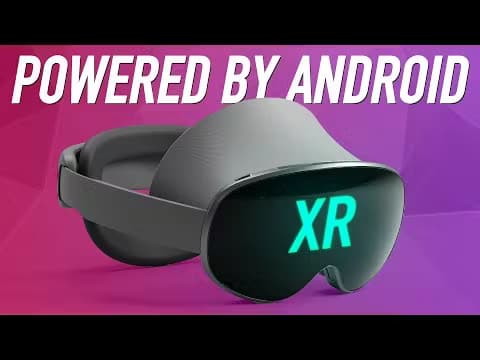
About Google Android XR
What Is Google Android XR
Google Android XR is an operating system that Google built for extended reality (XR) headsets and glasses. It pulls together the company's work in AI, AR and VR into one platform, then pairs it with the Gemini assistant. The idea is simple. Instead of tapping at a screen, you talk to a device that can see the room around you.
Google announced it on December 12, 2024, alongside Samsung and Qualcomm. Samsung is building the first headset, a device known as Project Moohan, while Qualcomm supplies the chips that power a wider range of headsets and glasses from partners like Sony and XREAL. Because it runs on Android, the mobile and tablet apps you already use from Google Play work out of the box, so you don't start from an empty store.
The catch is timing. Android XR shipped first as a developer preview. The hardware is still rolling out. If you want one today, you're largely waiting on devices rather than on software.
Getting Started
- Create a Google account or sign in with an existing one, since Android XR ties into the Google apps and Gemini assistant you already use.
- Set up your Android XR headset or glasses and pair them with your Google account during the on-device setup flow.
- Sign in to the Google Play store on the device to install the mobile and tablet apps you already own.
- Talk to Gemini using your voice to launch apps, plan tasks or ask about what's in front of you.
- Open apps like YouTube, Google Maps or Chrome across one or more virtual screens to start working or exploring.
Product Information
A quick look at Google Android XR's pricing, supported platforms, and performance.
Best for
The users, tasks, and scenarios where this tool fits best.
Users
- Developers building immersive apps
- People who live in Google's apps
- Early adopters curious about XR
Tasks
- Hands-free help on the move
- Multitasking with virtual screens
- Watching on a big virtual screen
- Exploring places before you visit
Scenarios
- A student researching a topic while keeping notes open on nearby screens
- A traveler navigating an unfamiliar city
- A remote worker setting up a portable workspace
Key features
Gemini as the Front Door
Gemini is the assistant you talk to across Android XR. It reads your intent from what you say, not just from a typed command. It can answer questions about the world in front of you. Ask it to plan a trip or explain something you're looking at. It responds in the flow of the conversation. That conversational layer is what separates Android XR from earlier XR platforms that leaned on controllers and menus. No menus needed.
A Blend of Virtual and Real
Headsets running Android XR can shift between full immersion and staying present in the room. You can fill the space around you with apps and content. Then dial reality back in when you need it. The mix matters for people who want focus without shutting the world out entirely. That's the point.
Your Google Play Apps Out of the Box
Because Android XR is Android, the mobile and tablet apps you already own from Google Play run on it from day one. You're not waiting for a brand-new library to fill up. Google says more apps, games and immersive content built for XR are on the way too. Big difference.
Familiar Google Apps, Reimagined
Google rebuilt several of its own apps for the platform. YouTube and Google TV run on a virtual big screen, Google Photos brings memories back in 3D, Maps adds Immersive View flyovers, and Chrome spreads your browsing across multiple virtual screens. Circle to Search also works with a gesture, so you can look up whatever is in front of you.
A Shared Platform for Developers
Android XR supports ARCore, Android Studio, Jetpack Compose, Unity and OpenXR from the start. Developers can build for headsets and glasses using tools they already know, and the same code can reach a range of devices. That open, unified approach is aimed at giving both users and developers more choice.
Glasses for Everyday Help
Beyond headsets, Android XR is meant to power lightweight glasses you'd wear all day. The pitch is helpful information one tap away, like directions, translations or message summaries, delivered within your line of sight or straight to your ear. Google began real-world testing of prototype glasses with a small group of users, and it has said privacy for both wearers and bystanders is part of that work.
Pros and cons
Pros
- Runs Android apps from Google Play out of the box, so the library isn't empty on day one.
- Gemini adds a conversational AI layer that makes headsets and glasses feel natural to control.
- Backed by Google, Samsung and Qualcomm, with a broad set of device partners building hardware.
- Developer-friendly: it supports ARCore, Unity, OpenXR and other tools many teams already use.
- Ties neatly into the Google apps people already rely on, from Maps to Photos.
Cons
- Launched first as a developer preview, so consumers had to wait for finished hardware.
- Device availability trails the software, which limits what you can actually buy.
- The best features depend on Gemini and an internet connection, so offline use is limited.
- Glasses remain in prototype testing, so their real-world polish is still unproven.
Frequently asked questions
It's Google's operating system for extended reality headsets and glasses. It mixes AI, AR and VR, and it's built on Android so existing Play apps run on it.
Related content
Explore related tools, skills, and articles for Google Android XR.
Google Android XR Alternatives

Odyssey 3
Odyssey · OtherOdyssey-3 is Odyssey's foundation world model. It simulates physics in real time, turns a prompt into an interactive environment, and adapts to robots, cars and games.

JarvisCore
Prescott Data · Coding · Productivity · OtherJarvisCore is an open source Python runtime where AI agents work as equal peers on an agent mesh, claim tasks from a shared ledger, and reach external services through a zero-trust broker.
Clef
Cloudflare · Business · OtherClef is Cloudflare's open-source decision model for Workers AI. It returns calibrated probabilities for typed questions, not generated text, so agents can classify, route, and act fast.