

Google Chrome Skills
Google · Other
Google Chrome Skills is a feature inside Gemini in Chrome that turns the prompts you keep retyping into saved, one-click workflows. Instead of pasting the same instructions into every page you visit, you save a prompt once, then fire it from the chat box with a slash command and run it on the current page or several tabs at once. It comes preloaded with a library of ready-made Skills for shopping, health and document tasks, and it's free for anyone signed into a Chrome desktop profile.
About Google Chrome Skills
What Is Google Chrome Skills
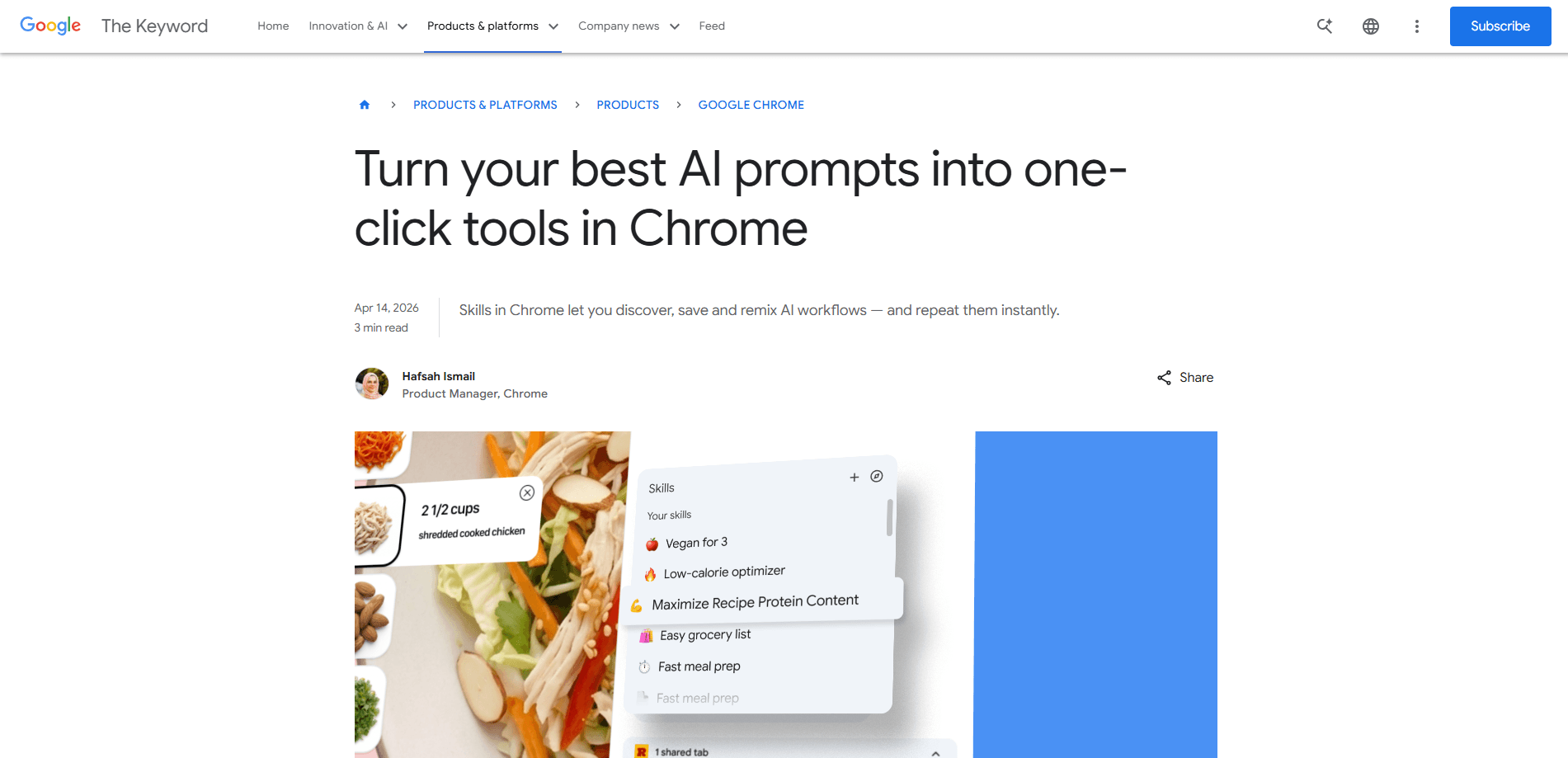
Google Chrome Skills is a way to reuse your best AI prompts without rewriting them every time. You write a prompt in Gemini in Chrome, decide you'll want it again, and save it as a Skill straight from your chat history. Next time you need it, you type a forward slash ( / ) in the Gemini box or click the plus button, pick your Skill, and it runs on whatever page you're looking at. You can edit a saved Skill or build a new one whenever your needs change. No retyping. No drift in your wording.
The bigger idea is that repetitive AI chores stop being chores. Before this, asking for ingredient substitutions to make a recipe vegan meant re-entering the exact same request on every recipe site you opened. Now that request lives in your browser. It waits for you. Version one is now rolling out to Gemini in Chrome on desktop, helping you tidy up AI-powered browsing without leaving the page.
The main limitation is where it lives. Skills run on Chrome desktop only, tied to Gemini in Chrome. That leaves phone and tablet users out for now. Sign-in is part of the deal too, and your saved Skills follow your Google account across signed-in desktop devices rather than sitting in one browser.
Getting Started
- Sign into Chrome on a desktop computer with your Google account, and confirm Gemini in Chrome is switched on in your browser settings.
- Open the Gemini panel and write a prompt you'd want to reuse, or run one of the ready-made Skills from the library.
- From your chat history, save that prompt as a Skill so it shows up in your saved list.
- Call it up later by typing / in the Gemini box or clicking the plus button, then pick the Skill you want.
- Select the tabs you want it to work on, run it, and edit the Skill any time your instructions need a tweak.
Product Information
A quick look at Google Chrome Skills's pricing, supported platforms, and performance.
Best for
The users, tasks, and scenarios where this tool fits best.
Users
- Busy professionals
- Students and researchers
- Online shoppers
Tasks
- Summarizing long documents
- Comparing products or plans
- Checking recipes and ingredients
Scenarios
- Handling fixed, repetitive work
- Early project research
- Cross-referencing options before a purchase
Key features
One-click saved prompts
The core of Google Chrome Skills is turning a prompt you like into a button you press. You save it directly from your chat history, then bring it back with a forward slash or the plus button in Gemini in Chrome. That means the exact wording you trust stays intact, instead of being retyped and slowly drifting. It's the difference between re-explaining your request and just running it.
Run across multiple tabs
A Skill doesn't have to stay on one page. You can point it at other tabs you've selected, so a single request works across several open pages at once. This is where comparison tasks get fast: open three product pages, run one Skill, and get a combined view without copying anything into a chat window by hand. The multi-tab reach is what separates a saved prompt from a real workflow. That's a big difference.
Ready-made Skills library
Google ships a starting library of Skills for common jobs, so you don't have to build everything from scratch. There are Skills for breaking down a product's ingredients while you shop, picking a gift by cross-checking your budget against what the recipient likes, and more. You can add any of them as a saved Skill and run it, or open it up and edit the prompt to match how you work.
Editable and reusable at any time
Skills aren't locked once you save them. If your instructions change, you edit the Skill instead of starting over, and you can create new ones whenever a new task shows up. Because they sync with your Google account, a Skill you save on your work computer is there when you sign in at home. Over time your collection becomes a personal toolkit shaped to your own habits.
Built-in action confirmations
Skills lean on the same safety setup Chrome applies to Gemini prompts. When a Skill is about to do something with a real effect, like adding a calendar event or sending an email, it asks you to confirm first. That keeps you in control, so a one-click workflow can't quietly fire off actions you didn't intend. Trust matters here.
Cross-device sync for signed-in users
Your saved Skills follow your signed-in Chrome desktop profile rather than living on a single machine. Save one at the office, sign in later on another desktop, and it's waiting there. Not bad. The trade-off is the sign-in requirement: without a Google account, the syncing doesn't happen, and the feature stays tied to the browser you're on.
Pros and cons
Pros
- Turns the prompts you reuse most into one-click actions, so repetitive AI tasks take far less setup.
- A Skill can run across several selected tabs at once, which makes comparison work genuinely quick.
- A ready-made library covers common jobs like shopping and document scanning, so you can start before you build anything.
- Saved Skills sync with your Google account across signed-in desktop devices.
- Sensitive actions like sending email or adding calendar events ask for confirmation before they run.
Cons
- It's desktop only for now, so anyone working from a phone or tablet has no access. That's a real gap.
- You need to be signed into Chrome and using Gemini in Chrome, which rules out quick browser hopping.
- If Google changes or pulls the feature, your saved workflow habits go with it.
- Building a truly personal Skill library takes time; the ready-made ones won't fit every niche task. Expect some trial and error.
Frequently asked questions
It's for saving the AI prompts you use again and again so you can run them with one click inside Gemini in Chrome. If you've ever wanted to save AI prompts once and reuse them everywhere, this is the feature for that. Instead of retyping the same request on every page, you save it once and call it up with a slash command. It's aimed at repetitive tasks like summarizing documents, comparing products, or breaking down ingredients.
Related content
Explore related tools, skills, and articles for Google Chrome Skills.
Google Chrome Skills Alternatives
BinkBink
BinkBink · OtherBinkBink is a free online game platform and AI game maker that lets anyone turn a short text description into a playable browser game. You can jump into hundreds of community-made games. Or describe your own idea and play it in seconds, then share it with friends. Want to create your own game? You don't need to code. No engine setup, no download, no hassle.

Audiogen
Audiogen Inc. · OtherAudiogen is an AI music generator built by Audiogen Inc., a small research team that spent about 2.5 years training its own generative music model and designing a web interface around it. Instead of a plain text box, this AI music tool turns the timeline into a beginner-friendly Generative Audio Workstation, or GAW, where inpainting, extending, remixing and stem editing work more like painting on a canvas. The product is still in beta, so access runs through a waitlist or an invite. Paid plans aren't published yet.

Aiml API
AIMLAPI OÜ · OtherAiml API is a unified AI model API that puts more than 1000 models from OpenAI, Google, Anthropic, and others behind one endpoint and one bill. You write code against a single OpenAI-compatible schema, then switch between chat, image, video, and audio models by changing a model string. It suits developers and small teams who want multi-model access without juggling a dozen separate provider accounts, and it removes the usual billing headache that comes with testing several vendors. One key covers it all.