

Upsonic
Upsonic · Coding · Productivity
Upsonic is an open-source Python framework for building autonomous AI agents, task agents, and multi-agent teams, with tools, memory, RAG, MCP support, and 30+ model connections.
About Upsonic
What Is Upsonic
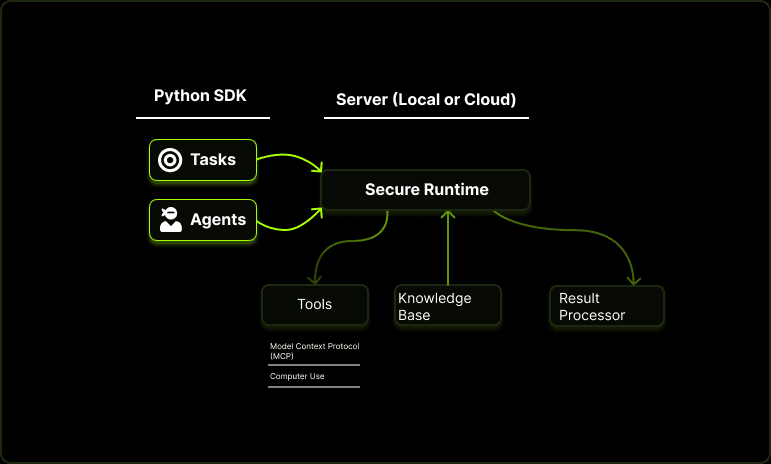
Upsonic is a Python framework that handles the plumbing behind AI agents: planning, tool calls, memory, retrieval, and multi-agent coordination. You install it with pip, point it at a model, and describe a task in plain language. The agents take it from there.
The framework leans on reliability. Agents run inside a sandboxed workspace that blocks path traversal and dangerous shell commands, and optional guardrails screen inputs and outputs before they reach a model or a user. The team behind it positions Upsonic for regulated work, like document analysis, onboarding, and financial reconciliation, where an agent going off script costs real money.
The biggest limitation is scope. Upsonic is a developer tool, not a chatbot you open in a browser. You need Python skills and provider API keys before anything runs. Its enterprise layer, AgentOS, sits behind a sales conversation rather than a public price list, so cost at scale is hard to pin down upfront.
Getting Started
- Install the package with
uv pip install upsonicorpip install upsonic. - Create a
.envfile and add a key for one of the supported providers, such as OpenAI, Anthropic, Google, or a local Ollama endpoint. - Build an
Agentand aTask, then describe what you want done in the task. - Run it with
agent.print_do(task)and check the output. - Add tools, memory, a knowledge base, or a second agent once the first task works.
Product Information
A quick look at Upsonic's pricing, supported platforms, and performance.
Best for
The users, tasks, and scenarios where this tool fits best.
Users
- Backend and AI developers
- Fintech and operations teams
- Automation builders
Tasks
- Document analysis
- Multi-step research
- Tool-driven workflows
- Long-running assistant work
Scenarios
- A fintech team automating merchant onboarding and checking each step against a rulebook.
- A developer prototyping a local agent with Ollama when a cloud model is too costly or too sensitive.
- A support team wiring an agent to internal docs so answers cite real, current material.
- A research group running repeatable evaluations before trusting an agent with live traffic.
Key features
Two Agent Styles in One Framework
Upsonic splits agents into two shapes. Autonomous agents handle open-ended, multi-step work and can touch the filesystem and shell inside a locked workspace. Traditional agents fit structured tasks with a defined input and output contract. You pick based on the problem, and both run through the same pipeline.
Tools and MCP Integration
You write a function, mark it with a decorator, and hand it to an agent as a tool. Beyond your own code, Upsonic speaks the Model Context Protocol, so agents reach thousands of external services without custom glue. Ready-made connectors cover search, crawling, sandboxes, and finance data.
Memory and Knowledge Bases
Agents keep conversational memory and pull from a RAG knowledge base for retrieval. Store that memory in SQLite, Postgres, Redis, Mongo, or Mem0, and build retrieval pipelines on Qdrant, Pinecone, Chroma, pgvector, or Weaviate. The point is continuity: an agent that recalls earlier context beats one that starts fresh each run.
Multi-Agent Teams
A Team groups several agents and runs them in sequential, coordinate, or route mode. Each agent gets its own name, role, and goal. This suits work that genuinely needs different specialties, like one agent researching and another writing, rather than a single agent pretending to do everything.
Built-in OCR
The OCR layer turns PDFs and images into text through a layered pipeline, with engines including EasyOCR, Tesseract, PaddleOCR, and DeepSeek. It matters for teams whose data lives in scans and invoices rather than clean text files.
Safety, Human-in-the-Loop, and Tracing
Guardrails screen content against preset privacy, financial, and security policies. Human-in-the-loop checkpoints pause a run for approval or input. Tracing hooks into Langfuse and PromptLayer, so you can see the path an agent took, not just its final answer.
Pros and cons
Pros
- Ships under the MIT license, so you can read, fork, and self-host the code without a vendor lock-in.
- Supports more than 30 model providers, from OpenAI and Anthropic to local Ollama and vLLM endpoints.
- Sandboxed execution blocks path traversal and risky shell commands by default.
- Covers the full build path, from tools and memory to RAG, teams, OCR, and tracing, in one framework.
- Keeps the Python API small, so a working agent takes a few lines.
Cons
- No graphical interface for building agents; everything happens in code, which rules out non-developers.
- You supply your own model API keys, so the framework is free but running agents is not.
- The enterprise platform AgentOS has no public pricing, which makes budgeting harder for larger rollouts.
- Docs and examples move fast, and some integrations assume you already know agent concepts.
Frequently asked questions
Upsonic builds AI agents in Python. You use it for tasks that need a model to plan, call tools, and hold context, such as document analysis, research, and automated operations. It suits both single agents and coordinated multi-agent teams.
Related content
Explore related tools, skills, and articles for Upsonic.
Upsonic Alternatives

Base Code
Base44 (Wix) · Coding · ProductivityBase Code is a shared cloud development environment from Base44. Teammates describe changes to an existing GitHub codebase in chat, preview them live and send them back as pull requests.

Google EmbeddingGemma 2
Google DeepMind · Writing · Image · CodingGoogle EmbeddingGemma 2 is a 740M-parameter open model that turns text, code, images, audio, and video frames into vectors in one 768-dimension space, running on phones and laptops.

GitGlow
GitGlow · Coding · ProductivityGitGlow is a local-first desktop Git client that lets independent developers review their own code and their AI agents' changes in one place before shipping.