

GPTRPG
GPTRPG · Writing
GPTRPG is a browser-based ChatGPT RPG platform where you play interactive stories, chat with AI characters and build your own scenarios.
About GPTRPG
What Is GPTRPG
GPTRPG is a web platform for AI roleplay that turns a language model into a narrator, a game master and a cast of characters. You pick a scenario, choose a character and type what your character does. The model answers in prose, remembers the scene and keeps the plot moving turn by turn. There's no game client to install and no dice to roll, which makes it a text adventure you read rather than a board you manage.
The catalog covers genres rather than one setting: sci-fi, apocalypse, crime, cyberpunk, medieval fantasy, romance and slice-of-life stories sit side by side. Some scenarios are written by the team, most come from users who publish their own worlds. You can also start from a blank page and write your own scenario with a premise, a cast and background notes.
The limits are practical. Everything runs in a browser and needs a connection. Each turn draws on an in-app currency called coins, plus a daily fatigue allowance that refills and doesn't roll over. Long campaigns therefore cost either time or money, and the writing quality depends heavily on which scenario you open.
Getting Started
- Create an account with an email address or a Google login. New accounts get a small coin bonus.
- Pick a few interest tags during onboarding, then browse Discover for scenarios in those genres.
- Open a story, read the premise and pick a character. Safe mode is on by default and can be switched off in settings.
- Choose an AI model from your profile menu. Cheaper models use fewer coins per turn, stronger ones use more.
- Type your action or line of dialogue, send it, and steer the story from there. Rolling back a turn is possible, but spent coins aren't returned.
Product Information
A quick look at GPTRPG's pricing, supported platforms, and performance.
Best for
The users, tasks, and scenarios where this tool fits best.
Users
- Solo players who like reading more than clicking
- Aspiring writers testing a premise
- Language learners
Tasks
- Running a one-off adventure in 20 minutes
- Turning a story idea into a playable world
- Continuing a campaign across days
Scenarios
- Commuting or waiting in line
- Late-night solo play
- Testing a visual novel concept
Key features
Scenario Library Sorted by Genre
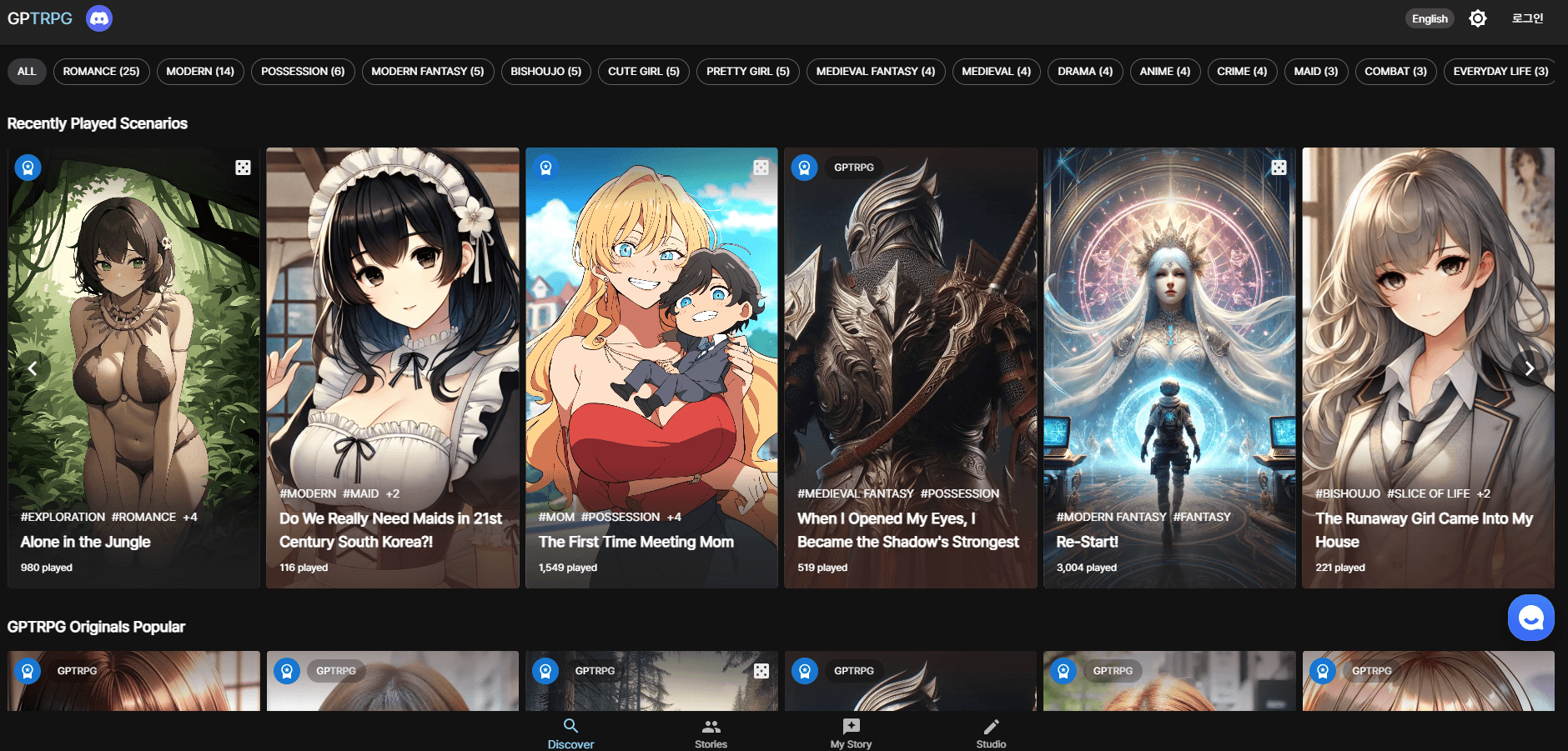
Discover groups stories by tags such as SF, apocalypse, crime, cyberpunk and medieval fantasy, and each card shows session counts and how many lorebooks it uses. That metadata is the fastest way to judge whether a world is developed or barely started. New releases are split into freedom mode, game mode and general sections, so you can see what the platform itself is pushing this week.
Three Play Modes
Freedom mode drops the rules and lets the narrator follow whatever you type. Game mode keeps stats, dice checks and outcomes, which suits players who want a challenge rather than a shared story. General scenarios sit in between and work like a guided interactive novel. Switching modes changes the pacing a lot, so try one of each before committing to a long campaign.
Lorebooks for World Consistency
A lorebook stores the facts a scenario needs to stay coherent: places, factions, character histories and rules of the setting. Scenarios show their lorebook count on the card, and heavily built worlds tend to hold together better over dozens of turns. If you write your own scenario, this is where most of the work goes.
Scenario Creator Studio
The studio lets you define a premise, cast, tags and background notes, That's the path from an interactive story idea to a published scenario for other players. Creators earn points when someone plays their work, and points convert into coins at a set rate. It's a real incentive rather than a badge. Payouts are small and scale with how often your scenario gets opened.
Character Chat
Beyond scripted scenarios, GPTRPG hosts characters who wait for a direct chat. Conversations stay in the character's voice and can be reopened later from My Story. It's the closest thing on the site to a pure AI character chat tool, and it's useful for warming up a character before you write them into a scenario.
Visual Novel Mode
Visual novel mode adds artwork and framed dialogue to a story, turning a text session into something closer to a reading app. It doesn't change how the model responds, only how the scene is presented. For showing a concept to someone else, the difference in impact is large.
Model Choice and Turn Costs
A model menu in the profile area lists options labelled by trade-off, from basic to high quality. Each model has its own coin or fatigue cost per turn, shown before you send. Picking the cheap model for dialogue-heavy scenes and the stronger one for plot turns is the simplest way to keep spending down.
Pros and cons
Pros
- No install and no setup: a browser, an account and a scenario are enough to start playing.
- The scenario catalog is broad and mostly user-written, so niche genres like hardboiled crime or apocalyptic sci-fi actually exist.
- The creator studio pays points that convert to coins, which gives writers a reason to publish instead of hoarding drafts.
- A daily fatigue allowance covers light play without spending anything, and safe mode keeps public content filtered by default.
Cons
- Every turn costs coins or fatigue, so long campaigns either drain the daily allowance fast or turn into a recurring bill.
- Unused fatigue disappears at reset, which punishes occasional players who log in every few days.
- Story quality swings with the scenario. A thin lorebook produces a narrator that forgets names and locations within a dozen turns.
- There's no native app and no offline mode, so a stable connection is mandatory.
Frequently asked questions
Yes, up to a point. Every account gets a daily fatigue allowance that covers a limited number of turns, and new signups receive bonus coins. Heavier play needs coin packs or a membership.
Related content
Explore related tools, skills, and articles for GPTRPG.
GPTRPG Alternatives

Claude for Google Workspace
Anthropic · Writing · Productivity · BusinessClaude for Google Workspace puts Claude in a sidebar inside Google Docs, Sheets, and Slides, where it reads the file you have open and edits it in place.

Claude Haiku 5.5
Anthropic · Writing · Coding · ChatbotClaude Haiku 5.5 is Anthropic's fastest and cheapest small model, built for high volume tasks at $0.10 per million input tokens with a 1M token context window.

NoteWorthy
Suman Hansada · Writing · Productivity · AI AssistantNoteWorthy is a notes app for iPhone, iPad and Mac that writes titles, tidies formatting, summarizes long notes and files each one with on-device AI. No account, no upload, no network requests.