

Grain
Grain Intelligence Inc. · Business · Chatbot
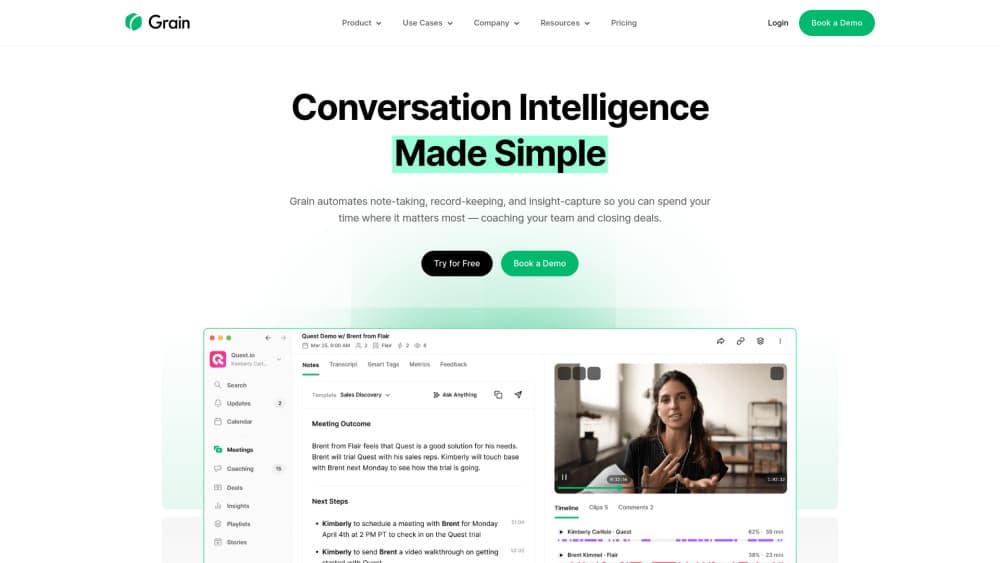
Grain is an AI notetaker that records meetings with or without a bot, turns them into searchable transcripts and action items, then passes them to Claude, ChatGPT, or your own agents.
About Grain
What Is Grain
Grain is an AI meeting recorder built on one premise: the recording only pays off if the work after the call actually happens. It captures your calls, writes a transcript, pulls out decisions and action items, and then makes all of that readable by the AI tools your team already runs. It ships as a web app with desktop and mobile companions.
The difference shows up after the meeting ends. Plain meeting transcription is hard to reuse. Grain attaches participant context and cross-meeting links, so an agent can answer "what did we promise this customer last quarter" without you pasting five documents first. Transcripts export as clean Markdown, which happens to be the format most LLM workflows handle best.
Two limits matter. Recording, uploading, and importing are paid-seat features; the free plan is aimed at people who mostly watch and read what their team shares. And bot-free capture only hears audio that plays through your computer, so a meeting held in a physical room needs a different setup.
Getting Started
- Sign up at grain.com with Google or Microsoft, or join through your team's invite link if a workspace already exists.
- Connect a calendar and set capture rules: every meeting, internal only, or external only.
- Choose how to record. Install the desktop app for bot-free transcription, or send the Grain bot to Zoom, Google Meet, Microsoft Teams, or Webex calls.
- Type notes and flag important moments during the call. They attach to the transcript timeline as you go.
- Open the meeting afterward to check the AI notes and action items, then share the recording, export Markdown, or push the transcript into Claude, ChatGPT, or your own agent.
Product Information
A quick look at Grain's pricing, supported platforms, and performance.
Best for
The users, tasks, and scenarios where this tool fits best.
Users
- Sales teams
- Product and research teams
- Managers and recruiters
Tasks
- Turning a call into follow-up tasks
- Giving an AI agent meeting context
- Catching up on a call you missed
Scenarios
- Recurring customer calls
- Hiring loops
- Research interviews
Key features
Bot-Free Transcription
Bot-less transcription runs from the desktop app and catches your computer's audio without a participant called "Grain" appearing in the call. That matters on customer calls where a visible recorder changes the tone. The same account can still send a bot when you want video of a meeting you can't attend.
Enriched Transcripts in Markdown
Transcripts carry participant details and context from other meetings, and they export as clean Markdown in more than 100 languages. This is the feature that makes the library useful outside Grain, because the text drops into an LLM without cleanup. Speaker labels survive the export.
AI Notes and Action Items
Every meeting gets a summary, a list of next steps, and AI-generated notes you can share from Grain or send to your inbox. Custom prompts and note templates on paid plans let you change the shape of that output. On the free and entry tiers you take the default format.
Handoff to Claude, ChatGPT, and Agents
One-click export opens a transcript directly in Claude or ChatGPT, and the MCP server plus API let agents search across meetings and query your full history. Teams that already run agents get meeting memory without building a connector. The API also accepts uploads for audio, video, or transcripts only.
Search and Team Sharing
Ask Grain's AI a question across your whole meeting library and answers come back with citations to the exact moment. Shared workspaces, team auto-share rules, and libraries split into personal and team tabs keep the right recordings with the right people. Teams and CRM sync sit on Business and Enterprise.
Pros and cons
Pros
- Captures calls on Zoom, Google Meet, Microsoft Teams, Webex, and Slack huddles, so the recording library doesn't fragment by platform.
- Bot-free mode removes the "recorder has joined" moment that makes some customers hold back.
- Markdown transcripts with participant context plug straight into Claude, ChatGPT, and agent workflows.
- Free viewer seats let an entire team read notes while only the people who record pay.
Cons
- Custom AI prompts and note templates start on the first paid tier, so free users can't change how summaries look.
- Bot-free recording only picks up audio played through your computer, which leaves in-person meetings and phone calls uncovered.
- Business and Enterprise pricing is quote only, and those workspaces require at least two paid seats.
Frequently asked questions
Yes, there's a free plan with no credit card required. It covers viewing meetings your team shares and trying AI notes, so Grain pricing starts at $0. Recording, uploading, and importing need a paid seat.
Related content
Explore related tools, skills, and articles for Grain.
Grain Alternatives

Knocket
Knocket (Tencent RTC team) · Productivity · Business · ChatbotKnocket is a free live chat and contact page tool that lets visitors message you from your website, app, or a shareable link, with every reply handled from Telegram or one inbox.

shippedit.me
Krawlup · Marketing · Businessshippedit.me now redirects to Krawlup, a web platform that audits SEO, AEO and page speed every week, then hands the fixes to AI coding agents over MCP.

Ayven
Alknoma · Productivity · BusinessAyven is an AI control centre by Alknoma that turns a plain-language goal into a dated plan, hands the work to your people and AI agents, and asks for your approval only when the call is yours.