

Grammarly-AI Writing Assistant
Superhuman Platform (formerly Grammarly, Inc.) · AI Detection
Grammarly is an AI writing assistant and grammar checker that fixes spelling and grammar mistakes, rewrites sentences, and adjusts tone across more than a million apps and websites.
About Grammarly-AI Writing Assistant
What Is Grammarly
Grammarly is an AI writing assistant and grammar checker built by Superhuman Platform (formerly Grammarly, Inc.). It started in 2009 as a grammar checker for students and grew into a broader AI writing partner that coaches correctness, clarity, tone, and originality everywhere you type. You install a browser extension or desktop app, and it follows you into Gmail, Google Docs, Microsoft Word, Slack, LinkedIn, and roughly a million other places.
The core promise is simple: you keep writing the way you already do, and Grammarly flags problems as you go. Free users get basic grammar and spelling fixes plus a read on your tone. Grammarly pricing stays low at the entry level and rises with the rewrite and detection features. The paid Pro plan adds full-sentence rewrites, tone controls, plagiarism detection, and AI text generation through prompts.
The main limitation is depth versus a full generative model. Grammarly is excellent at improving text you already have, but for long-form drafting from scratch or deep research, people often pair it with a chatbot. It also leans heavily on English: editing support covers English, Spanish, French, German, Portuguese, and Italian, and some advanced features remain English-first.
Getting Started
- Create a free account on the Grammarly website or sign in with Google.
- Install the browser extension or desktop app so it can work inside the tools you already use.
- Open any text field, such as an email or document, and let Grammarly underline suggestions as you type.
- Accept or dismiss each suggestion, or use the prompt box to generate and rewrite text.
- Upgrade to Pro if you need unlimited suggestions, tone adjustment, and plagiarism checks.
Product Information
A quick look at Grammarly-AI Writing Assistant's pricing, supported platforms, and performance.
Best for
The users, tasks, and scenarios where this tool fits best.
Users
- Students and researchers
- Working professionals
- Non-native English speakers
- Marketing and support teams
Tasks
- Proofreading email and chat
- Rewriting sentences for tone
- Checking for plagiarism and AI text
- Generating a first draft
Scenarios
- Writing nonstop across many tabs
- Tightening a résumé or cover letter
- Editing a shared team document
Key features
Grammar and Spelling Correction
This is the foundation everyone gets, even on the free plan. Grammarly scans your text in real time and flags grammar, punctuation, spelling, and commonly confused words like its and it's. Each suggestion comes with a short explanation, so you learn as you fix.
Tone Detection and Adjustment
Before you send something, Grammarly tells you how it reads: confident, friendly, formal, or tense. On paid plans you can then adjust the tone to land closer to what you want, which matters most for sensitive emails or client messages.
Full-Sentence Rewrites
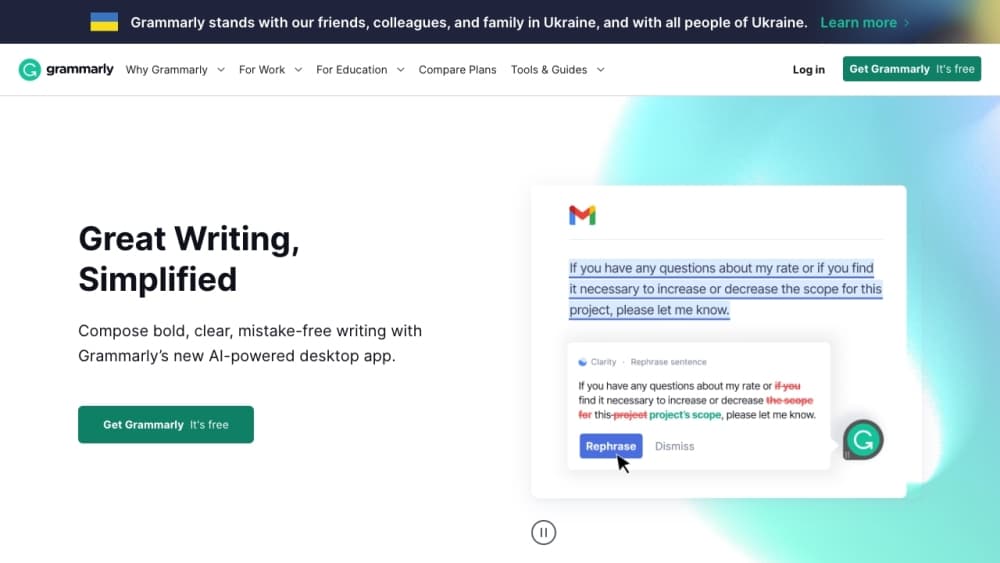
The AI text rewriter cleans up your prose. Click a sentence and Grammarly offers a cleaner version, cut for length, clarity, or formality. This is the feature that separates Pro from the free tier, and it is where the tool saves the most time on bloated drafts.
Plagiarism and AI Detection
The built-in plagiarism checker and AI detector run on paid plans. Grammarly compares your text against a large web and academic database to catch accidental copying, and a separate detector estimates whether a passage was written by AI. Both are useful for students, teachers, and editors who need to verify originality.
Generative AI Prompting
You can ask Grammarly to brainstorm ideas, draft a reply, or summarize a thread using simple prompts. The free plan includes 100 prompts a month, Pro raises that to 2,000 per member, and Enterprise is unlimited.
Works Everywhere You Type
The extension and desktop app live inside more than a million websites and apps, including browsers, email clients, word processors, and messaging tools. That reach is the main reason people stick with it over a standalone web checker.
Pros and cons
Pros
- Real-time suggestions work in the tools you already use, so there is no workflow change.
- Free plan covers grammar, spelling, and tone reading at no cost.
- Tone adjustment and full-sentence rewrites genuinely speed up editing on Pro.
- Plagiarism and AI detection in one place help students and teachers verify originality.
- Strong security posture, with SOC 2 compliance and a pledge not to sell your content.
- Works as a steady AI writing partner across every tool in a team's daily routine.
Cons
- The free plan limits how many suggestions you receive, which frustrates heavy writers.
- Advanced rewriting, plagiarism, and AI detection all sit behind the paid plan.
- Editing support for non-English languages is narrower than for English.
- The tools are handled mostly through a browser extension, which some users find intrusive.
- Tone labels can misread humor or sarcasm and nudge you toward blander wording.
Frequently asked questions
Yes. The free plan checks grammar, spelling, and punctuation and shows your tone at no cost. You only pay when you want unlimited suggestions, full-sentence rewrites, tone adjustment, plagiarism checks, and AI detection.
Related content
Explore related tools, skills, and articles for Grammarly-AI Writing Assistant.
Grammarly-AI Writing Assistant Alternatives
Isgen AI
Isgen · AI DetectionIsgen AI is a web-based AI detector that scores text for machine authorship and shows you which sentences and phrases push the number up. It's built for teachers, editors, students, and writers. Their question is simple: did this draft come from ChatGPT, GPT-5, Claude, Gemini, DeepSeek, or another model? You paste or upload content, run a scan, and get a Human, AI, and Mixed breakdown in seconds. There's also a companion editor that scores text while you write it.
Humanizeai Tools
Humanizeai Tools · Writing · AI DetectionHumanizeai Tools is a web-based AI humanizer that rewrites machine-generated text so it sounds like a person wrote it, which is the whole point of the category it belongs to. Paste a draft from ChatGPT, Claude, or Gemini, run it through the tool, and it swaps out the phrases and sentence patterns that AI detectors flag. If your goal is to make AI text sound human before you publish it, this is the kind of tool built for exactly that. It suits students, bloggers, and marketers who need copy that reads naturally and clears tools like GPTZero, Copyleaks, and Winston AI after a single pass.

Hidemyai
Hidemyai · Writing · AI DetectionHidemyai is an AI content humanizer. It rewrites text from ChatGPT, Jasper, and similar tools so the result reads like a person wrote it. You paste your draft, pick a document type and tone, and the service returns a version meant to bypass AI detectors such as Originality.ai, Turnitin, and ZeroGPT. It targets writers, marketers, and students who lean on AI drafts but can't ship copy that sounds robotic. The promise is simple: make AI content undetectable.