

GrowMatic SEO Chrome Browser Extension
GrowMatic Pte. Ltd. · Coding · Marketing
GrowMatic SEO Chrome Browser Extension is a free Chrome tool that scrapes Google search results and scores the keywords, n-grams, and entities worth putting in your meta titles and descriptions.
About GrowMatic SEO Chrome Browser Extension
What Is GrowMatic SEO Chrome Browser Extension
GrowMatic SEO Chrome Browser Extension is a browser add-on that turns live Google search results into a keyword checklist for a single page. You enter a target keyword and a country, and it pulls the terms Google treats as related, then shows you which of those terms already live in your page's meta title, headings, and copy. It's built for people who write or rewrite pages and want to match what's actually ranking instead of guessing.
The extension runs entirely in the browser and collects no data, so there's nothing to install server-side and no account to create. It supports more than 100 country-specific Google interfaces, which matters if you target markets outside the US and want the keyword mix those searchers actually see.
The catch is scope. This is a research assistant, not an all-in-one SEO suite. It won't audit crawlability, check backlinks, or track rankings over time. Treat the output as raw material for your own judgment, and keep an eye on how often Google changes its result-page markup, since scrapers break when the page layout shifts.
Getting Started
- Open the Chrome Web Store listing and click Add to Chrome, then pin the extension to your toolbar.
- Click the extension icon, type your target keyword, and pick the country whose Google results you want to study.
- Choose how many organic results to scrape (10 to 100+) and, optionally, paste the URL of the page you want to compare against the SERP.
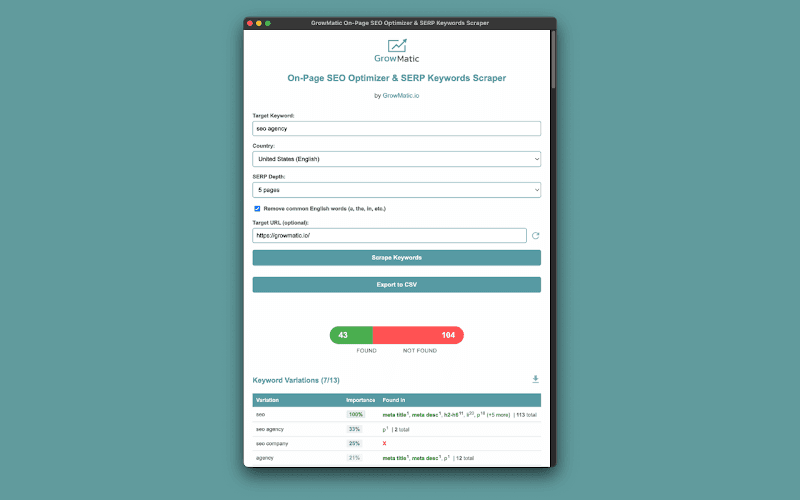
- Read the score panel: check keyword variations, title and description n-grams, related entities, and related searches.
- Export any section to CSV or copy individual terms to fix your meta title, meta description, and headings.
Product Information
A quick look at GrowMatic SEO Chrome Browser Extension's pricing, supported platforms, and performance.
Best for
The users, tasks, and scenarios where this tool fits best.
Users
- SEO professionals
- Content writers and strategists
- Digital marketers and site owners
Tasks
- Rewriting a meta title and description
- Finding content gaps
- Building a keyword variation list
Scenarios
- Getting a single landing page ready before a content push
- Researching a non-US market
- Shipping fast meta edits without a subscription
Key features
SERP Keyword and N-Gram Extraction
The extension works as a SERP keywords scraper and on-page SEO optimizer in one pass. Point it at a keyword and it scrapes the organic results, then runs n-gram analysis to pull out keyword variations Google treats as related plus n-gram phrases lifted from competitors' meta titles and descriptions. Each phrase gets an importance score so you can tell the load-bearing terms from the noise. This is the core of the tool, and it's what separates it from a static keyword list.
On-Page Match Scoring
The top bar scores how many of the discovered terms already appear in the URL you're analyzing, and the "Found in" column shows exactly which HTML element hit each one. Think of it as an on-page SEO optimizer that scores coverage rather than guessing. Bold markers flag the high-value spots like meta title, meta description, and H1 through H6 headings. It answers one question fast: is this page covering the terms that matter for its target keyword?
Content Gap Analysis
Because the tool compares your page against the terms the SERP rewards, the terms it marks "not found" double as a to-do list. You see which related entities and phrases your competitors rank with but your page ignores, which is often where the ranking gap hides.
AI Meta Title and Description Prompts
For any title or description you're working on, you can copy a ready-made prompt shaped around your SERP analysis and drop it into your own LLM. These SEO keyword suggestions are prompts, not finished tags, so you keep the final say. It doesn't call an AI service itself, so there's no API key or account to manage, and you stay in control of the final wording.
Related Entities and Searches
Beyond exact keywords, the extension surfaces the people, places, brands, and concepts Google associates with your term, along with related search intents. Use the entities to enrich a page, or split a distinct topic into its own interlinked page.
Country-Specific SERP Analysis
You can target over 100 country-specific Google interfaces, organized alphabetically, with analysis tuned to each language. For anyone working outside the US, this is the difference between a keyword list built for your audience and one built for someone else's.
CSV Export and Session Recovery
Every section exports to CSV for content briefs or competitor analysis, and individual rows copy to your clipboard with one click. Automatic CAPTCHA detection and progress saving mean a long scrape won't force you to start over when Google throws up a check.
Pros and cons
Pros
- Free to use, with no account, API key, or subscription needed.
- Runs fully in the browser and collects no data, so your research stays local.
- Scores keyword importance and pins each term to a specific HTML element, which speeds up meta edits.
- Covers 100+ country-specific Google SERPs for market-specific keyword research.
- One-click CSV export and clipboard copy fit cleanly into an existing content workflow.
Cons
- It's a single-page research tool, so there's no site-wide audit, backlink analysis, or rank tracking.
- Scraping depends on Google's result-page markup, which means selector changes can break extraction until an update ships.
- The AI suggestions are copyable prompts for your own LLM, not generated output, so you still do the writing.
- Heavier scrapes can trip CAPTCHA checks, which adds friction to large jobs.
Frequently asked questions
It scrapes Google search results for a target keyword and reports the keyword variations, n-grams, entities, and related searches worth using in your page's meta tags and content. It then scores how many of those terms already appear in a URL you're analyzing.
Related content
Explore related tools, skills, and articles for GrowMatic SEO Chrome Browser Extension.
GrowMatic SEO Chrome Browser Extension Alternatives

Base Code
Base44 (Wix) · Coding · ProductivityBase Code is a shared cloud development environment from Base44. Teammates describe changes to an existing GitHub codebase in chat, preview them live and send them back as pull requests.

Google EmbeddingGemma 2
Google DeepMind · Writing · Image · CodingGoogle EmbeddingGemma 2 is a 740M-parameter open model that turns text, code, images, audio, and video frames into vectors in one 768-dimension space, running on phones and laptops.

GitGlow
GitGlow · Coding · ProductivityGitGlow is a local-first desktop Git client that lets independent developers review their own code and their AI agents' changes in one place before shipping.