

Gsong AI
Gsong.ai · Other
Gsong AI is a browser-based AI song generator that turns a written prompt into a finished track with vocals, melody, and instrumental backing. You type a description or paste your own lyrics, pick a style, and the platform builds a song you can download, remix, or turn into a lyric video. It sits in the same space as Suno and Udio. But the free tier and the annual-only access to its newest model, which is the only way you get the flagship engine, set it apart from the rest.
About Gsong AI
What Is Gsong AI
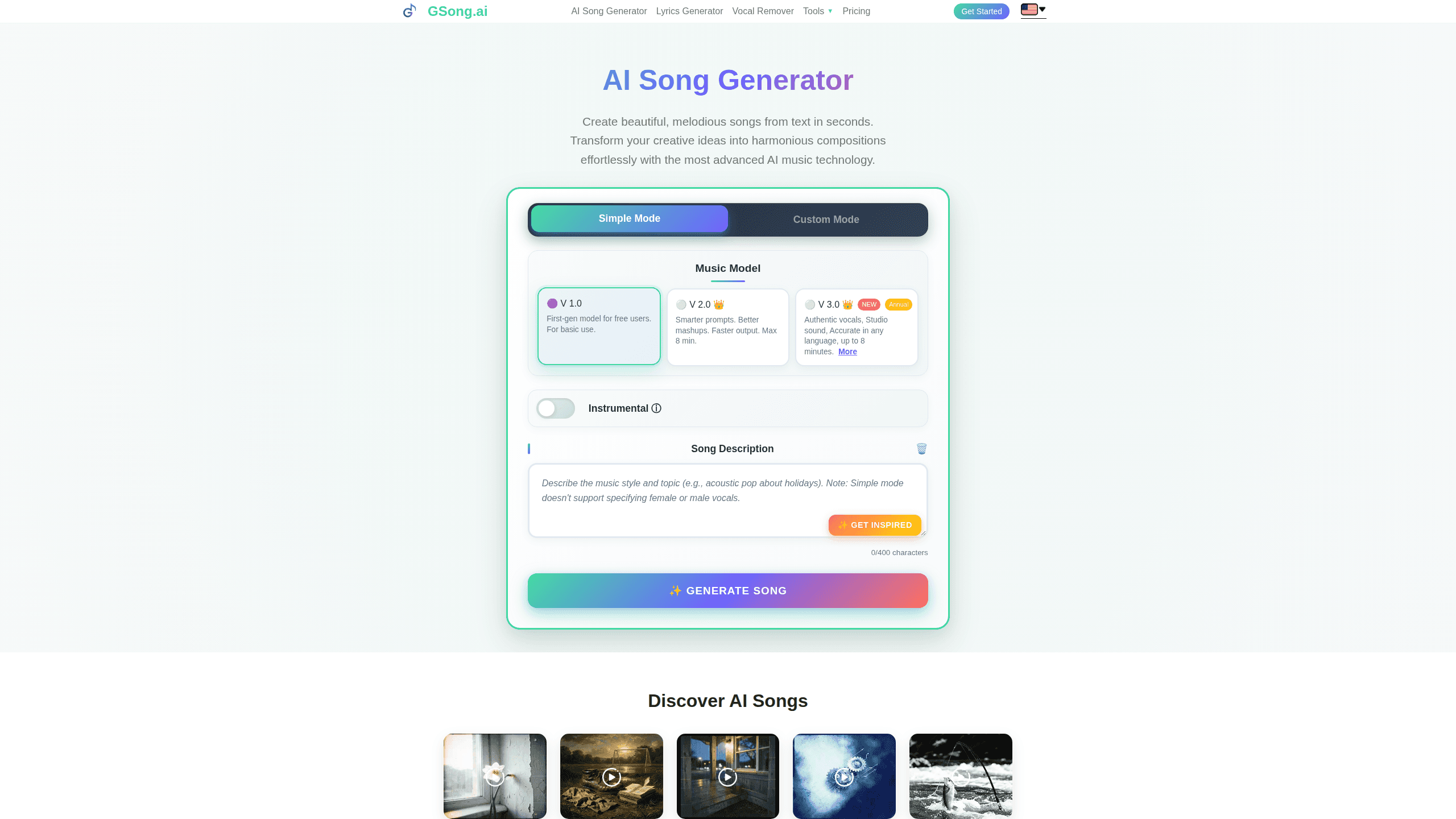
Gsong AI is an online music creation platform. You describe the song you want in plain text, and its AI models handle composition, arrangement, and vocals. The tool covers the messy parts of songwriting that stop most beginners cold: melody, chords, structure, and recording, all of which normally demand years of practice before anything sounds listenable.
The pitch is speed and simplicity. A prompt like "chill lo-fi night" becomes a full arrangement, and you never touch a digital audio workstation, which means you can go from a vague idea to something playable in the time it takes to make coffee. There are three model versions, and the best one (3.0) is locked behind an annual subscription. That's the trade-off worth knowing before you sign up.
The limits matter too. The free plan gives you one credit a day and access to the oldest model only. That's tight. So output quality on free sits well below what the paid tiers produce. Can you still make a decent track? Sometimes. It depends on how much patience you have for retries.
Getting Started
Gsong AI runs entirely in your browser, so there's nothing to install. No downloads. No setup.
- Open gsong.ai and create a free account with an email address.
- Choose a music model (V1.0 is free, V2.0 and V3.0 need a paid plan).
- Write a song description, or switch on Instrumental to skip lyrics entirely.
- Add a style of music and an optional title, then hit generate.
- Preview the result, then download it as MP3 or WAV, or export it further.
Product Information
A quick look at Gsong AI's pricing, supported platforms, and performance.
Best for
The users, tasks, and scenarios where this tool fits best.
Users
- Beginners with no music theory
- Content creators
- Songwriters stuck on a melody
Tasks
- Writing lyrics
- Generating songs from text
- Making a lyric video
Scenarios
- A birthday song for a friend
- Background music for a video edit
- Practicing a foreign language
Key features
Text to music generation
Type a few words or a full paragraph, pick a style, and this text to music engine builds a complete song. The more detail you give, the closer the result lands to what you had in mind. Styles range across pop, rock, jazz, EDM, blues, metal, rap, and instrumental. Plenty of room to experiment without leaving the page.
Three model versions
Gsong AI ships three engines with clear trade-offs. V1.0 is the free entry point for basic use. V2.0 adds smarter prompts and handles mashups up to eight minutes. V3.0 is the current flagship, with authentic vocals, studio-grade sound, and up to eight minutes of output. Only annual subscribers get V3.0, which is the single biggest reason to pay yearly rather than monthly.
AI lyrics generator
If you don't have words yet, the lyrics tool drafts them for you from a theme, mood, or story. It's the fastest way to break writer's block. On the free plan you still get ten lyric generations a day.
Song editing and stem tools
A finished generation isn't a dead end. You can extend a track, remove vocals with fast or HD separation, export audio to MIDI, and swap in a custom cover image, which turns a one-shot generator into something closer to a light production suite for anyone who wants to keep working on a track after the first take.
Lyric video creation
On paid plans, Gsong AI converts a song into an MP4 lyric video with time-synced captions. That saves a separate editing step for anyone publishing to short-video platforms.
Download and export options
You can pull your work out in several formats. Monthly plans include MP3 downloads, while annual plans add unlimited WAV downloads and a commercial license for every track you generate, which is the part that matters most if you plan to sell or monetize anything you make. Time-synced lyrics export as text files alongside the audio.
Pros and cons
Pros
- Works fully in a browser with no install and a short learning curve.
- Free tier is genuinely usable for testing ideas, with one credit and a couple of songs a day.
- V3.0 handles multiple languages and reaches up to eight minutes per track.
- Extra tools like stem separation, MIDI export, and lyric videos add real value beyond generation.
- Annual plans grant commercial rights, which matters if you publish monetized content.
Cons
- The best model, V3.0, is annual-only, so monthly subscribers can't reach top quality.
- Monthly plans limit downloads to MP3 and skip the commercial license, which rules them out for many creators.
- Unused monthly credits don't roll over, so a quiet month means wasted spend.
- The free plan's single daily generation caps how much you can realistically test.
Frequently asked questions
It generates songs and lyrics from text. You can generate songs from text alone, with no instruments and no music theory. That's the whole point. You describe the music you want, and the platform produces a full track with vocals and instrumentals, then lets you download or edit it.
Related content
Explore related tools, skills, and articles for Gsong AI.
Gsong AI Alternatives

Odyssey 3
Odyssey · OtherOdyssey-3 is Odyssey's foundation world model. It simulates physics in real time, turns a prompt into an interactive environment, and adapts to robots, cars and games.

JarvisCore
Prescott Data · Coding · Productivity · OtherJarvisCore is an open source Python runtime where AI agents work as equal peers on an agent mesh, claim tasks from a shared ledger, and reach external services through a zero-trust broker.
Clef
Cloudflare · Business · OtherClef is Cloudflare's open-source decision model for Workers AI. It returns calibrated probabilities for typed questions, not generated text, so agents can classify, route, and act fast.