

HanaVerse
Ashish Patnaik · Other · Chatbot
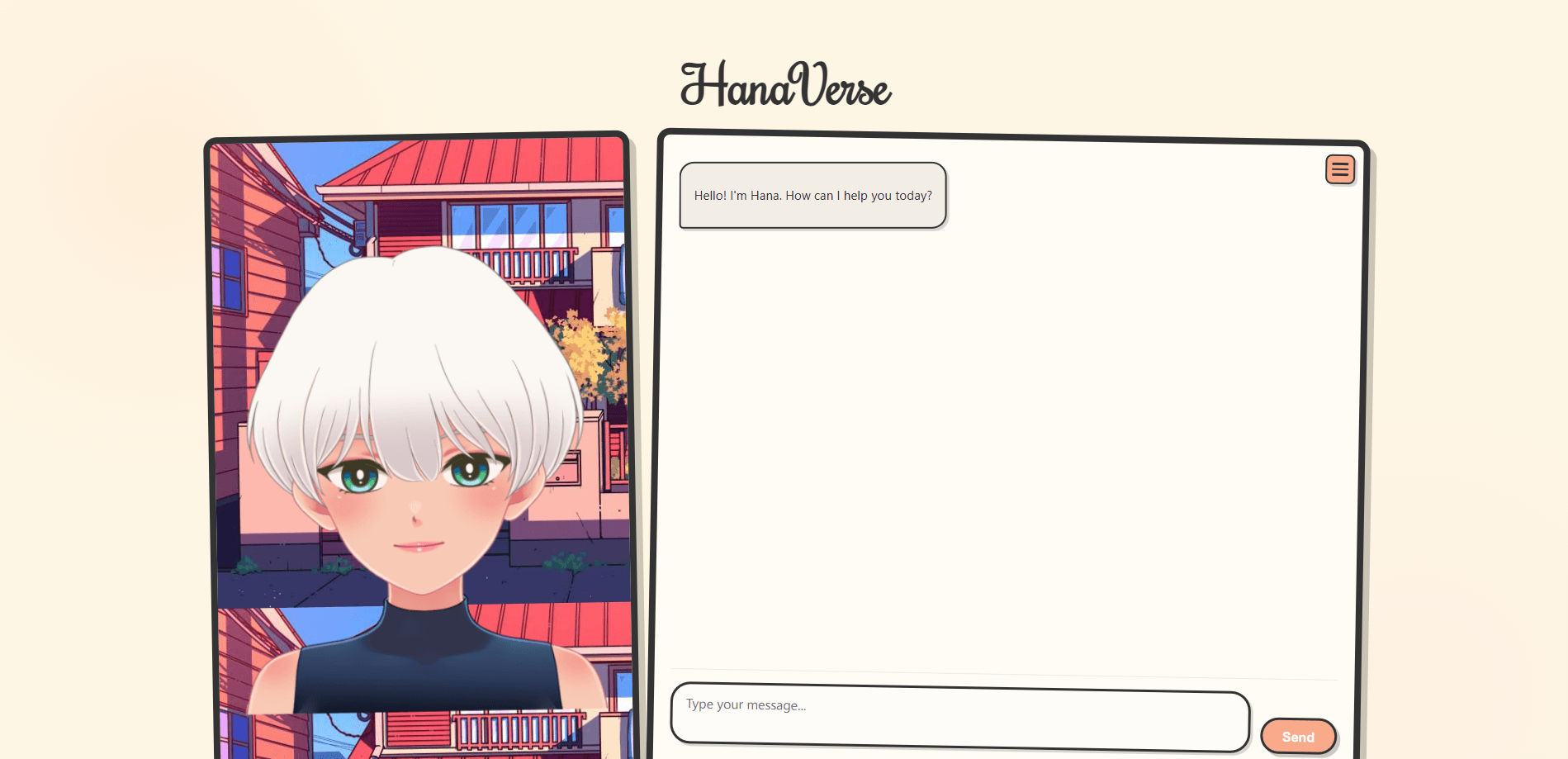
HanaVerse is a free, open-source web interface for chatting with Ollama models, pairing local AI replies with Hana, an animated 2D character that moves as you type.
About HanaVerse
What Is HanaVerse
HanaVerse is a browser interface for Ollama, the tool that runs large language models on your own machine. It puts a friendly chat window in front of those models and adds Hana, a 2D anime character built with Live2D who reacts to what you type. The project is public on GitHub under the name Ashish-Patnaik/HanaVerse and pairs a Flask server with a static web front end.
The problem it solves is presentation. Raw Ollama works from a terminal, where you talk to a model through commands and plain text. HanaVerse wraps that same engine in a familiar chat layout, complete with streaming responses, Markdown formatting and math rendering, so the local setup feels closer to a commercial assistant.
Three limits matter before you start. It's a self-hosted project, so you run the Flask server and point it at an Ollama instance that's already installed. The Live2D character needs a Cubism 4 model that supports motionsync3, and you supply the model files yourself. The license also blocks commercial use, so it's meant for personal or educational setups.
Getting Started
- Install Python 3.8 or newer and Ollama on the machine that'll host it, and confirm Ollama is running.
- Clone the HanaVerse repository from GitHub and install the Python dependencies listed in requirements.txt.
- Start the Flask server with python server.py, which listens on port 5000 by default.
- Open index.html in your browser and enter your Ollama server URL and model name in the settings menu.
- Type a message to start chatting, and set a system prompt if you want replies shaped for a specific task.
Product Information
A quick look at HanaVerse's pricing, supported platforms, and performance.
Best for
The users, tasks, and scenarios where this tool fits best.
Users
- Ollama users who want a visual front end
- Live2D and virtual character fans
- Developers testing local models
- Students and hobbyists learning about local AI
- Writers who want math and code rendered cleanly
Tasks
- Chatting with a local model
- Testing different Ollama models
- Shaping responses with a system prompt
- Studying math or code
Scenarios
- Running a private chat setup at home
- Trying a character-driven assistant
- Demoing local AI to others
Key features
Live2D character that reacts to chat
Hana is the hook. She's a 2D character rendered with the Live2D Cubism SDK and the pixi-live2d-display library, and she responds with motion as you interact. That turns a plain chat box into something closer to a virtual companion. The catch is the model requirement: you need a Cubism 4 model that supports motionsync3, and you drop the files into the models directory yourself.
Streaming chat with any Ollama model
The interface connects to your Ollama server and streams responses as they generate. You set the server URL and the model name in the settings menu, so any model you've pulled, from llama3:8b to codellama:7b, works in the same window. A stop button appears while a reply is generating, so you can halt a long answer without reloading.
Markdown and LaTeX rendering
Replies come back formatted rather than as raw text. Prism handles syntax highlighting for code blocks, and KaTeX renders mathematical equations, so a model's working shows up the way it would in a prepared document. That matters most when you're using the tool to study or to draft anything technical.
Custom system prompts
A system prompt field lets you steer the model's behavior before a conversation starts. The project suggests roles like a math helper that shows step-by-step solutions, a coding assistant that adds explanations, or a recipe generator that formats lists. You set the prompt once, and it shapes every reply that follows.
Browser-based settings, no config files
Server URL, model name and system prompt all live in a settings panel you open from the hamburger menu in the chat window. There's no config file to edit for day-to-day use and no dashboard to learn. You change a few fields, press set, and the session updates.
Free and open source
HanaVerse is published on GitHub with a custom non-commercial license, so personal and educational use is free and the source is there to read or fork. There's no paid tier, no account and no usage cap. The trade-off is that you host and maintain it, and commercial use isn't allowed as things stand.
Pros and cons
Pros
- Free to run with no account, subscription or usage cap, since it's an open-source project you host yourself.
- Works with any model you've pulled into Ollama, so you're not locked to one vendor or one engine.
- Markdown, code highlighting and KaTeX math make technical replies easy to read.
- The Live2D character adds a layer of personality that a plain chat window doesn't have.
Cons
- Setup is manual, since you clone the repo, install dependencies, run a Flask server and already have Ollama working.
- The character needs a compatible Cubism 4 model that supports motionsync3, which you have to source and add yourself.
- The license bars commercial use, so businesses can't ship it as part of a product.
- It's a personal project with a small user base, so support and updates depend on the maintainer's spare time.
Frequently asked questions
HanaVerse is used as a web front end for Ollama, the tool that runs language models on your own computer. It gives those models a chat window with streaming text, Markdown and math rendering, and adds a reacting anime character named Hana. You run it yourself and point it at your local Ollama server.
Related content
Explore related tools, skills, and articles for HanaVerse.
HanaVerse Alternatives

Odyssey 3
Odyssey · OtherOdyssey-3 is Odyssey's foundation world model. It simulates physics in real time, turns a prompt into an interactive environment, and adapts to robots, cars and games.

JarvisCore
Prescott Data · Coding · Productivity · OtherJarvisCore is an open source Python runtime where AI agents work as equal peers on an agent mesh, claim tasks from a shared ledger, and reach external services through a zero-trust broker.
Clef
Cloudflare · Business · OtherClef is Cloudflare's open-source decision model for Workers AI. It returns calibrated probabilities for typed questions, not generated text, so agents can classify, route, and act fast.