
Handfonted
HandFonted · Writing
HandFonted is a free online tool that turns a single photo of your handwriting into a real TrueType (.ttf) font using AI and computer vision. As an AI font generator, it needs no signup.
About Handfonted
What Is HandFonted
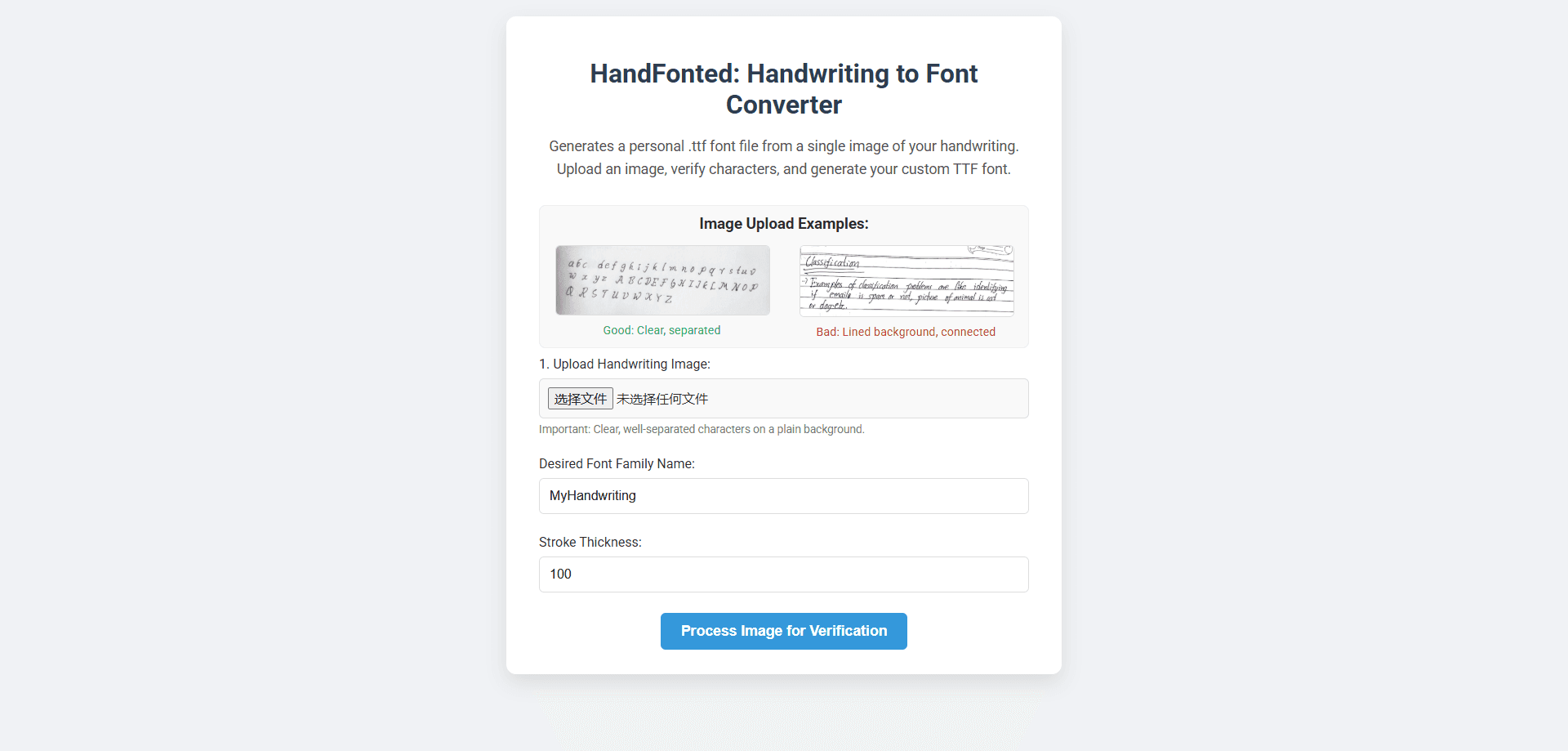
HandFonted is a browser-based tool for turning your handwriting into a font you can actually install and type with. You photograph a sheet of handwritten letters, upload it, and the site's neural network cuts out each character, figures out which letter it is, and rebuilds every stroke as a clean vector glyph. The result is a standard TrueType (.ttf) file, not a decorative image, which is what makes it a real handwriting font maker rather than a text effect.
The appeal is practical. Instead of hunting for a handwriting font that looks sort of like yours, you get a custom font from handwriting that is genuinely yours, often in under a minute and without paying anything. It suits designers, small-shop sellers, teachers, and anyone who wants a personal touch in digital work.
The catch is in the input. HandFonted only works as well as the photo you give it. Clear, well-separated characters on a plain white background convert well, but a lined page, connected cursive, or a blurry picture will trip up the character detection. It also generates a text font, so it is built for letters and numbers, not full illustration or logo work.
Getting Started
- Open handfonted.xyz in any modern browser and scroll to the font generator. No account or signup is required.
- Upload a clear photo of your handwriting, written as separate characters on a plain background, and give the font family a name.
- Adjust the stroke thickness, then let the tool process the image so it can detect your characters.
- Check the detected characters, relabel or remove anything it got wrong, and confirm the set.
- Preview your font by typing sample text, then download the .ttf file and install it on your computer.
Product Information
A quick look at Handfonted's pricing, supported platforms, and performance.
Best for
The users, tasks, and scenarios where this tool fits best.
Users
- Independent designers
- Small online sellers
- Teachers and tutors
- Hobby letterers
Tasks
- Making a personal signature font
- Building branding assets
- Creating social media graphics
- Crafting invitations and cards
Scenarios
- A quick weekend project
- Testing a handwriting-to-font workflow
- Class or workshop demos
Key features
Single-Photo Font Capture
HandFonted builds a whole font from one image. You write your characters on plain paper, snap a photo, and upload it. The tool does not ask for a multi-page worksheet or a template download, which keeps the setup short. If you want to create a font from a photo, one good image is the whole entry point.
AI Character Segmentation and Recognition
A multi-stage pipeline does the heavy lifting. It first segments each character out of your image, then classifies it to work out whether it is an A, a B, or a number, and finally rebuilds the pixel shapes as smooth vector outlines. The recognition step is what makes the output a real font instead of a traced picture.
Vector Glyph Generation
Each detected character is converted into clean vector outlines before the font is compiled. Working much like a TTF font converter, that step is why the finished .ttf stays sharp at any size, from a small caption to a poster headline. You also get a stroke thickness control, so you can nudge the weight of the whole font before you generate the file.
Character Verification Step
Before the font is built, HandFonted shows you the characters it detected so you can check them. You can relabel a character that was misread or drop one that does not belong. This review pass is the difference between a rough first attempt and a usable font.
Instant Browser Preview and Download
You type sample text and see your handwriting render live, so you can judge the result before saving it. When it looks right, you download the .ttf file directly. There is no export queue and nothing to install to try the tool.
Privacy-First Processing
Uploaded images are processed in real time and deleted from the server once the font is generated. The site states it does not store, view, or share your images or the fonts you make. For people wary of handing over personal handwriting, that policy matters.
Pros and cons
Pros
- Free to use, with no signup and no software to install.
- Produces a standard .ttf file that installs on Windows, macOS, and Linux.
- Works from a single photo instead of a full character worksheet.
- The verification step lets you fix misread characters before generating.
- Uploaded images are deleted after processing, and nothing is stored.
Cons
- Quality depends on your photo, so lined paper, connected cursive, or blurry shots hurt the result.
- It builds text fonts only. There is no symbol or logo art support.
- No public API, so it cannot be wired into an automated pipeline.
- There is no account system, which means no saved font library to return to.
Frequently asked questions
HandFonted turns a photo of your handwriting into a custom TrueType (.ttf) font. You can then install that font and type with it in any app that supports custom fonts.
Related content
Explore related tools, skills, and articles for Handfonted.
Handfonted Alternatives

Claude for Google Workspace
Anthropic · Writing · Productivity · BusinessClaude for Google Workspace puts Claude in a sidebar inside Google Docs, Sheets, and Slides, where it reads the file you have open and edits it in place.

Claude Haiku 5.5
Anthropic · Writing · Coding · ChatbotClaude Haiku 5.5 is Anthropic's fastest and cheapest small model, built for high volume tasks at $0.10 per million input tokens with a 1M token context window.

NoteWorthy
Suman Hansada · Writing · Productivity · AI AssistantNoteWorthy is a notes app for iPhone, iPad and Mac that writes titles, tidies formatting, summarizes long notes and files each one with on-device AI. No account, no upload, no network requests.