

Harness Manager
Juan Sebastian Solano · Coding · Productivity
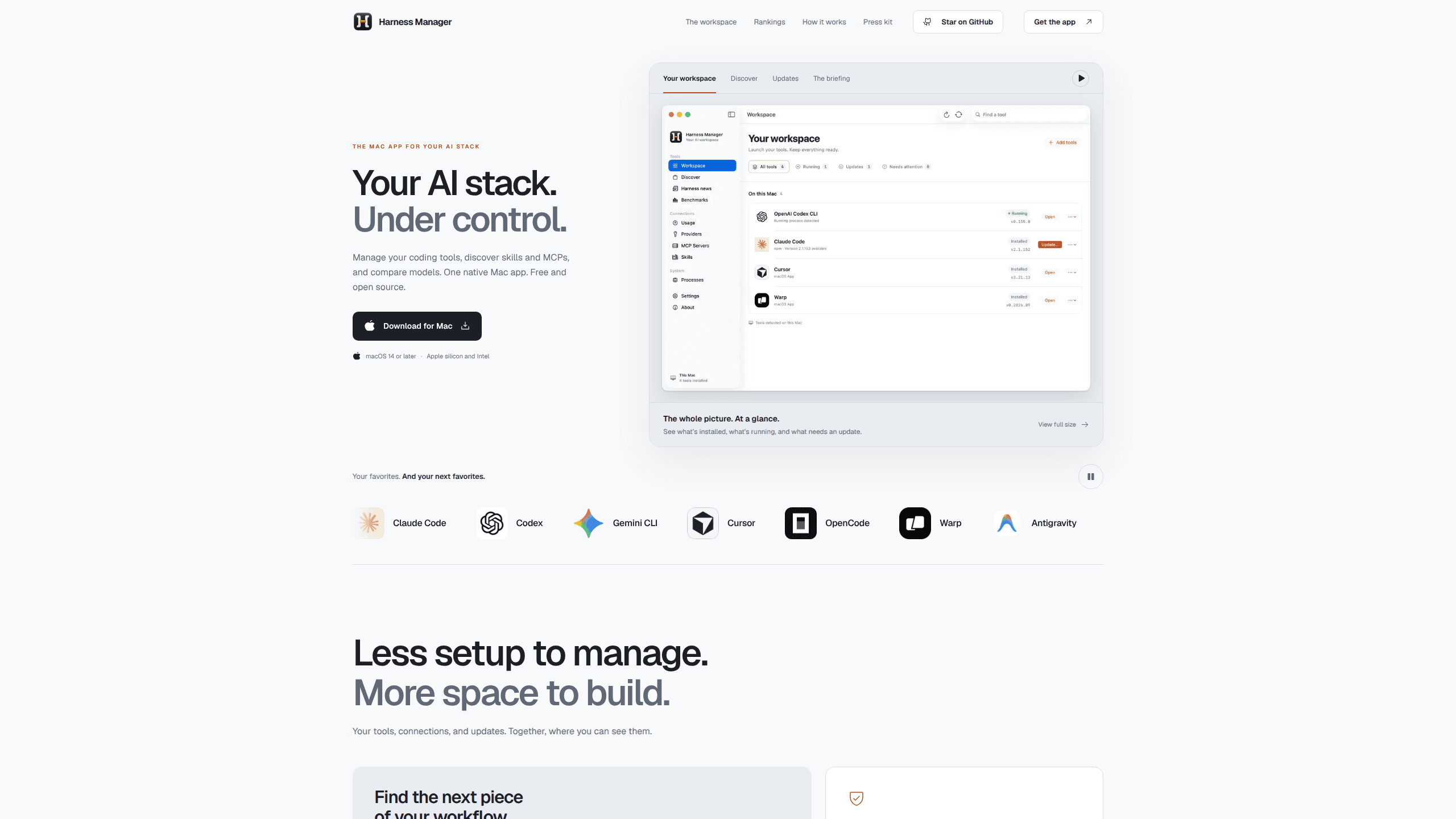
Harness Manager is a free, open source Mac app that shows every AI coding tool on your machine, reviews updates before they run, and puts model comparisons beside your setup.
About Harness Manager
What Is Harness Manager
Harness Manager is a desktop app for macOS that keeps track of the AI coding tools you build with. A harness, in this context, is the program that wraps a model and turns it into a working coding agent: Claude Code, Codex, Gemini CLI, Cursor, and a growing list of others. Most developers now run three or four of them at once, each with its own config files, MCP servers, skills, and update path.
That spread is the problem the app targets. Version numbers live in different places, an MCP server gets added to one tool and forgotten in another, and a tool you installed last month may be several releases behind. Harness Manager puts the whole AI coding stack on one screen so you can see what's installed, what's running, and what's waiting for an update.
It does not replace those tools or write code for you. It's a control surface that reads what's already on disk and links back to the original sources for anything it recommends. The current build is an early preview: it's free, licensed under Apache 2.0, and macOS may ask you to approve it in Privacy & Security on first launch because it isn't notarized yet.
Getting Started
- Download the DMG from the GitHub releases page and drag Harness Manager into Applications. The app needs macOS 14 or later and runs on Apple silicon and Intel Macs.
- Open the app and let it scan. It looks for supported tools and configuration already on your disk, then groups them into one workspace.
- Check the update list. Each entry shows the installed version and the command that would run, so you can review the change before approving it.
- Look through providers, MCP servers, skills, and running processes to see which tool owns which connection.
- Open the rankings tab when you're picking a model, or the briefing tab when you want to know what shipped this week.
Product Information
A quick look at Harness Manager's pricing, supported platforms, and performance.
Best for
The users, tasks, and scenarios where this tool fits best.
Users
- Developers who run several coding agents at once
- Teams standardizing on Claude Code or Codex
- Anyone testing models before switching
Tasks
- Auditing an AI coding stack
- Reviewing updates before they run
- Picking a model for a specific job
Scenarios
- Setting up a new Mac
- A coding agent starts behaving oddly after an update
- A skill or MCP server gets popular and you want to try it
Key features
One Catalog for Harnesses, MCP Servers, and Skills
The app browses coding harnesses, meta-harnesses, MCP servers, and skills in a single catalog sorted by popularity. You can start from Claude Code and Codex and work outward to tools you haven't tried, with each entry linking to its own project. It's a faster way to find the next piece of a workflow than scrolling through social feeds.
Update Review With the Exact Command
Updates are listed with the installed version, the available version, and the command that would run. Nothing executes until you confirm. That read-before-run pattern matters with package managers, where a single update can pull in dependencies you didn't plan for.
Setup Inspection Across Tools
A setup view lists provider configuration, MCP servers, skills, and running processes next to the tools that use them. When two harnesses share a provider key or an MCP server is registered in one tool but missing from another, the mismatch shows up here instead of in a stack trace later.
Model Comparison Inside the App
Rankings cover 31 collections and 7 comparison metrics, from coding and agentic performance to speed, latency, context length, and price. There are collections for design, UI components, full-stack apps, tool calling, and long-context reasoning. Data comes from Modelgrep and is cached locally, so the comparison works without keeping a browser tab open.
The Harness Briefing
A news feed gathers publisher announcements, community finds, and official releases from sources such as OpenAI, Google Developers, Simon Willison, Hacker News, and project release feeds. Every story links back to where it came from, and full articles open inside the app.
Local-Only by Design
Harness Manager reads tools and configuration on your Mac. It doesn't upload provider credentials, and it doesn't turn the machine into a remote control panel. Install and update commands appear before they run and wait for your confirmation. The source is public under Apache 2.0, so the claim is checkable.
Pros and cons
Pros
- Free and open source under Apache 2.0, with no account, subscription, or usage cap.
- Updates show the exact command first, which is more useful than a badge that only says an update exists.
- The setup view connects providers, MCP servers, skills, and processes to the tools that use them, so configuration drift becomes visible.
- Model comparison sits in the same window as your tools, which cuts the tab switching that usually precedes a model swap.
- Native SwiftUI build for macOS instead of an Electron wrapper, with a DMG you can drag into Applications.
Cons
- macOS 14 or later only. Windows and Linux users have no version to install.
- The build is an early preview and isn't notarized, so Gatekeeper blocks the first launch until you approve it in System Settings.
- Catalog coverage depends on what the project has indexed, so a niche harness or an internal MCP server may not appear.
- State stays on one machine, so a team gets no shared inventory of who runs which tool.
Frequently asked questions
Harness Manager is a free Mac app that lists the AI coding tools installed on your computer, along with their versions, configuration, MCP servers, and skills. It also handles update review and model comparison in the same window.
Related content
Explore related tools, skills, and articles for Harness Manager.
Harness Manager Alternatives

Base Code
Base44 (Wix) · Coding · ProductivityBase Code is a shared cloud development environment from Base44. Teammates describe changes to an existing GitHub codebase in chat, preview them live and send them back as pull requests.

Google EmbeddingGemma 2
Google DeepMind · Writing · Image · CodingGoogle EmbeddingGemma 2 is a 740M-parameter open model that turns text, code, images, audio, and video frames into vectors in one 768-dimension space, running on phones and laptops.

GitGlow
GitGlow · Coding · ProductivityGitGlow is a local-first desktop Git client that lets independent developers review their own code and their AI agents' changes in one place before shipping.