

hob
hob · Coding · Productivity · Business
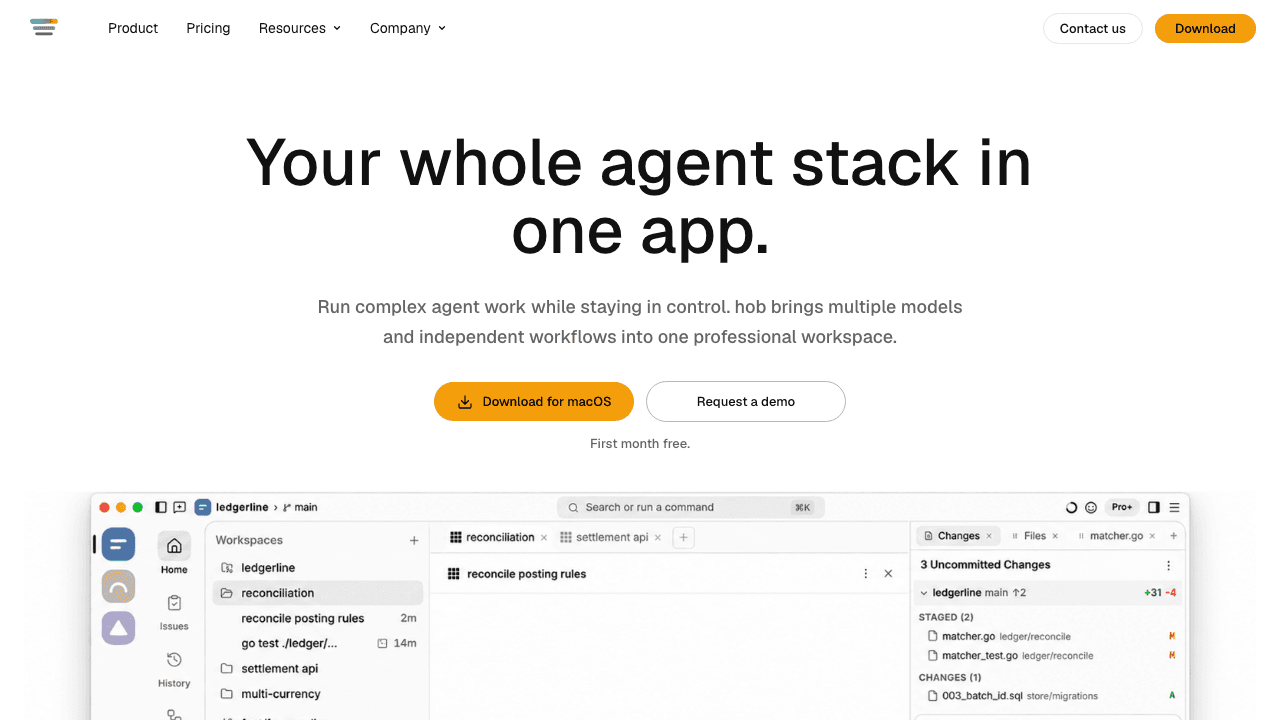
hob is a professional AI agent workspace that brings multiple AI coding agents and independent workflows into one desktop app. Instead of juggling separate terminal windows, you run Claude Code, Codex, and OpenCode side by side, route work between them, and keep every session right where you left it. The agent stack stays in one place. It targets developers and small teams who already lean on agentic coding tools.
About hob
What Is hob
hob is a desktop application for people who run AI coding agents as part of their daily work. It puts several agent backends into a single interface, so a task that needs Claude Code for one part and Codex for another doesn't force you into three terminals and a mess of lost context.
The core idea is that agents are treated as users of the workspace. They can open files, surface diffs, hand work to each other, and walk you through the app, rather than only editing code behind your back. A durable local history means the conversation outlives the session, so you can shut the laptop and resume later.
The biggest limitation is scope. hob is a workspace layer, not a model. You still bring your own inference and pay for it separately, and it runs on desktop only (macOS, Windows, Linux). No pure browser-only or mobile-first version exists. Team billing and admin controls are still in development, which matters if you're rolling it out across a large org today.
Getting Started
- Download the desktop app for macOS, Windows, or Linux, or install it on a VM or headless server for remote work.
- Start your first month free and activate your license.
- Connect the agent backends you already use, such as Claude Code, Codex, or OpenCode.
- Open a workspace, give an agent a task, and split the work across parallel panes or terminals.
- Review the diff and hand off follow-up work, then resume any conversation later from the local history.
Product Information
A quick look at hob's pricing, supported platforms, and performance.
Best for
The users, tasks, and scenarios where this tool fits best.
Users
- Individual developers
- Small engineering teams
- Blockchain and security researchers
Tasks
- Parallel code edits
- Pull request review
- Issue triage
- Recurring automation
Scenarios
- Picking up whatever shipped this week
- Stepping away mid-task
- Working against remote infrastructure
Key features
Multi-agent workspaces
hob runs Claude Code, Codex, and OpenCode in the same app, each in its own pane or terminal. You can split a job across agents and let them hand work to each other instead of copying output between windows. For anyone used to running six agent instances in a terminal, this replaces the tab-hunting with a single view. It's an agent workspace for developers who are tired of losing context.
Agent control surface
Every agent can operate hob itself, not just edit your files. It opens the files and diffs you need, routes tasks to another agent, and can walk you through the app on request. That turns the workspace into something agents act inside, rather than a passive editor they write to. Big difference.
Encrypted remote access
The full workspace runs in a browser, with a phone companion for on-the-go checks, and it drives your real session rather than a copy. Access goes through an encrypted relay with no public ports exposed. No public ports. Remote access sits in the Pro+ tier and above, so it isn't part of the entry plan.
Worktrees for parallel work
When two tasks shouldn't touch the same files, hob gives agents separate worktrees so your main tree stays clean. You keep the branch when the work lands and throw the worktree away when it doesn't. It just works. This is the feature that makes genuinely parallel agent work practical rather than risky.
Automations
You can automate recurring work, such as reviewing incoming user feedback, with every run following the same steps. Secrets stay inside hob, so no agent or model provider sees them. Automations can auto-start tasks that should keep running without you nudging them. That's a relief.
Pull requests and remote issues
Pull requests and issues live in the app alongside the code. Open, comment on, and close PRs from a command or by hand, and manage GitHub, Gitea, and Forgejo issues without a separate browser tab. Issues made by an agent link back to their chat, which keeps the paper trail intact.
Pros and cons
Pros
- Runs multiple agent backends in one place, so you stop juggling terminal windows.
- Durable local history lets you resume any conversation after closing the app.
- Secrets stay inside the workspace, which keeps them away from agents and providers.
- Worktrees let agents edit in parallel without stepping on your main branch.
- Works on macOS, Windows, and Linux, and runs headless on remote machines.
Cons
- It's a workspace, not a model, so you still pay separately for your own inference.
- Remote access is locked to the Pro+ tier and above, not the entry plan.
- Team billing and admin controls are still in development, which limits large rollouts.
- No browser-only or mobile-first edition for teams that don't want a desktop install.
Frequently asked questions
hob is a desktop workspace for running AI coding agents. It puts tools like Claude Code, Codex, and OpenCode into one app so you can run, review, and automate agent work without switching between terminals.
Related content
Explore related tools, skills, and articles for hob.
hob Alternatives
Forefront
Forefront · CodingForefront is a web platform for building with open-source AI. It lets you fine-tune leading open-source language models on your own data, evaluate how they perform, and run them through an API or export them to host yourself. Developers who want the convenience of a closed-source platform but insist on owning their models and data are the target audience here.

Startkit
StartKit.AI · CodingStartkit is a boilerplate for building AI SaaS and AI wrapper products. Think of it as an AI startup boilerplate with the boring parts already wired up: authentication, Stripe and Lemon Squeezy payments, usage limits, transactional email, and an AI API starter that talks to OpenAI, Anthropic, Groq, or Llama. You clone the repo, set your price, and start on the part of your product that people actually pay for. It's Next.js under React and Tailwind, so most of the boilerplate code already feels familiar.
Testim
Tricentis · CodingTestim is an AI-powered test automation platform for building and running end-to-end tests across web, mobile, and Salesforce applications. It leans on machine learning to keep tests stable when an interface changes, so teams spend less time fixing broken selectors. Not bad for an automated testing tool you can start using today. You create tests by recording actions in a browser, then optionally add JavaScript when you need more control. It's a solid pick for busy QA teams.