

Hooper
Built Different AI Inc. · Marketing · AI Assistant
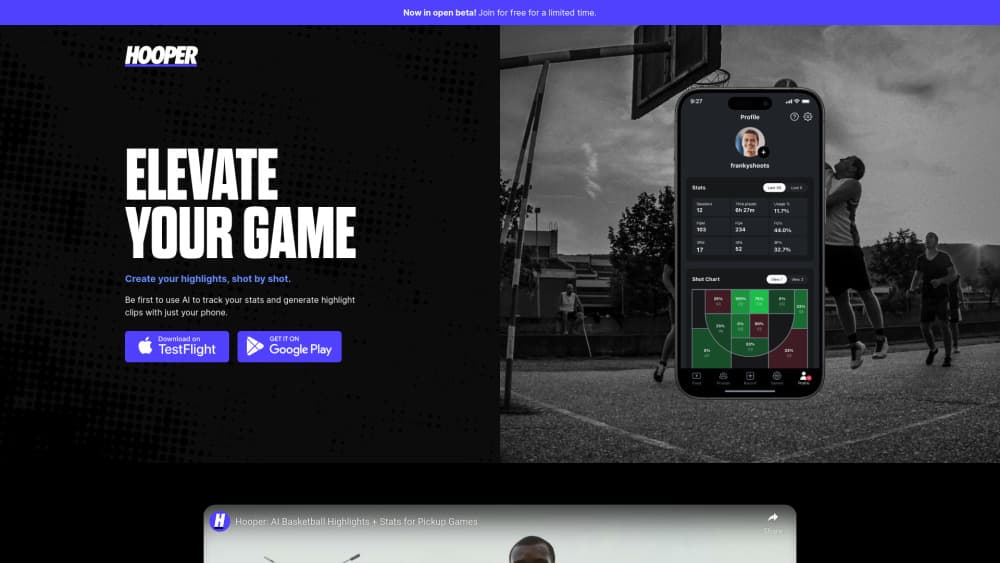
Hooper is an AI basketball app that turns one phone recording into per player stats, shot charts, and auto edited highlight mixtapes.
About Hooper
What Is Hooper
Hooper is a basketball film app from Built Different AI Inc. that reads game video shot on a phone and produces the kind of box score and film clips a college program pays a staff to assemble. You set the phone up, record or upload the game, and the app works out who shot, who made it, and which plays deserve a clip.
The gap it fills is practical. Pickup runs, AAU games, and rec leagues rarely get filmed properly, and the person holding the phone ends up scrubbing through two hours of footage to find six good plays. Hooper cuts that to about fifteen minutes of real action and labels each play by player, so a group chat gets clips instead of a link to a raw file.
The limits matter as much as the features. Tracking depends on camera placement, and Hooper puts its own accuracy at 92% with the recommended setup. A full court game needs two phones, one per half, linked into a single session. Ground mode works but drops the basketball shot chart and the two versus three point split. Uploads run over WiFi, so a slow connection means waiting.
Getting Started
- Install Hooper on iOS or Android and create an account. The free plan needs no card.
- Mount the phone at least five feet off the ground behind the baseline, angled at the half court you want tracked.
- Record the game live, or upload footage you already have.
- Pick yourself from the players the app detected so the stat line lands on the right person.
- Open the mixtape, the shot chart, and the box score, then share clips or send the game to Hooper Hub for the web film room.
Product Information
A quick look at Hooper's pricing, supported platforms, and performance.
Best for
The users, tasks, and scenarios where this tool fits best.
Users
- Individual players
- Parents and team managers
- Coaches and league organizers
Tasks
- Building a highlight reel for recruiting or social
- Reviewing shot selection after a game
- Tracking team stats across a season
- Feeding clips into another product
Scenarios
- Weekly pickup runs with a regular group
- A youth tournament weekend
- Skills training sessions
Key features
AI Mixtapes
Hooper watches the whole recording and cuts each shot, make or miss, into its own clip, then groups them into a highlight reel. Dead time between plays gets dropped, which is why a two hour game can be reviewed in about fifteen minutes. Clips can be saved and shared straight from the app.
Shot Tracking and Shot Charts
Every attempt gets logged with a location, and the app builds a basketball shot chart that separates twos from threes. The stat line covers points, makes, attempts, and shooting splits per player. This is the part that replaces a volunteer with a clipboard.
Roster and Group Stats
You can add players to a group, assign them to sessions, and compare totals over time. The Team plan removes the seat limit, so a coach can track a full roster rather than one athlete. Pickup groups get the same structure without a league account.
Hooper Hub Film Room
Games processed in the app also land in a browser based film room with full games, play by play, and every player's clips. Coaches can pull up a specific quarter or a single player's shots without touching the phone. It runs on desktop, which is where most film review actually happens.
REST API and Webhooks
Developers can submit a session with a video URL or a Veo link and receive a webhook when processing finishes, with highlights and player stats keyed by jersey number. That makes the computer vision basketball engine usable inside a league site, a streaming overlay, or a club app.
MCP Server
Hooper ships an MCP server, so an assistant such as Claude or Cursor can query sessions, list players, and pull highlights in plain language. A coach can ask who led the game in scoring and get the answer with clips attached, no dashboard digging.
Pros and cons
Pros
- One phone is enough hardware, which removes the cost barrier that kept automated tracking out of youth and rec basketball.
- The AI highlights generator separates makes from misses, so film review starts with the plays that matter.
- Team pricing at $29.99 a month covers a full roster, and the per player cost drops as the roster grows.
- The Hooper API and MCP server open the output to outside apps, which is rare for a consumer sports app.
- Free tier is real: two hours of footage a month and five saved clips, enough to test the tracking before paying.
Cons
- Full court coverage needs a second phone and a second person to run it, so solo recording only covers one half.
- Ground mode loses the shot chart and the two versus three point split, which removes much of the analytical value.
- Uploads are WiFi only and processing takes time, so same day film from a tournament means planning around the queue.
- Accuracy depends on camera height and angle, and a shaky or low setup drags the tracking well below the 92% figure Hooper quotes.
Frequently asked questions
It works as a basketball stats tracker and a clip cutter in one. Feed it game video and it returns per player stats, a shot chart, and auto generated highlights. The tracking is done by computer vision, so nobody tags plays by hand.
Related content
Explore related tools, skills, and articles for Hooper.
Hooper Alternatives

ngram 2.0
ngram · Video · Marketingngram 2.0 is an AI video generator for teams. It turns a prompt, a screen recording, or a product URL into a narrated explainer, product demo, or AI avatar video, and every scene stays editable.

shippedit.me
Krawlup · Marketing · Businessshippedit.me now redirects to Krawlup, a web platform that audits SEO, AEO and page speed every week, then hands the fixes to AI coding agents over MCP.

MePersona
MePersona, Inc. · Writing · Productivity · MarketingMePersona is an AI unified inbox for creators. It learns your voice, drafts replies to fan messages from 12 platforms, and sends only what you approve.