

HubWis
HubWis · Writing
HubWis is an AI learning tool that turns PDFs and text into audio summaries, short text digests, and chat answers in a browser, a Chrome extension, or an iPhone.
About HubWis
What Is HubWis
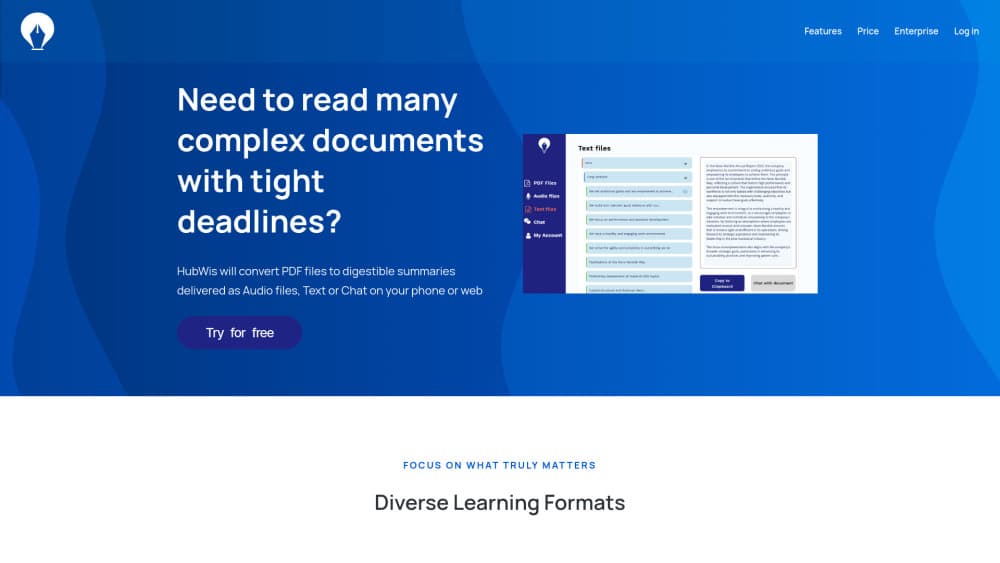
HubWis is a reading tool with one job: shrink a long document into something you can absorb without losing an afternoon at a desk. You upload a PDF or paste text, and it hands back an executive summary, an audio version it calls a micro podcast, and a chat window tied to that one file.
The workload it targets is study and business reading. Students use it as an AI study tool for lecture slides and textbook chapters. Managers drop in quarterly reports before a review, using it as a PDF summarization tool for documents they'd rather skim. HR teams turn dense policy manuals into short audio clips for new hires. Each account keeps its files in a separate database, so one client's contract doesn't sit next to another client's.
The limits matter as much as the feature list. Summaries are only as good as the text layer inside the file, which makes scanned pages and messy tables a weak spot. There's no native Android app and no public API. And the product itself has gone quiet: hubwis.info now serves unrelated content and hubwis.com returns a dead page, so new signups appear closed as of October 2026. Check before you build a workflow around it.
Getting Started
- Create an account on the HubWis site and confirm the signup email.
- Upload a PDF or paste text into the reader. The credit cost shows before the conversion starts.
- Choose an output: a text summary, an audio summary, or a document chat session.
- Play or download the audio, or keep asking questions in the chat until the material makes sense.
Product Information
A quick look at HubWis's pricing, supported platforms, and performance.
Best for
The users, tasks, and scenarios where this tool fits best.
Users
- Students facing 40 page chapters
- Managers who read to prepare
- HR and learning teams
- Readers with low vision or heavy screen fatigue
Tasks
- Turning a long research report into something listenable
- Asking a contract questions instead of hunting for clauses
- Revising from lecture notes
- Reformatting a training manual for onboarding
Scenarios
- The commute or a gym session
- The twenty minutes before a client call
- Onboarding week at a company that hands out a 100 page handbook
Key features
Audio Summaries as Micro Podcasts
HubWis renders a document as a spoken summary you can play in the browser or in the iOS app. The pitch is multitasking: read less, listen while you walk, drive, or cook. Length tracks the source, so a short brief stays short.
Text Summaries You Can Skim
Every upload also returns a written digest, which is the faster path when you need facts rather than a narrative. As an AI PDF summarizer it handles reports, papers, and manuals where the reader already knows the subject and just needs the load lightened.
Chat With a Single Document
The document chat stays scoped to one file, so answers draw on that source instead of the open web. That makes it useful for contracts and specifications, where a general chatbot tends to drift. You can keep asking follow ups in the same thread.
Credit Pricing Tied to File Size
New accounts start with 500 free credits. After that you buy credit packs, and the cost of a conversion is calculated from the PDF size in megabytes and shown before the job runs. Credits don't expire, which suits people who read in bursts.
A Separate Database per Account
HubWis states that each user's data sits in an isolated database that other users and models can't reach. For lawyers, recruiters, and anyone handling client material, that answer matters more than a feature list.
Browser, Chrome Extension, and iPhone Access
The core product runs in a browser. A Chrome extension covers PDFs you open while browsing, and the iOS app handles listening on the move. Android users are left out, and there's no desktop client.
Pros and cons
Pros
- One upload produces three outputs: text summary, audio, and chat, so you don't pay twice for different formats.
- 500 free credits let you test the PDF to audio pipeline on real documents before spending anything.
- Credit packs don't expire, which fits seasonal reading instead of forcing a monthly subscription.
- Files stay in a private per account database, a real advantage for client work.
- The Chrome extension removes the download step for PDFs you find in a browser tab.
Cons
- Availability is unclear: the original domain now shows unrelated content and the alternate domain is dead, so new users may not be able to sign up.
- No public API and no Android app, which rules out automation and leaves Android users without a mobile option.
- Metering by file size punishes image heavy scans. An 80MB scanned report can cost far more credits than a 2MB text file with more to read.
- Summary quality falls off on scanned pages and complex tables, and the site makes no promise about OCR.
Frequently asked questions
It converts PDFs and pasted text into three formats: a written summary, an audio summary, and a chat session tied to the document. The point is to cut reading time, not to edit or reformat the file.
Related content
Explore related tools, skills, and articles for HubWis.
HubWis Alternatives

Google EmbeddingGemma 2
Google DeepMind · Writing · Image · CodingGoogle EmbeddingGemma 2 is a 740M-parameter open model that turns text, code, images, audio, and video frames into vectors in one 768-dimension space, running on phones and laptops.

MePersona
MePersona, Inc. · Writing · Productivity · MarketingMePersona is an AI unified inbox for creators. It learns your voice, drafts replies to fan messages from 12 platforms, and sends only what you approve.

Fluence
Yay Software (Yannick Huchard) · Writing · Voice & Language · ProductivityFluence is an Android app that reads PDFs, EPUBs, Word files and web articles aloud, follows each sentence as it speaks, and answers questions about the text on the phone itself.