

Humanizar Texto
Humanizar Texto · Writing · AI Detection
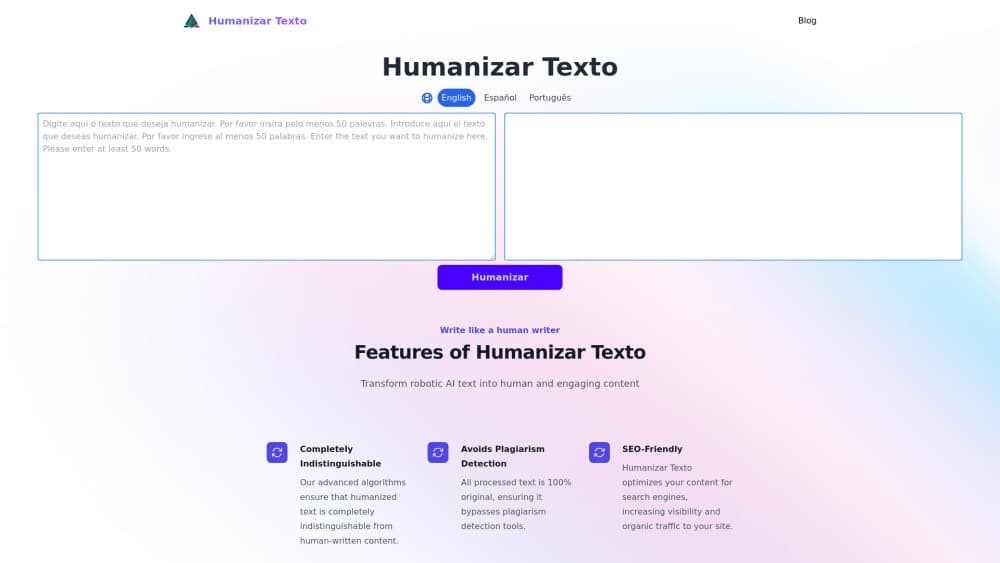
Humanizar Texto is a browser-based humanizer built for Spanish first. Paste a ChatGPT or Gemini draft and it rewrites the phrasing so the text reads like ordinary human writing.
About Humanizar Texto
What Is Humanizar Texto
Humanizar Texto does one job. It takes text that sounds machine-made and rebuilds the sentences until they sound like a person wrote them. The name is Spanish for "humanize text", and that's the market it chases. Most humanizers ship in English and bolt on Spanish later. This one starts in Spanish, which matters if you publish for readers in Spain, Mexico, Argentina or anywhere else in the Spanish-speaking world.
The workflow is a paste box. You bring a draft from ChatGPT, Gemini, Claude or DeepSeek, choose how hard the rewrite should push, and copy the result. It doesn't write for you. It doesn't check facts, and it can't rescue a weak argument. What it changes is how the text sounds, not what it claims.
Here's something to check before you commit. When I opened the listed domain, humanizartexto.cc, it served an unrelated gambling page instead of a writing tool. A parked or hijacked domain isn't proof the product is dead, but treat it as a warning: confirm you're on the real site before you paste client work or type in card details. That single check costs you two minutes and saves you a bad afternoon.
Getting Started
- Open the tool and paste your draft into the input box. Check the word counter first, because free allowances on tools like this are usually small.
- Set the output language. Spanish and English are the two it handles with any confidence.
- Choose rewrite strength. A light pass keeps your sentence order. A heavy pass rebuilds whole paragraphs and drifts further from your original.
- Run the built-in detector check, then read the output line by line against your source.
- Copy the text and fix names, numbers, quotes and legal wording by hand. The rewrite will not protect those for you.
Product Information
A quick look at Humanizar Texto's pricing, supported platforms, and performance.
Best for
The users, tasks, and scenarios where this tool fits best.
Users
- Spanish-language content writers
- University students writing in Spanish
- Small marketing teams without a native editor
Tasks
- Humanizing ChatGPT drafts before publishing
- Rewriting product descriptions
- Cleaning up AI-assisted emails and support replies
- Preparing bilingual copy
Scenarios
- A blog post that reads too stiff
- Client work that has to clear a detector
- Last-minute edits before a deadline
Key features
Spanish-first rewriting
The rewrite engine treats Spanish as the default, so it works with Spanish sentence structure rather than translating an English pattern into Spanish words. If your goal is to humanize AI text in Spanish without hiring an editor, this is the feature that decides it. That shows up in small things: clause order, the way pronouns get dropped, the difference between formal and casual address. Output still needs a read-through, and regional register varies, so a draft aimed at Madrid may need light edits before it lands well in Bogotá.
Meaning-preserving paraphrase
The tool swaps vocabulary and restructures sentences while leaving the argument in place. It isn't a summarizer and it isn't a spinner that mangles grammar. Practically, that means your structure survives and your phrasing doesn't. Anything dense with terminology, such as legal or medical text, comes back looser than it went in.
Built-in detector score
A checker sits next to the editor and reports how machine-like the text looks. You can run it before and after the rewrite to see whether the pass did anything. Treat the number as a rough signal. Detectors disagree with each other, and a high human score is not a guarantee that a specific reviewer will agree.
Rewrite strength control
You pick how far the tool drifts from your draft. Light settings keep your voice and fix rhythm. Aggressive settings produce cleaner-sounding prose that may no longer sound like you. Most people land in the middle after two or three tries. That control is what separates a Spanish AI humanizer you can trust on client work from a one-click toy.
No install, no editor to learn
Everything runs in a browser tab. There's no plugin, no desktop app, no account wall in front of the paste box on most visits. You copy in, copy out, and close the tab. For anyone who needs to humanize ChatGPT text once a week, that's the whole product.
Word counter and usage caps
A live counter shows how much text you've loaded, which matters when a free tier caps a single request at a few hundred words. Long documents need splitting, and splitting costs you consistency across sections. Plan the cuts along paragraph breaks so the seams don't show.
Pros and cons
Pros
- Spanish output that reads like Spanish, not translated English, which is the main reason to pick it over an English-first AI to human text converter.
- The detector panel gives you a number before and after, so you can tell whether a pass helped. It won't promise a full AI detector bypass, and it doesn't pretend to.
- Nothing to install. A browser tab and a paste box cover the entire workflow.
- Strength settings let you keep your own voice on short edits and push harder on catalog copy.
- Short replies and email drafts come out usable in a single pass, with no manual cleanup.
Cons
- The domain listed for the product served unrelated content when checked, so verify the real site before paying or pasting confidential text.
- No API and no bulk upload, which rules it out for teams that need humanizing inside a publishing pipeline.
- Aggressive settings can flatten your own style along with the machine patterns, and there's no way to lock specific sentences.
- Free allowances are tight for long documents, so a 3,000-word article means several passes and a consistency check at the end.
Frequently asked questions
It rewrites AI-generated text so it reads more like human writing. You paste a draft, the tool restructures sentences and swaps phrasing, and you copy the result. It doesn't generate new content or verify facts.
Related content
Explore related tools, skills, and articles for Humanizar Texto.
Humanizar Texto Alternatives

Google EmbeddingGemma 2
Google DeepMind · Writing · Image · CodingGoogle EmbeddingGemma 2 is a 740M-parameter open model that turns text, code, images, audio, and video frames into vectors in one 768-dimension space, running on phones and laptops.

MePersona
MePersona, Inc. · Writing · Productivity · MarketingMePersona is an AI unified inbox for creators. It learns your voice, drafts replies to fan messages from 12 platforms, and sends only what you approve.

Fluence
Yay Software (Yannick Huchard) · Writing · Voice & Language · ProductivityFluence is an Android app that reads PDFs, EPUBs, Word files and web articles aloud, follows each sentence as it speaks, and answers questions about the text on the phone itself.