
HumanizeText.ai
HumanizeText.ai · Writing · AI Detection
HumanizeText.ai is an AI text humanizer that rewrites machine drafts into prose that reads like a person wrote it, with modes built to slip past Turnitin, GPTZero and Originality AI.
About HumanizeText.ai
What Is HumanizeText.ai
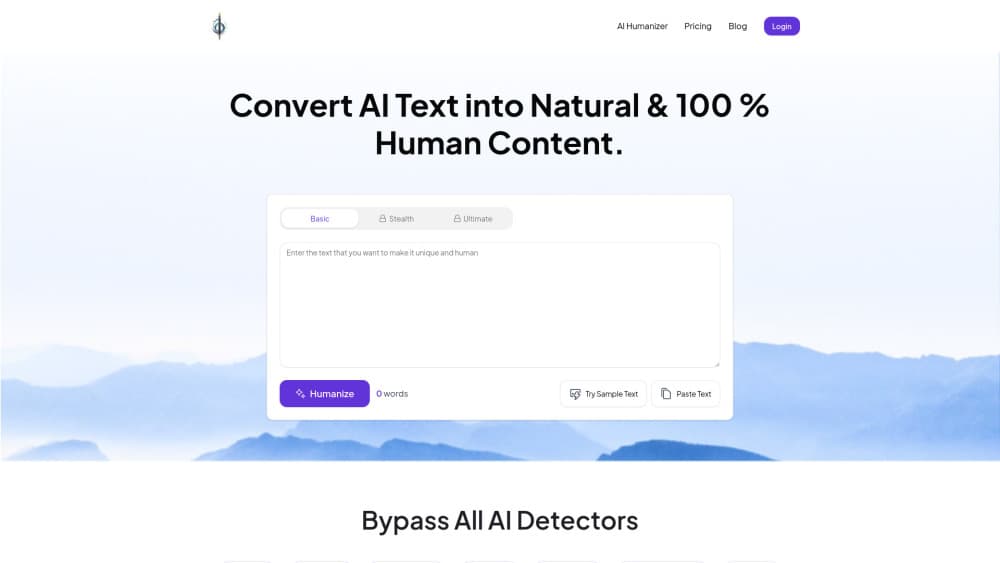
HumanizeText.ai is a browser tool that takes text from ChatGPT, Claude or any other model and rewrites it with more varied sentence lengths, looser phrasing and fewer of the patterns detectors score. You paste a draft, choose a mode, and get a new version back in seconds. Nothing to install.
The problem it targets is narrow and real. Detectors flag text for signals like even rhythm and predictable word choice. A humanizer shakes those signals up while keeping your argument, your facts and your keywords in place. The site says output comes back free of plagiarism and grammar errors, but that's a vendor claim and not an audited result.
The limits matter just as much. Rewriting can flatten a voice you liked, and no tool can promise a pass on every checker every day. HumanizeText.ai tells users to review the result before publishing, which is the honest position. Treat it as the last edit before a human read, not a replacement for one.
Getting Started
- Open humanizetext.ai in a browser. The editor loads without a signup.
- Paste your AI draft into the box. The counter tracks word count and shows when you go over your plan's input limit.
- Choose a mode. Standard is the light touch, while Stealth, Ultimate and Undetectable push harder at the patterns detectors look for.
- Hit the Humanize Text button and read the new version. Fix names, numbers and anything that drifted from your meaning.
- Move to a paid plan when the free allowance runs out, then work inside the monthly word quota.
Product Information
A quick look at HumanizeText.ai's pricing, supported platforms, and performance.
Best for
The users, tasks, and scenarios where this tool fits best.
Users
- Students and researchers
- Bloggers and SEO writers
- Freelance editors and agencies
Tasks
- Cleaning up an AI first draft before publishing
- Rewriting product descriptions in bulk
- Running a detector check on your own writing
- Reshaping marketing copy drafted in English
Scenarios
- A deadline night with three articles half written by a model
- A content team that ships weekly SEO posts
- A solo consultant who writes proposals in a hurry
Key features
Four Rewriting Modes
Standard, Stealth, Ultimate and Undetectable sit on a slider from light edit to heavy reconstruction. Basic plans unlock Standard and Undetectable, while Premium and Ultro add Stealth and Ultimate. Undetectable mode is the setting the site pushes for undetectable AI writing. Heavier modes change more sentences, which raises the chance of a meaning slip you have to catch.
Wide Detector Coverage
The site names Turnitin, GPTZero, Originality AI 3.0, the OpenAI classifier, CrossPlag, ContentAtScale, Sapling, CopyLeaks and ZeroGPT as targets for its AI detector bypass. That list covers the checkers most schools and clients actually use. No humanizer can guarantee a result against all of them, and the site doesn't publish independent test data.
Free AI Detector On The Same Page
A detector sits next to the humanizer, so you can score a draft, rewrite it, and score it again without opening another tab. That loop is the practical part of the product. You see whether a GPTZero bypass actually held instead of trusting the marketing line.
Keyword Retention
The rewrite is built to keep your target phrases in the text rather than swapping them for synonyms. For anyone publishing SEO pages, that's the difference between a readable rewrite and one that costs you rankings. Read the output with your keyword list open, since a paraphrase can still soften a term.
Word Quotas That Match The Plan
Basic allows 10,000 words a month with a 500 word input cap. Premium raises that to 60,000 words and a 1,000 word input cap. Ultro removes both limits. The input cap is the number that decides your workflow, because a 2,000 word article has to be split into chunks on the cheaper plans.
Paste, Rewrite, Review
The whole flow is three steps with no project setup, no style profiles and no training on your samples. That keeps the tool quick for one-off jobs. It also means you can't teach it your voice, so a house style still needs a manual pass at the end.
Pros and cons
Pros
- Detector coverage spans the checkers schools and clients rely on, including Turnitin and GPTZero.
- Runs in the browser with no install, no plugin and no project setup.
- Keyword retention keeps SEO phrases in place through the rewrite.
- The free AI detector turns a vendor claim into something you can test in a minute.
- Plan ladder from 10,000 to unlimited words fits both occasional and heavy use.
Cons
- The 500 word input cap on Basic forces you to split long articles, which costs time on every batch.
- Detector results are vendor claims. The site publishes no independent benchmarks, so expect variation between checkers.
- Output still needs a human read. The site says so itself, and heavy modes drift more than light ones.
- No public API is documented, so teams can't wire the humanizer into their own publishing pipeline.
Frequently asked questions
It rewrites text produced by an AI model so it reads more like human writing. You paste a draft, pick a mode, and get a new version with different sentence rhythm and word choice. The meaning is meant to stay the same.
Related content
Explore related tools, skills, and articles for HumanizeText.ai.
HumanizeText.ai Alternatives

Google EmbeddingGemma 2
Google DeepMind · Writing · Image · CodingGoogle EmbeddingGemma 2 is a 740M-parameter open model that turns text, code, images, audio, and video frames into vectors in one 768-dimension space, running on phones and laptops.

MePersona
MePersona, Inc. · Writing · Productivity · MarketingMePersona is an AI unified inbox for creators. It learns your voice, drafts replies to fan messages from 12 platforms, and sends only what you approve.

Fluence
Yay Software (Yannick Huchard) · Writing · Voice & Language · ProductivityFluence is an Android app that reads PDFs, EPUBs, Word files and web articles aloud, follows each sentence as it speaks, and answers questions about the text on the phone itself.