

Humanize AI
Humanizer.org · Writing · AI Detection
Humanize AI is a browser based AI text humanizer from Humanizer.org that rewrites machine drafts into natural prose and scores them against AI detectors before you publish.
About Humanize AI
What Is Humanize AI
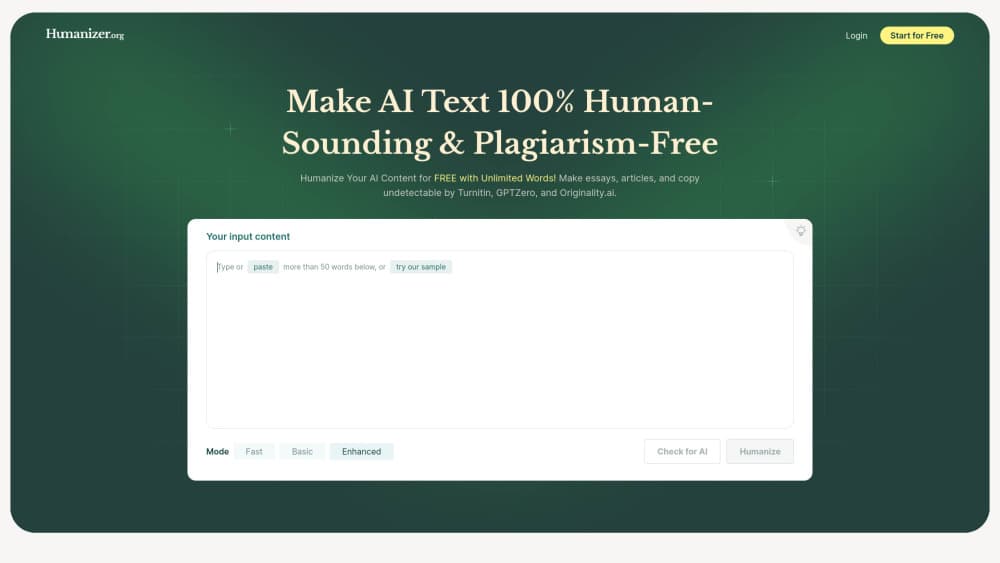
Humanize AI is the AI to human converter behind Humanizer.org, a web app that takes text produced by ChatGPT, Gemini, Claude, or any other model and rebuilds it so it reads like something a person typed. You paste a draft, choose a mode, and get a rewritten version in seconds. The same workspace then runs that output through an AI detector, so the score appears next to the text instead of in a separate tab.
The tool exists because machine writing has a recognizable fingerprint. Sentences land at similar lengths, paragraphs open the same way, and transitions repeat. Readers feel it even when they can't name it. Humanize AI works on those patterns directly: it varies rhythm, swaps stock phrasing for plainer words, and keeps your facts, names, and numbers where you put them.
There are real limits. Everything runs in the browser, so there's no desktop app and no plugin for Word or Google Docs. Each plan caps how many words you can submit in one pass, which means long reports get split into chunks. And no humanizer can promise a clean result on every detector, because Turnitin and Originality.ai update their models on their own schedule.
Getting Started
- Open humanizer.org and paste your draft into the input box. You can run a short test before creating an account.
- Pick a humanization mode and, if your text isn't in English, the matching target language from the dropdown.
- Press the humanize button. If the draft is longer than your per input limit, split it into sections and run each one.
- Read the score from the built-in detector panel. If it's weak, run the output through again or switch to a stronger mode.
- Check the rewrite once by hand for names, figures, quotes, and citations, then copy it into your document.
Product Information
A quick look at Humanize AI's pricing, supported platforms, and performance.
Best for
The users, tasks, and scenarios where this tool fits best.
Users
- Students and researchers
- Bloggers and content marketers
- Non-native English writers
Tasks
- Humanizing chatbot drafts
- Cleaning up stiff business email
- Rewriting landing page copy
- Preparing multilingual versions of one article
Scenarios
- A client wants proof that a delivered article clears GPTZero
- You have a stack of AI-assisted lecture notes to publish
- Your team writes in three languages every week
Key features
Sentence Level Rewriting
The core job is breaking the rhythm that gives machine text away. Humanize AI shortens some sentences, lengthens others, and swaps repeated openers so a paragraph stops sounding metronomic. You can rewrite AI content paragraph by paragraph and compare the original against the rewrite before you accept the result.
Built-In AI Detector
Every humanized draft can be scored without leaving the page. The panel reports how the text holds up against common detection models, which is the fastest way to decide whether a second pass is needed. Most people come here for undetectable AI writing, and this check is the honest measure of how close they are. Scores shift as detectors retrain, so treat them as a signal rather than a certificate.
Multilingual AI Humanization
The tool lists 17 interface and output languages, including Spanish, Portuguese, French, German, Japanese, Korean, and Traditional Chinese. That matters for teams that publish in more than one market, because the rewrite follows the target language's sentence habits instead of forcing English word order onto it.
Meaning Retention
A rewrite that loses your argument is useless. Humanize AI keeps names, figures, product terms, and the order of your points while changing how the sentences are built. You still get a usable draft, not a summary of one.
Originality Insights
Paid plans add an originality check next to the humanization score, so you can see whether a passage overlaps with published text. It's the practical way to catch a paragraph a model reproduced too closely from its training data.
Word Based Plans
Usage is measured in words per month and words per input, not in seats. Standard covers 8,000 words a month at 500 words per pass, Premium raises that to 80,000 and 1,000, and Unlimited removes both ceilings. Small teams can start on the cheapest tier and move up when volume grows.
Pros and cons
Pros
- A free tier exists, so you can humanize AI text and check the output before paying anything.
- The detector score sits on the same screen as the rewrite, which saves a tab and a copy paste.
- Seventeen languages are supported, including Japanese and Korean, which many competing humanizers skip.
- Meaning and key terms survive the rewrite, so product pages and technical drafts stay accurate.
- Everything runs in the browser with no install, which makes it easy to test on a locked down work laptop.
Cons
- There's no public API, so you can't wire the rewriting step into a CMS or an automated publishing pipeline.
- Per input caps force long reports through multiple passes, and each pass costs you review time.
- Detector scores are a snapshot. A draft that clears one model can still get flagged after the next update.
- No desktop or mobile app, and no editor plugin, so the workflow is always paste, rewrite, copy back.
Frequently asked questions
It rewrites AI-generated text so the output reads like human writing. The rewrite changes sentence length, word choice, and paragraph flow while keeping your facts and structure, then shows how the result scores against AI detectors.
Related content
Explore related tools, skills, and articles for Humanize AI.
Humanize AI Alternatives

Claude for Google Workspace
Anthropic · Writing · Productivity · BusinessClaude for Google Workspace puts Claude in a sidebar inside Google Docs, Sheets, and Slides, where it reads the file you have open and edits it in place.

Claude Haiku 5.5
Anthropic · Writing · Coding · ChatbotClaude Haiku 5.5 is Anthropic's fastest and cheapest small model, built for high volume tasks at $0.10 per million input tokens with a 1M token context window.

NoteWorthy
Suman Hansada · Writing · Productivity · AI AssistantNoteWorthy is a notes app for iPhone, iPad and Mac that writes titles, tidies formatting, summarizes long notes and files each one with on-device AI. No account, no upload, no network requests.