

Image to Text Converter
Imagetotext.me · Writing · Image · Marketing
Imagetotext.me's Image to Text Converter is a browser OCR tool that turns photos, screenshots, and PDFs into editable text. The free tier handles five images per batch, paid plans up to 150.
About Image to Text Converter
What Is Image to Text Converter
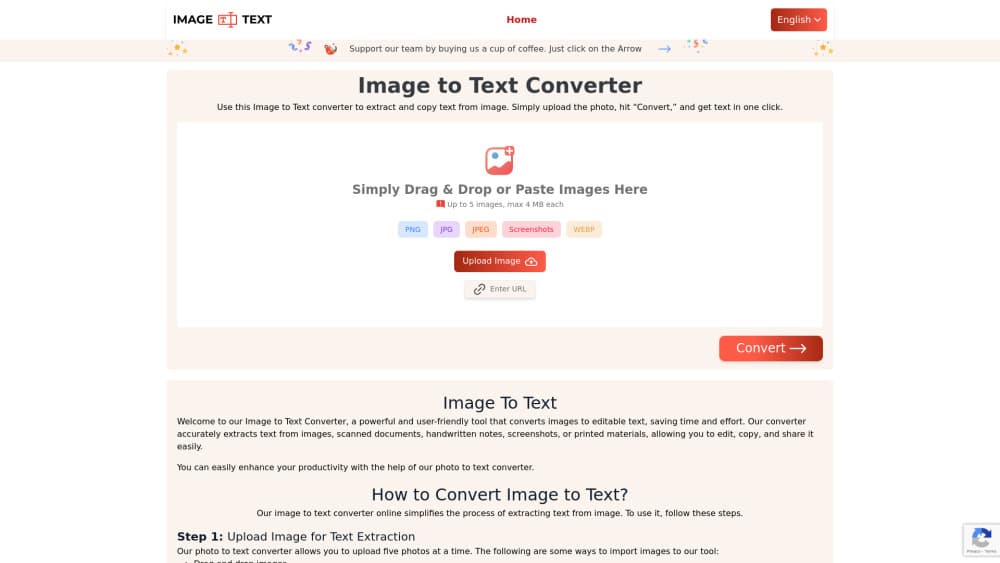
Image to Text Converter is the main tool on imagetotext.me, a site built around online OCR work. You drag an image in, paste it, drop a URL, or pick a file, then click convert, and the photo to text converter does the reading. The text comes back in an editable box you can copy or export. No account is needed to start, and the free version doesn't cap how many times you use it in a day.
To extract text from images, the engine behind it is Tesseract, the open source OCR library, plus a set of Python tools that handle image cleanup and character matching. You get two reading modes. Simple OCR costs one credit per image and returns plain text. Formatted OCR costs ten credits and tries to keep the layout of tables, columns, and paragraphs intact. That difference matters if you plan to paste results into a spreadsheet or a slide.
Limits are mostly about size and volume. Free uploads top out at 4MB per image, paid plans go to 30MB, and the number of files in one submission ranges from 5 on the free tier to 150 on Business. Blurry or low resolution photos still convert, but accuracy drops, and no OCR tool gets every character right. The same site also runs smaller utilities for translating text inside images, compressing files, converting formats, and reverse image search, so the converter is one piece of a broader set.
Getting Started
- Open imagetotext.me and drop your image into the upload box, paste it from the clipboard, or paste an image URL.
- Crop and rotate the file if the text sits at an angle or the frame includes things you don't want read.
- Pick Simple or Formatted OCR, then press convert.
- Check the output, fix any misread characters, then copy it or download it as TXT, DOCX, or PDF.
Product Information
A quick look at Image to Text Converter's pricing, supported platforms, and performance.
Best for
The users, tasks, and scenarios where this tool fits best.
Users
- Students
- Data entry staff
- Researchers
- Office teams
Tasks
- Copying text out of a screenshot
- Digitizing handwritten notes
- Extracting math equations
- Converting JPG or PDF pages to Word
Scenarios
- Sorting a stack of receipts at month end
- Building a study guide from textbook photos
- Moving a paper archive to a shared drive
Key features
Simple and Formatted OCR Modes
Simple OCR returns plain text at one credit per image. Formatted OCR costs ten credits and keeps tables, line breaks, and paragraph structure closer to the original page. Choose based on whether you need clean prose or something you can paste into a spreadsheet without rebuilding rows.
Batch Limits That Scale With the Plan
Free accounts convert five images per submission with no daily cap. Standard lifts that to 25, Premium to 50, and Business to 150 with batch processing. If your work comes in bursts, the free tier is enough. If it comes in folders, the batch ceiling decides how much clicking you avoid.
Crop and Rotate Before Conversion
You can straighten a skewed photo or cut away the background before the OCR run starts. A crooked page costs accuracy, so this step is worth the extra second. It also stops the tool from reading text you didn't want, like a neighbouring column on a newspaper page.
Math Equation Extraction
The converter recognizes formulas and symbols, not only body text. Students and teachers get the obvious use, and anyone copying a printed problem set can reuse the equation as text instead of retyping symbols by hand.
Handwriting and Poor Quality Photos
Mild blur, low resolution, and uneven lighting don't stop the conversion. Results on handwriting vary a lot by pen, paper, and neatness, so plan on editing. Recognition degrades fastest on cursive and on photos taken at an angle.
Exports Without Watermarks
Download options include TXT, DOCX, and PDF, and none of them carry a watermark. That's the difference between a tool you can use at work and one you can only use for personal notes. Copy to clipboard is the fastest route for short snippets.
Pros and cons
Pros
- No signup and no daily session limit on the free tier, so a one-off job costs nothing.
- Formatted OCR keeps table and paragraph structure, which saves manual cleanup.
- Accepts PNG, JPG, JPEG, WEBP, GIF, and PDF, so screenshots and scans both work.
- Paid plans start at $4.99/mo, and the API entry plan at $8/mo is cheap for occasional automation.
- Lifetime option at $89.99 avoids a subscription if you only need 120,000 credits.
Cons
- The 4MB file cap on free uploads rejects many phone photos straight from the camera.
- Five images per batch on the free plan means a 200 page archive turns into a lot of separate runs.
- Credits burn fast with Formatted OCR at ten per image, so heavy layout work drains a 10,000 credit plan in about 1,000 pages.
- There's no desktop or mobile app, so offline work isn't possible.
Frequently asked questions
Yes. The free plan needs no signup, gives you 200 credits, and converts up to five images per submission with no daily limit on sessions. Paid plans add larger files, bigger batches, and faster conversion.
Related content
Explore related tools, skills, and articles for Image to Text Converter.
Image to Text Converter Alternatives

Google EmbeddingGemma 2
Google DeepMind · Writing · Image · CodingGoogle EmbeddingGemma 2 is a 740M-parameter open model that turns text, code, images, audio, and video frames into vectors in one 768-dimension space, running on phones and laptops.

MePersona
MePersona, Inc. · Writing · Productivity · MarketingMePersona is an AI unified inbox for creators. It learns your voice, drafts replies to fan messages from 12 platforms, and sends only what you approve.

Fluence
Yay Software (Yannick Huchard) · Writing · Voice & Language · ProductivityFluence is an Android app that reads PDFs, EPUBs, Word files and web articles aloud, follows each sentence as it speaks, and answers questions about the text on the phone itself.