

Imagine Stories
Biomed Neurotechnologie Sp. z o.o. sp. j. · Writing · Leaning
Imagine Stories turns a few choices into a personalized fairy tale for a child, with AI pictures and reading aids built for parents, teachers, and therapists.
About Imagine Stories
What Is Imagine Stories
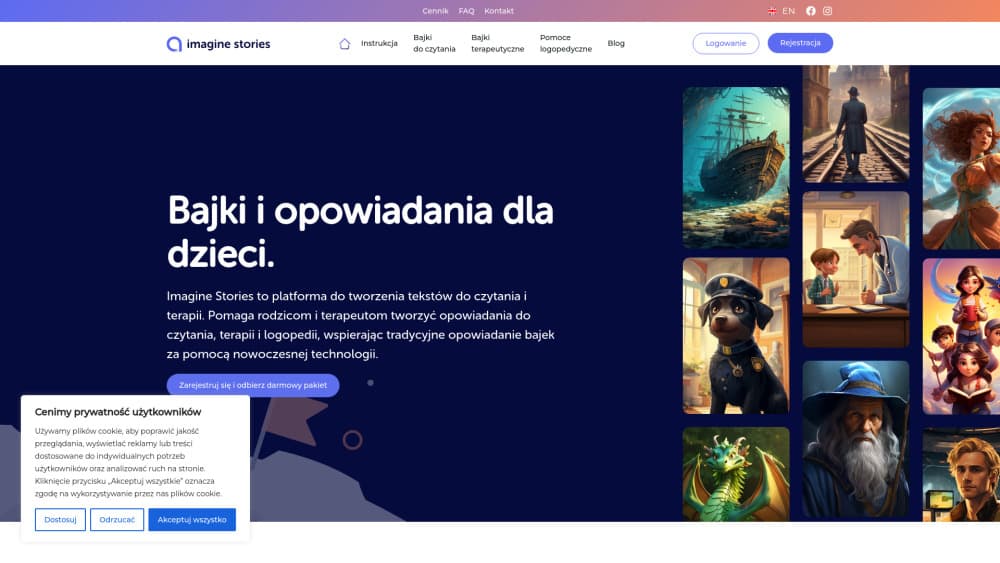
Imagine Stories is a web platform from Biomed Neurotechnologie, a Polish company in Wrocław that works on learning and therapy tools. You pick a hero, a setting, a theme, and an illustration style, and an AI story generator writes a short tale with pictures to match.
The product grew out of reading therapy rather than bedtime entertainment. It works as a story generator for teachers, speech therapists, and psychologists who need reading practice texts that fit one child, including therapeutic stories about emotions, shyness, or cooperation. Parents use the same builder for evening stories and for reading practice at home.
The limits are practical. Everything runs in a browser, there's no mobile app, and the main site and help pages are written in Polish first. Story quality depends on how much detail you put into the brief, and the paid packages sit behind a checkout page, so you can't compare prices from the marketing site alone.
Getting Started
- Open imaginestories.pl and create a free account with an email address.
- Choose the age band for the child, from 3 up to 16, then set the hero, place, theme, and genre. A random option fills the fields if you're in a hurry.
- Pick an illustration style and generate the story. The AI writes the text and adds pictures in the same pass.
- Adjust the reading view for the child: font size, font type, text highlighting, highlight color, and the pace of the highlight.
- Download the story as a Word file, print it, or keep it in the account library for later.
Product Information
A quick look at Imagine Stories's pricing, supported platforms, and performance.
Best for
The users, tasks, and scenarios where this tool fits best.
Users
- Parents who read to a child every night
- Primary school teachers
- Speech therapists and psychologists
- Reading specialists working with the Warnke method
Tasks
- Writing a bedtime story with a child as the main character
- Preparing a reading practice text for a lesson
- Explaining an emotion through a story
- Building speech therapy material
Scenarios
- A parent with no time at 8 pm
- A therapist between sessions
- A teacher planning a week of reading
Key features
Guided story builder
The builder asks for a hero, a place, a theme, a genre, and an illustration style before it writes anything. That structure is the main difference from a blank chat prompt, because a parent or teacher can shape the result without learning how to prompt an AI. A random fill option covers the days when nobody has an idea.
Age bands from 3 to 16
Stories are written for a chosen age range rather than a general young reader. Vocabulary, sentence length, and plot complexity shift with the band, which matters when the same platform has to serve a preschooler and a teenager. The age setting also gives teachers a way to keep a class on one topic at different difficulty levels.
AI illustrations with a style choice
Each story comes with pictures generated in the selected style. You can keep the look consistent across a series or change it for a new tale. For a printed booklet or a therapy handout, the images do a lot of the work in holding a child's attention.
Reading aids for dyslexia and training
The reading view includes text highlighting, adjustable highlight speed, font size, font type, and highlight color. These are the dyslexia reading aids that set the platform apart from a plain AI fairy tales site, and they follow the kind of structured practice used in Warnke method training. A child sees one line or word at a time instead of a full page.
Therapeutic and speech therapy angles
Themes can focus on emotions, cooperation, empathy, or a specific behavior the adults want to discuss. Speech therapists get short narratives built around chosen sounds and phrases. The story becomes a shared object in the session, not a test.
Word export and print
Every finished story can be downloaded as a Word document or printed straight from the browser. That covers a paper handout for a classroom, a booklet for a child, and a record for a therapist's file. Stories also stay in the account library, so a favorite can be read again without generating it twice.
Pros and cons
Pros
- A complete illustrated story comes together in minutes, and the guided fields keep the output close to the brief.
- Age bands and text settings make one story usable for reading practice, not just entertainment.
- The reading aids are aimed at children with dyslexia and fit structured training, which most AI story generators ignore.
- The therapeutic and speech therapy use cases are built into the theme options rather than bolted on.
- Word export and printing turn a digital story into a handout, a booklet, or a therapy record.
Cons
- It runs in a browser only, so there's no Android or iOS app for reading offline on a tablet.
- The main site and FAQ are in Polish, and the English pages cover only parts of the product, so English-speaking parents may need a browser translator.
- Package prices appear at the Stripe checkout rather than on the pricing page, which makes it hard to compare bundles before you commit.
Frequently asked questions
It's a web platform that uses AI to write personalized stories for children and illustrate them. You choose the hero, age, setting, theme, and art style, and the tool produces a short story you can read on screen, print, or download as a Word file.
Related content
Explore related tools, skills, and articles for Imagine Stories.
Imagine Stories Alternatives

Google EmbeddingGemma 2
Google DeepMind · Writing · Image · CodingGoogle EmbeddingGemma 2 is a 740M-parameter open model that turns text, code, images, audio, and video frames into vectors in one 768-dimension space, running on phones and laptops.

MePersona
MePersona, Inc. · Writing · Productivity · MarketingMePersona is an AI unified inbox for creators. It learns your voice, drafts replies to fan messages from 12 platforms, and sends only what you approve.

Fluence
Yay Software (Yannick Huchard) · Writing · Voice & Language · ProductivityFluence is an Android app that reads PDFs, EPUBs, Word files and web articles aloud, follows each sentence as it speaks, and answers questions about the text on the phone itself.