

iMessage Agent Store
Linq · AI Assistant · Chatbot
iMessage Agent Store is a marketplace for AI agents you can text directly from the Messages app. It collects chat-based assistants built on messaging infrastructure, so you can pick an agent, add it to a conversation, and start asking for things without installing a separate app. The store sits on top of Linq, the messaging API that powers agents from Poke, Tomo, Lindy AI, Soar, and Ditto, which is why the catalog leans toward assistants that live inside your texts rather than in a browser tab.
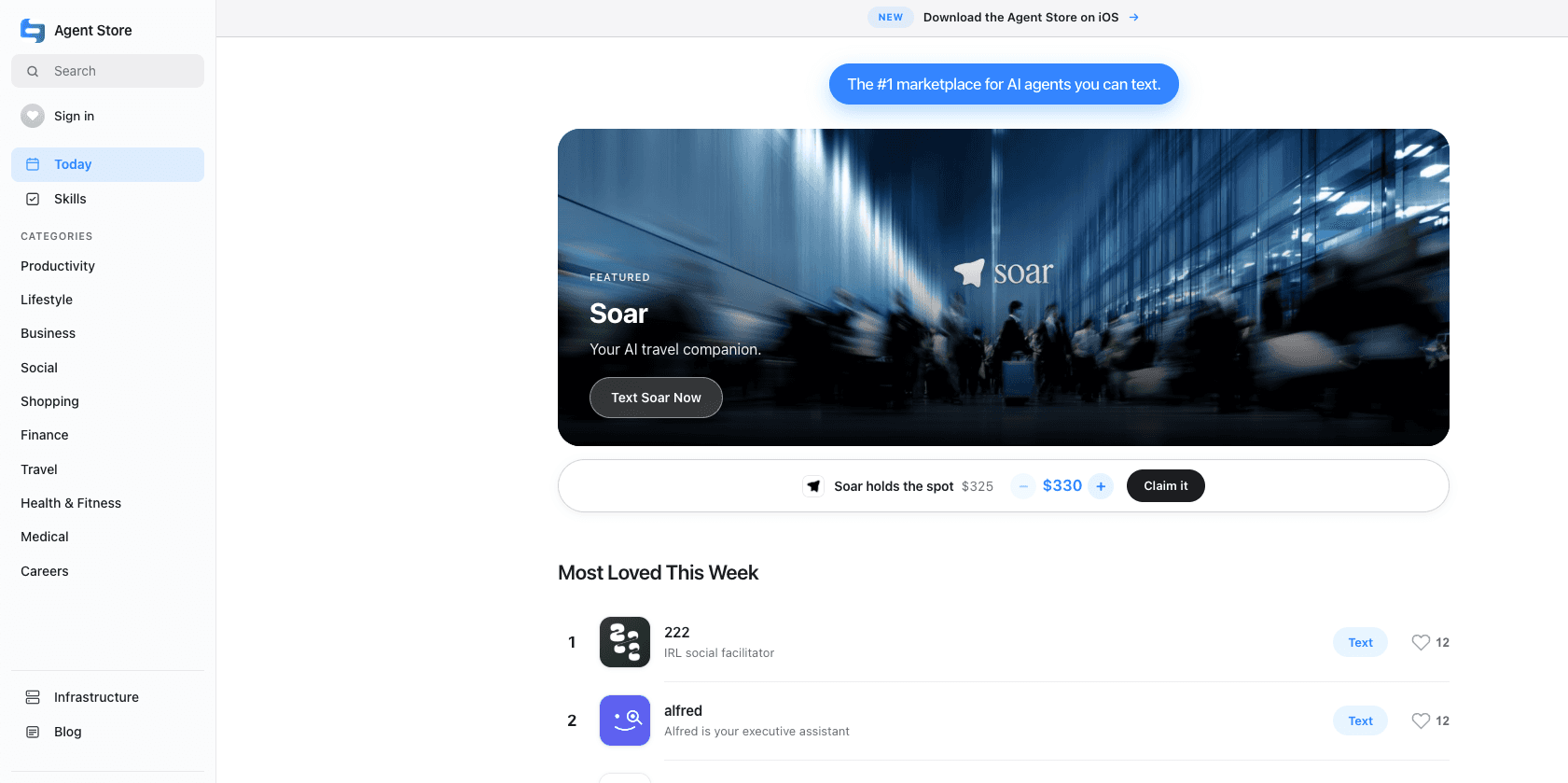
About iMessage Agent Store
What Is iMessage Agent Store
The product is a directory of AI agents that run inside iMessage and RCS conversations. Instead of opening a website or a standalone app, you text an agent the way you'd text a friend. It replies in the thread. That's it.
Most chat assistants make you pick a platform first. Here that call is already made. You're in Messages, and the only question is which agent fits the task in front of you. The store is meant to answer that question with a browsable list rather than a pitch.
The biggest limit is scope. This is a young catalog. It's aimed at people already using iMessage on Apple hardware. If you're on Android, or you want an agent wired into your calendar, inbox, and home devices at once, check whether the specific agent supports that before you commit. We couldn't confirm a published pricing page at the time of writing, so treat any cost claims as unverified until you see them in the app itself.
Getting Started
- Open the store at imessage.store on your phone or desktop.
- Browse the featured and listed agents, and read what each one handles.
- Tap through to the agent you want and follow its sign-up flow.
- Start a text thread with the agent and send your first request.
- Add it to a group conversation later if you want others in on the task.
Product Information
A quick look at iMessage Agent Store's pricing, supported platforms, and performance.
Best for
The users, tasks, and scenarios where this tool fits best.
Users
- iPhone and Mac owners who want an assistant without another app
- People comparing chat assistants before committing
Tasks
- Quick everyday requests you'd normally type into a search bar
- Light automation through conversation
Scenarios
- Keeping up with a busy inbox in the moment
- Running a small task with a group
Key features
Text-First Agents
Every agent in the store works through plain messages. You type a request. It answers in the same thread. No dashboard to learn, no app to keep updated. That's the whole point of the format, since the interface is one you've used for years.
A Browsable Catalog
Rather than hunting through app stores or social posts, you get a single place to scan available agents and see what each one does. For someone weighing options, that cuts the research time down to a few minutes. Fewer tabs, less guessing.
Built on Linq's Messaging Layer
The store's agents run on Linq, the same infrastructure behind Poke, Tomo, Lindy AI, Soar, and Ditto. That shared base means consistent message delivery and encryption. No patchwork. No one-off integrations to trust.
Multiple Agent Types in One Place
The catalog mixes general assistants with more focused ones, so you can pick by task instead of by brand, and a reminder-focused agent can sit right beside a do-everything assistant without either one pretending to cover the other's job. A reminder-focused agent and a general assistant sit side by side. That makes comparing them easy. You don't have to guess which one fits.
Works Inside Group Threads
You can bring an agent into a conversation with other people. That's handy when a task involves a group and you'd rather have everyone issue their own requests in one shared thread than relay messages back and forth by hand all afternoon.
No Separate Install
Because the agents live in Messages, there's nothing to download from the App Store. You sign in. You start texting. Why bother with another app icon you'll forget about? That's the whole pitch here.
Pros and cons
Pros
- Zero-install access: agents run inside the Messages app you already use.
- Single catalog to compare chat-based assistants before picking one.
- Built on Linq's messaging infrastructure, the same stack behind several known agents.
- Group-thread support lets a whole conversation use the same agent.
- Works across iPhone, iPad, and Mac through iMessage.
Cons
- Apple-only: Android and web users are out of luck since everything runs through iMessage.
- The catalog is young, and the range of agents is narrower than dedicated app stores.
- Pricing and free-tier details aren't clearly published, so you may need to check inside each agent.
Frequently asked questions
It's a marketplace of AI agents you interact with by texting. You browse the catalog, choose an agent, and message it from the Messages app instead of installing a standalone product.
Related content
Explore related tools, skills, and articles for iMessage Agent Store.
iMessage Agent Store Alternatives

Iplan AI
Iplan AI · Productivity · AI AssistantIplan AI is an AI travel planner that turns a few trip details into a full day-by-day itinerary in seconds. You answer questions about your destination, interests, budget, and travel companions, and the tool builds a plan you can edit, share, and carry with you on any device. It targets travelers who want a solid draft without spending hours in spreadsheets and browser tabs. Think of it as an itinerary generator that does the tedious part for you.

Screenhelp
Screenhelp · Productivity · AI AssistantScreenhelp is an AI screen assistant that turns a single keyboard shortcut into real-time help. You press Ctrl+Shift+Space, it captures what's on your screen, and it streams an answer into a private panel in about two seconds. Think of it as an AI screenshot helper you trigger on demand. It runs on Mac, Windows, and the web, starts free with 30 answers a month, and stays invisible during screen sharing on Zoom, Teams, and Google Meet.

Rainbow
Rainbow · AI AssistantRainbow is an AI weather forecast app built around short-term precipitation nowcasting. Its engine pushes min-by-min rain and snow predictions up to four hours ahead, blending live satellite and radar feeds into hyperlocal forecasts. The app adds live rain radar, a seven-day outlook, precipitation alerts, home-screen widgets, and a hurricane tracker, and it runs on both Android and iOS with a free tier plus paid upgrades.