

Immersive Translate
Funstory.ai Limited · Writing · Coding · China AI
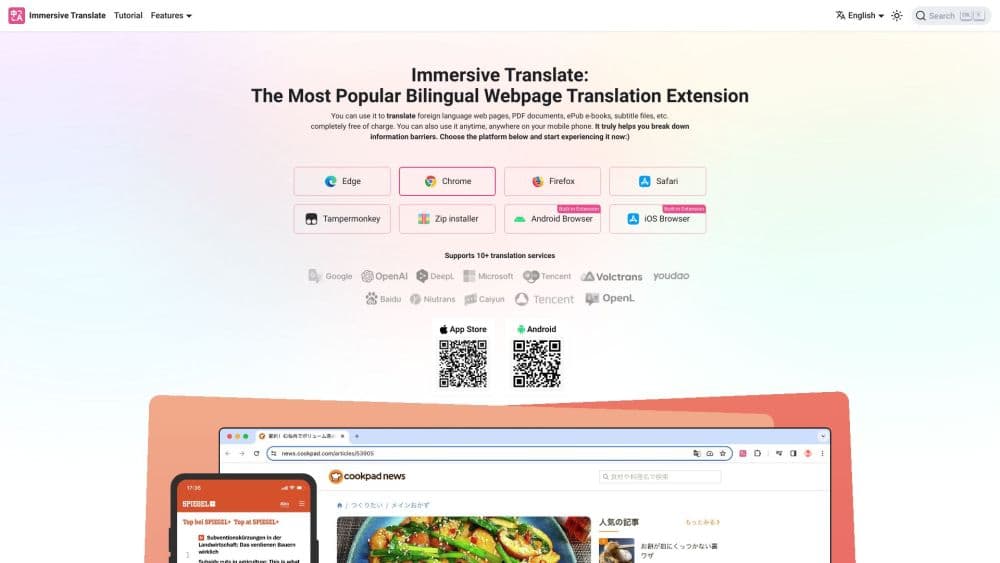
Immersive Translate is a bilingual AI translation extension for Chrome, Edge, and mobile that translates web pages, PDFs, and video subtitles side by side, keeping the original text in view.
About Immersive Translate
What Is Immersive Translate
Immersive Translate is a browser extension and mobile app that shows you two languages at once instead of replacing the page. It keeps the original paragraph and drops the translation right underneath it, so you can compare wording, check a term, or read a foreign article without losing the source. The tool is built by Funstory.ai Limited and reports more than 30 million users worldwide.
The problem it solves is access. A lot of the useful writing on the internet sits behind a language you don't read, and copying and pasting paragraph by paragraph is slow. Immersive Translate handles the full page in place, and it can also translate PDFs while keeping the layout, turn an EPUB into a bilingual ebook, and add subtitles to a video as it plays.
The main limit is that quality depends on the engine you pick. The tool routes requests through more than 20 engines such as DeepL, OpenAI, and Gemini, and the better ones sit behind Pro. Free users get a daily request cap, so heavy readers will hit that ceiling quickly.
Getting Started
- Install the extension from the Chrome, Edge, Firefox, or Safari store, or grab the Android app. A free account needs only an email address.
- Pin the icon to your toolbar, or skip straight to the shortcut: press Alt+A on a page to trigger a bilingual translation.
- Pick a translation engine and set your target language in the settings, then choose how the second language appears on the page.
- For documents, open the extension menu, choose More, and load a PDF, EPUB, or subtitle file to translate.
- On video sites, turn on bilingual subtitles and read the original and the translation on the same line.
Product Information
A quick look at Immersive Translate's pricing, supported platforms, and performance.
Best for
The users, tasks, and scenarios where this tool fits best.
Users
- Students and researchers
- Language learners
- Professionals who follow global news
- Casual readers on the fence
Tasks
- Reading academic papers
- Watching foreign video
- Translating an ebook
- Filling out forms and chatting in another language
Scenarios
- A research sprint where you need to skim a dozen foreign sources fast
- A language class that assigns a foreign article
- A commute where you want to watch a foreign channel
Key features
Bilingual Page Translation
The core mode shows the original and the translation together, paragraph by paragraph, instead of swapping the page out. It detects the main content area so navigation and sidebars don't get buried in clutter. You read in two languages at once, which is the reason the tool exists.
PDF Translation With Layout Kept
The tool translates PDFs and holds the original layout, so tables and headings stay where they were. The advanced version recognizes formulas, tables, and text inside scanned images. That makes it usable for papers and manuals where a reflowed document would lose its meaning.
Video Subtitle Translation
On major video sites, including YouTube and Netflix, it generates bilingual subtitles as the video plays. You get the original line and the translation on screen at the same time, no file downloads needed. It fits language learners and viewers who want to follow a foreign channel live.
Multiple Translation Engines
Immersive Translate routes text through more than 20 engines, among them DeepL, OpenAI, Gemini, and DeepSeek. You match the engine to the job: one reads better for literary prose, another handles technical terms. Switching is a setting, and Pro unlocks the higher-quality options.
Ebook and Document Translation
Beyond web pages, it handles EPUB, TXT, and subtitle files in one flow. You can export a bilingual ebook or a single-language version, depending on what your reader app expects. It saves the manual work of rebuilding a book chapter by chapter.
Privacy Controls
The service says it processes only what's needed for translation and outlines how long content is kept. Official translation services aren't supposed to use your text to train models, and requests travel over encrypted channels. For people translating client work, the policy is worth reading before you start.
Pros and cons
Pros
- The bilingual layout keeps the source next to the translation, which helps when exact wording matters.
- Wide platform reach: desktop browsers, Safari on iOS, and Android, with settings synced across up to 8 devices.
- A real free tier covers basic web and PDF translation, so you can test before paying.
- More than 20 engines to choose from, letting you trade speed and cost against quality.
Cons
- Engine quality varies, so results depend on which option you pick and how much you pay.
- Free users face a daily request cap, which heavy readers will reach during a long session.
- The best engines and the larger document quotas sit behind Pro, so the free experience is a preview rather than a full substitute.
- Each account is limited to 8 simultaneous devices, and going over logs out the oldest one.
Frequently asked questions
Yes. There's a free tier that covers basic web, subtitle, and PDF translation. It comes with a daily request limit, and signing up raises the cap. Heavier use and the top engines need a Pro subscription.
Related content
Explore related tools, skills, and articles for Immersive Translate.
Immersive Translate Alternatives

Google EmbeddingGemma 2
Google DeepMind · Writing · Image · CodingGoogle EmbeddingGemma 2 is a 740M-parameter open model that turns text, code, images, audio, and video frames into vectors in one 768-dimension space, running on phones and laptops.

MePersona
MePersona, Inc. · Writing · Productivity · MarketingMePersona is an AI unified inbox for creators. It learns your voice, drafts replies to fan messages from 12 platforms, and sends only what you approve.

Fluence
Yay Software (Yannick Huchard) · Writing · Voice & Language · ProductivityFluence is an Android app that reads PDFs, EPUBs, Word files and web articles aloud, follows each sentence as it speaks, and answers questions about the text on the phone itself.