
InDesign Translator
Paper Polyglot · Writing · Productivity
InDesign Translator is an online tool from Paper Polyglot that translates Adobe InDesign files in the browser and keeps every layout and style intact.
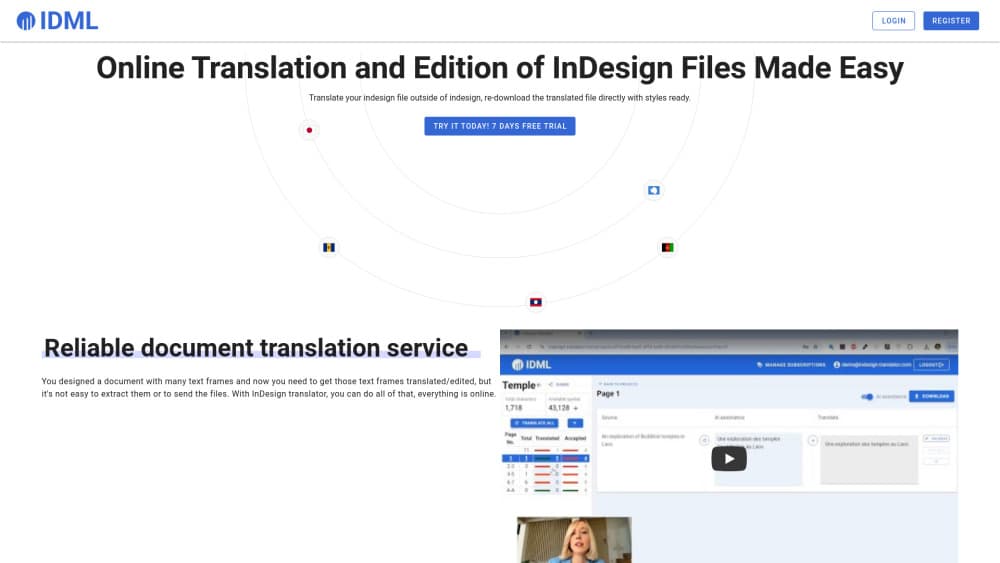
About InDesign Translator
What Is InDesign Translator
InDesign Translator (also branded Paper Polyglot) is a web service for translating Adobe InDesign documents without touching the layout. You export your InDesign file as an .idml file, upload it, and the tool pulls out every text frame. Translators then work on the text in the browser, and you download the finished file to reopen in InDesign. The design stays where you left it, and only the words change.
The people it fits best are design teams, publishers, and translation agencies handling brochures, magazines, and books in more than one language. The hard part of localizing an InDesign file has always been the handoff: extracting text frames, sending them off, then pasting the results back without breaking styles. This tool moves that whole loop online, and a translator doesn't need InDesign installed to take part.
There are limits worth knowing. The service is not affiliated with Adobe, and it only works with .idml files, not .indd. You export and re-import in InDesign yourself. Automatic translation runs on Google Translate, so it's a starting draft, not a finished text.
Getting Started
- In InDesign, export your document as .idml through File » Export, then pick the IDML format.
- Create a free account on the Paper Polyglot app, then create a project and set the source and target languages.
- Upload the .idml file. The tool extracts all text frames across the spreads in seconds.
- Translate frame by frame, or hit Translate all for a full Google Translate pass, then edit whatever needs a human touch.
- Download the translated file and open it in InDesign. Styles and layout are unchanged, only the text is new.
Product Information
A quick look at InDesign Translator's pricing, supported platforms, and performance.
Best for
The users, tasks, and scenarios where this tool fits best.
Users
- Design teams
- Translation agencies
- Freelance translators
Tasks
- Translating an InDesign document
- Collaborative editing
- Same-language review
Scenarios
- Localizing a product brochure for a new market
- Running a book or magazine translation with outside help
- Reviewing copy inside a finished layout
Key features
Automatic text frame extraction
Upload an .idml export and the system pulls every text frame out of the document within seconds, laid out by spread so you can jump straight to the frame you need. That step is what usually eats a localization project's time, and here it happens before you do anything else.
Browser-based translation and editing
The whole job runs in a browser. Each text frame sits next to its translation, so you can translate, edit, and check the wording without opening InDesign. A translator on the other side of the team gets the same view without installing a design app.
Collaboration without an account
You can switch a project's sharing setting to Private, Anyone with the link can see, or Anyone with the link can edit. The middle option lets someone read and download the translated file, while the last gives full editing control short of managing the subscription. The point is that a translator or client never needs a Paper Polyglot account to join.
One-click full translation
A Translate all button sends every text frame through an AI assistant built on Google Translate, so you get a complete first pass in one move. You can accept the whole set, or pick out the frames that need a rewrite and leave the rest alone.
Layout and style preservation
When you re-download the file, the formatting is kept and only the text has changed. Paragraph styles, character styles, and frame placement survive the round trip, which is the reason to use a tool like this instead of copy-pasting into a fresh document.
Same-language editing support
You can run the tool without translating anything. Point the source and target languages at the same one and it becomes a way to collect comments and edits on text frames, useful for proofreading inside a finished layout.
Pros and cons
Pros
- Keeps layouts and styles untouched, so a translated file reopens in InDesign looking like the original.
- Translators work from a browser link with no InDesign licence or account needed.
- Live progress monitoring lets a project lead check the translation state without asking for updates.
- Free registration with a 25,000-character translation allowance on the entry plan, enough to test the workflow.
Cons
- Only reads .idml files, so you still have to export and re-import through InDesign yourself.
- Automatic translation runs on Google Translate and reads like a first draft, not a finished text.
- No public API is documented, so teams wanting to automate the loop can't wire it into their own pipeline.
- The tool is not an Adobe product, so support and any integration questions go to the developer, not Adobe.
Frequently asked questions
InDesign Translator translates Adobe InDesign documents while keeping the layout and styles in place. You export the file as .idml, upload it, translate the text frames in the browser, and download a file that reopens in InDesign with only the text changed.
Related content
Explore related tools, skills, and articles for InDesign Translator.
InDesign Translator Alternatives

Google EmbeddingGemma 2
Google DeepMind · Writing · Image · CodingGoogle EmbeddingGemma 2 is a 740M-parameter open model that turns text, code, images, audio, and video frames into vectors in one 768-dimension space, running on phones and laptops.

MePersona
MePersona, Inc. · Writing · Productivity · MarketingMePersona is an AI unified inbox for creators. It learns your voice, drafts replies to fan messages from 12 platforms, and sends only what you approve.

Fluence
Yay Software (Yannick Huchard) · Writing · Voice & Language · ProductivityFluence is an Android app that reads PDFs, EPUBs, Word files and web articles aloud, follows each sentence as it speaks, and answers questions about the text on the phone itself.