

jambuild
Rajiv Ayyangar · Coding
jambuild is a browser-based AI web app builder that turns what you say and where you point into working pages. Changes land in under ten seconds, and one other person can join the same room.
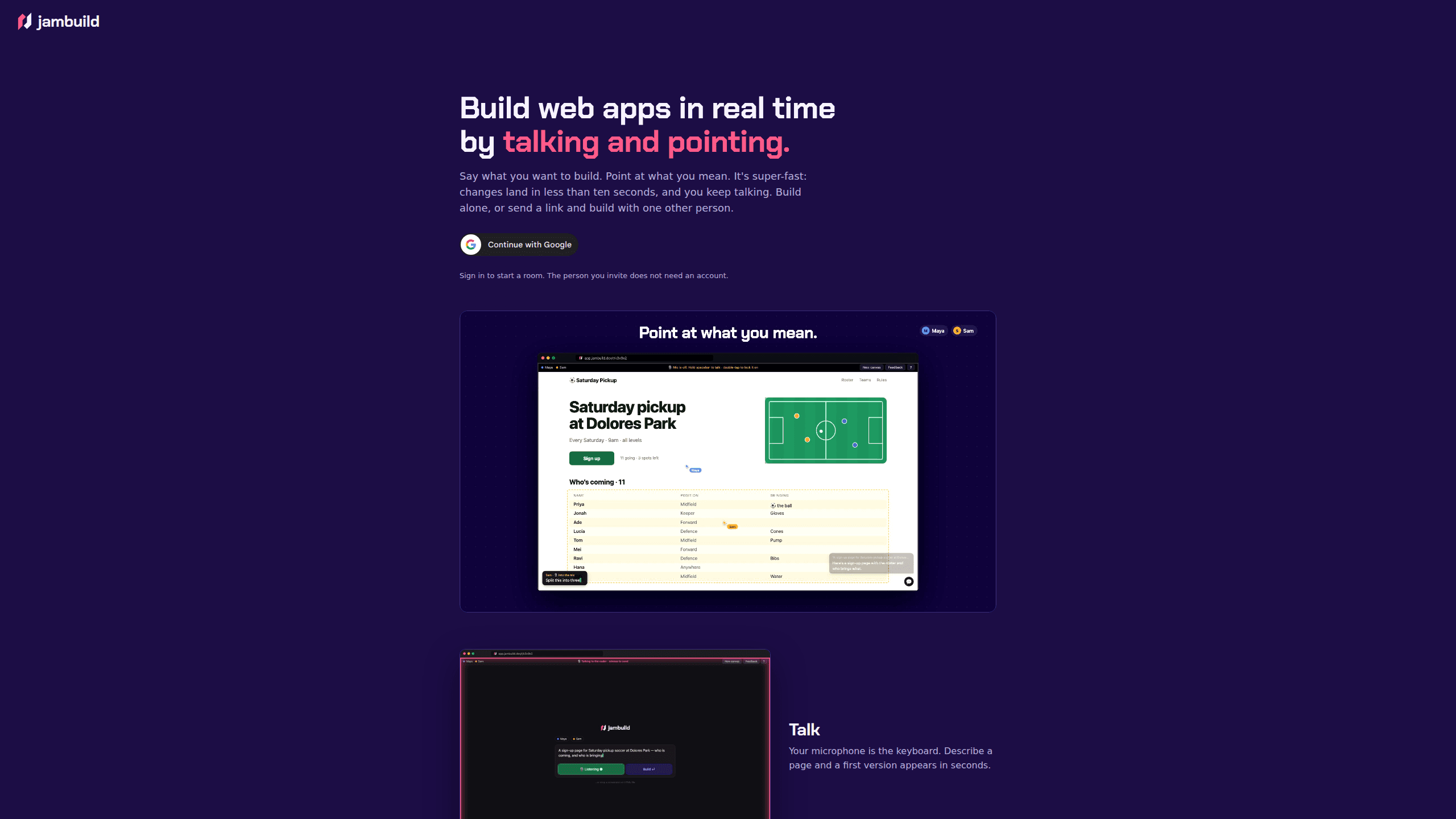
About jambuild
What Is jambuild
jambuild is a prototyping tool for people who would rather describe a page out loud than write a prompt. You open a room in Chrome on a desktop, speak, and a first version of the page appears within seconds. From there you keep talking while the page keeps changing. The product launched publicly at the end of September 2026, built by Rajiv Ayyangar, and it runs entirely in the browser at app.jambuild.dev.
The pitch is blunt: build web apps by talking, and let your cursor fill in the nouns. What separates it from text-only AI builders is the pointing. Move your cursor over the page and whatever sits under it lights up, for you and for anyone else in the room. Say "make this bigger" or "move that under the headline" and the instruction has a target instead of a description. That single change removes most of the guesswork in a normal prompt, where you spend half your words explaining which button you mean.
The constraints are real and worth knowing before you sign up. A room holds two people, not a team. It expects Chrome on a computer, and other browsers get a waitlist form instead of the editor. Free builds come with a daily limit, and you can lift that limit by attaching your own API key. No export or hosting path is documented on the site, so treat what you build as something to review and iterate on rather than ship.
Getting Started
- Open jambuild.dev in Chrome on a desktop and sign in with your Google account. The person you invite does not need one.
- Describe the page you want. A first version shows up in seconds, and you can keep talking while it renders.
- Point at a section or click a specific element, then say what should change about it.
- Send the room link to one other person. They join as a guest, see the same page, and can talk and point too.
- Keep the loop going. Every line you say to the builder is transcribed and stored with the prototype, so you can look back at how a decision was made.
Product Information
A quick look at jambuild's pricing, supported platforms, and performance.
Best for
The users, tasks, and scenarios where this tool fits best.
Users
- Non-technical founders
- Product managers
- Designers working with a developer
Tasks
- Drafting a first page layout
- Reworking an existing layout with someone else
- Testing copy in place
- Mocking up an internal tool
Scenarios
- A remote pairing session where one person drives the voice and the other drives the pointer.
- A client call where the page changes while the client is still describing what they want.
- An early-stage idea review, where the cheapest way to explain a concept is to build a rough version of it live.
Key features
Talking replaces typing
Your microphone does the work of a keyboard. Describe a page in plain speech and a first version appears in seconds, which means you can think out loud instead of composing a prompt. Voice coding usually means dictating one long instruction and hoping it lands. Here the speech is transcribed by Deepgram as you go, and you keep adding to it.
Pointing that both people can see
Hovering over the page highlights whatever is under your cursor, and the same highlight shows up on your collaborator's screen. You can say "this card" and both of you are looking at the same card. That shared cursor is the part most AI builders leave out, and it is what makes multiplayer vibecoding feel different from screen sharing a solo session.
Click to target one element
A click narrows the instruction to a single element. Say what should happen to it, and the change lands in seconds rather than reshaping the whole page. Small edits stay small.
Rooms built for two
Send a link and the other person joins without creating an account. They type a name, land on the same page, and can speak and point alongside you. Collaborative prototyping normally means passing a Figma file back and forth. Here both people act on the running page. The two-person cap keeps the room legible. It also means jambuild is not a replacement for a team workspace.
A change loop measured in seconds
The site promises changes in less than ten seconds, and the interface is built around staying in that rhythm. You keep talking while the page updates, so a session reads more like a conversation than a series of submissions.
Bring your own model key
Free builds run against a daily limit. Add your own API key and the limit lifts. Your key stays in the browser, travels with each build request, and is not stored on the server, which matters if you are spending your own credits.
Pros and cons
Pros
- Point and talk beats writing a prompt. Voice plus pointing cuts the explaining. You spend words on what you want, not on which element you mean.
- The invited person joins in one click and needs no account, which removes the usual signup friction in a live session.
- Changes arrive in seconds, so the tool supports thinking out loud instead of long prompt drafting.
- Free daily builds are enough to judge whether the workflow suits you before you spend anything.
- The transcript stays with the prototype, giving you a trail of decisions you can revisit later.
Cons
- Chrome on a desktop is the only supported setup. Safari, Firefox, and phones get a waitlist form, so anyone outside that window cannot try it.
- Two people per room. There is no way to bring a third collaborator or split work across seats.
- No export or hosting is documented, which limits jambuild to prototyping rather than production work.
- Anyone holding the room link can open the prototype and edit it. For anything sensitive, that means trusting the people you send it to.
Frequently asked questions
It is a browser-based tool for building web app prototypes by speaking and pointing. You describe a page, hover or click on what you mean, and the page updates in seconds. One other person can join your room through a link.
Related content
Explore related tools, skills, and articles for jambuild.
jambuild Alternatives

Base Code
Base44 (Wix) · Coding · ProductivityBase Code is a shared cloud development environment from Base44. Teammates describe changes to an existing GitHub codebase in chat, preview them live and send them back as pull requests.

Google EmbeddingGemma 2
Google DeepMind · Writing · Image · CodingGoogle EmbeddingGemma 2 is a 740M-parameter open model that turns text, code, images, audio, and video frames into vectors in one 768-dimension space, running on phones and laptops.

GitGlow
GitGlow · Coding · ProductivityGitGlow is a local-first desktop Git client that lets independent developers review their own code and their AI agents' changes in one place before shipping.