

JellyNet
JellyNet · Coding
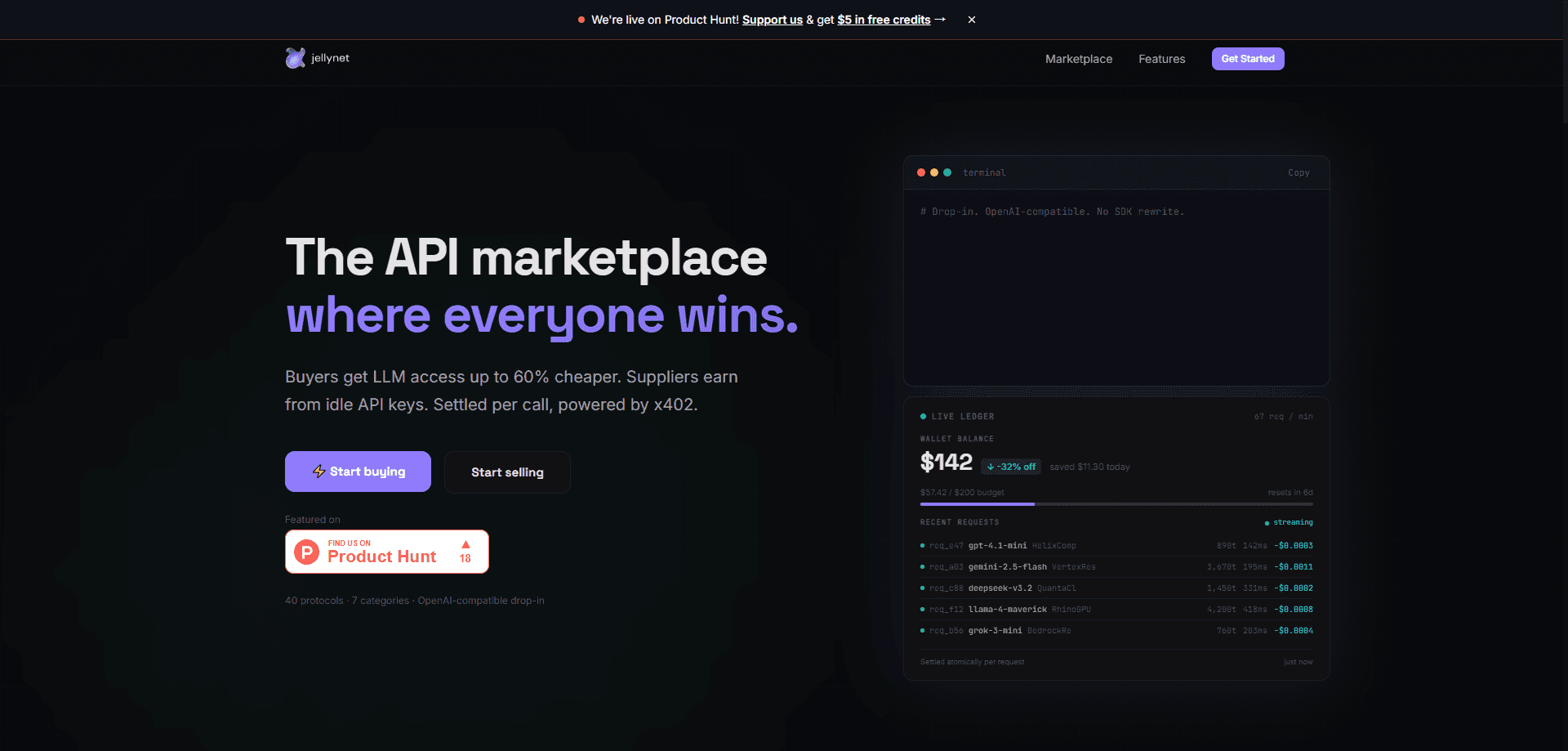
JellyNet is an agentic API marketplace that gives developers and AI agents one OpenAI-compatible endpoint for 40+ LLM providers, covering text, image, audio, and embedding models. Buyers pay per call, humans through Stripe and agents through the x402 protocol on Solana in USDC, while suppliers earn per consumed token. There's no SDK rewrite and no account to provision for agent traffic.
About JellyNet
What Is JellyNet
JellyNet is a marketplace that sits between people who need LLM capacity and people who have spare capacity to sell. On the buying side, you point any OpenAI-compatible client at JellyNet's endpoint and call models from OpenAI, Anthropic, Google, Meta, Mistral, DeepSeek, xAI, Groq, and a long list of others. On the selling side, you list unused API keys, proxy capacity, or spare compute, set a price, and get paid per request in USDC.
The pitch is cost and flexibility. JellyNet says buyers pay up to 60% below retail on the example flow it publishes (claude-sonnet-4.6 at a buyer rate of $1.99 per 1M tokens against a supplier payout of $1.79, with JellyNet taking a 10% cut of supplier revenue). Every transaction runs through a visible ledger, so you can trace what each request cost.
The main limit is maturity. JellyNet relies on the x402 payment standard, which is young, and settlement happens on Solana in USDC, so agent buyers need a funded wallet and a working x402 client. Humans who'd rather stick with cards use Stripe instead. If you're not comfortable with crypto rails or you need enterprise contracts and SLAs, this isn't built for that yet. I'd also treat the published savings as an example rather than a guarantee across every model.
Getting Started
- Create a JellyNet account with an email or a Stripe-backed signup if you're paying as a human, then generate an API key from the dashboard.
- Set your base URL to
https://api.jellynet.net/v1and point any OpenAI-compatible client or SDK at it. - Send a request with your chosen model (for example,
gpt-4oorclaude-sonnet-4.6) exactly as you would against OpenAI. - For agent traffic, skip the key. Hit the endpoint, read the standard
402 Payment Requiredresponse, pay the quoted USDC amount on Solana, and retry with theX-Paymentproof header. - Watch spend in the live ledger, which itemizes requests, token counts, latency, and cost per call.
Product Information
A quick look at JellyNet's pricing, supported platforms, and performance.
Best for
The users, tasks, and scenarios where this tool fits best.
Users
- Indie developers and small teams
- AI agent builders
- Suppliers with idle capacity
Tasks
- Swapping between providers without code changes
- Running high-volume, low-value inference
- Building agentic workflows that buy compute on their own
Scenarios
- Prototyping across many models
- Cost-capping a production app
- Tapping spare capacity for a side project
Key features
OpenAI-Compatible Drop-In Endpoint
JellyNet exposes a single API that matches the OpenAI request shape, so existing OpenAI SDK, Anthropic SDK, Vercel AI SDK, Cursor, and Claude Code setups work by changing the base URL and key. There's no new SDK to learn and no request format to rewrite. For teams already shipping against OpenAI, that's the difference between a config change and a migration project.
40+ Providers Behind One Key
Text, image, audio, and embedding models from OpenAI, Anthropic, Google Gemini, Meta Llama, Mistral, Cohere, DeepSeek, xAI Grok, Groq, Together AI, Perplexity, ElevenLabs, Stability AI, Replicate, Hugging Face, AWS Bedrock, Azure OpenAI, Fireworks AI, fal.ai, Jina, and Voyage AI all sit behind one credential. Instead of juggling a dozen dashboards and billing relationships, you manage one. The tradeoff is that you're trusting JellyNet's routing layer to stay current with each provider's API changes.
Pay-Per-Call x402 Settlement for Agents
The x402 flow is JellyNet's standout feature, and it's the part that makes x402 payments work in practice. An agent sends a request, gets back an HTTP 402 with the exact USDC amount and a payTo address, pays on Solana, and retries with proof, all in one round trip. No API keys. No accounts. No wallet UI for the agent to manage. It's a genuinely clean design for autonomous systems. It does depend on the x402 standard maturing, and on agents having funded wallets.
Automatic Failover and Routing
JellyNet advertises automatic failover across its supplier pool, so a request that hits an unavailable supplier can route elsewhere rather than failing outright. For applications that can't tolerate a single provider's outage, that redundancy has real value. How well failover holds under heavy load is hard to verify from the outside, so treat it as a stated capability rather than a proven one.
Transparent Live Ledger
Every request shows up in a ledger with the model, token count, latency, and cost, settled atomically per call. You can see a running budget. You can see how much you've saved against retail. For cost-conscious teams, that granularity beats squinting at a monthly invoice trying to figure out which feature burned the budget.
Supplier-Side Monetization
Sellers list unused API keys, IP addresses, or spare compute, set a price, and earn per consumed token, with Stripe payouts and x402 readiness. The dashboard is built to be usable without deep technical skill. Paste a key. Set a price. Go live. The obvious risk is that income only materializes if buyers actually route traffic to your listing.
Pros and cons
Pros
- One OpenAI-compatible endpoint covers 40+ LLM providers across text, image, audio, and embeddings.
- Published example pricing shows buyers paying up to 60% below retail, with a transparent 10% platform cut.
- Agent-friendly x402 flow lets AI agents pay per call in USDC on Solana with no account or key.
- Live ledger itemizes cost, tokens, and latency per request, which makes budgeting concrete.
- Suppliers can monetize idle capacity with minimal setup and per-token payouts.
Cons
- x402 and Solana-based USDC settlement are still young, so crypto-comfortable users are better served than card-only teams.
- Sample savings of up to 60% come from JellyNet's own published example and won't hold for every model or every call.
- Relying on a marketplace routing layer adds an intermediary between you and your model provider, which matters for compliance and data handling.
- No clear enterprise tier, SLA, or formal support contract is documented, so it's a poor fit for regulated or mission-critical deployments.
Frequently asked questions
JellyNet is an agentic API marketplace. It routes requests to 40+ LLM providers through one OpenAI-compatible endpoint and settles payment per call, letting buyers get discounted inference and suppliers sell spare capacity.
Related content
Explore related tools, skills, and articles for JellyNet.
JellyNet Alternatives
Forefront
Forefront · CodingForefront is a web platform for building with open-source AI. It lets you fine-tune leading open-source language models on your own data, evaluate how they perform, and run them through an API or export them to host yourself. Developers who want the convenience of a closed-source platform but insist on owning their models and data are the target audience here.

Startkit
StartKit.AI · CodingStartkit is a boilerplate for building AI SaaS and AI wrapper products. Think of it as an AI startup boilerplate with the boring parts already wired up: authentication, Stripe and Lemon Squeezy payments, usage limits, transactional email, and an AI API starter that talks to OpenAI, Anthropic, Groq, or Llama. You clone the repo, set your price, and start on the part of your product that people actually pay for. It's Next.js under React and Tailwind, so most of the boilerplate code already feels familiar.
Testim
Tricentis · CodingTestim is an AI-powered test automation platform for building and running end-to-end tests across web, mobile, and Salesforce applications. It leans on machine learning to keep tests stable when an interface changes, so teams spend less time fixing broken selectors. Not bad for an automated testing tool you can start using today. You create tests by recording actions in a browser, then optionally add JavaScript when you need more control. It's a solid pick for busy QA teams.