

Jina Debug
Chennchuu Inc. · Coding
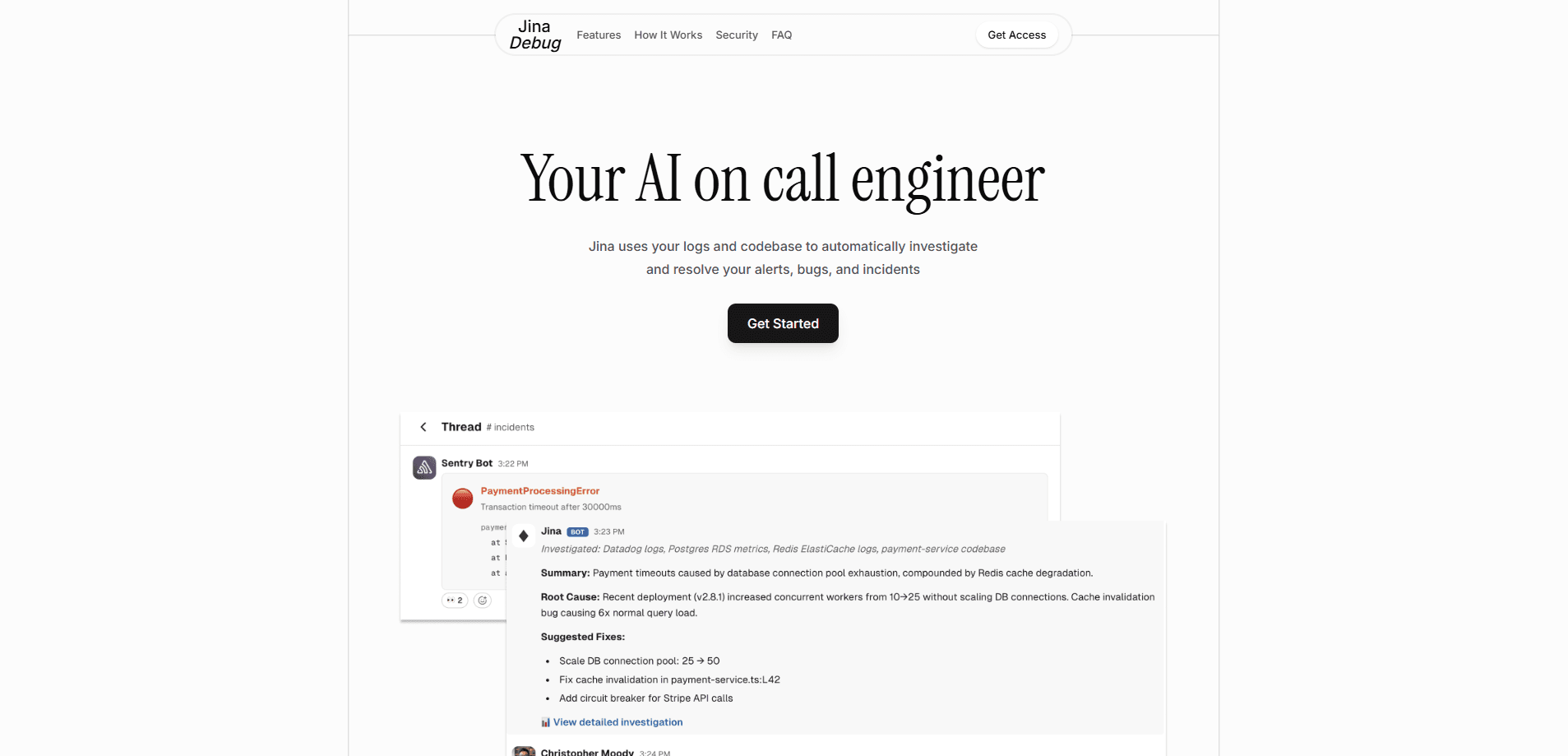
Jina Debug is an AI on-call engineer that automatically investigates and resolves alerts, bugs, and incidents. It plugs into your observability stack, codebase, GitHub, and Slack, then learns how your team handled past issues so it can act on new ones. When an alert fires, it pulls signals from across your systems, proposes a fix as a pull request, and waits for human approval before anything touches production. Think of it as automated alert investigation that runs before you even open your laptop. It's a focused take on AI incident resolution for teams that deal with frequent alerts and want to cut down on the manual digging that eats up on-call hours.
About Jina Debug
What Is Jina Debug
Jina Debug is an AI on-call engineer that watches your alerts and does the first round of investigation for you. Instead of a human opening five dashboards at 3 a.m., Jina reads logs, checks the codebase, and traces the root cause on its own. It then writes up the finding and, when it can, drafts a fix. That's the whole pitch in one line: it's the AI SRE tool that handles triage so you don't have to.
The tool is aimed at engineering teams, SREs, and DevOps folks who handle a steady stream of alerts. Its goal is simple: reduce alert fatigue and shorten the time between "something broke" and "we know why." So who actually needs this? Teams drowning in pages. This kind of on-call automation leans on your runbooks and on how you resolved issues before, so its suggestions get more specific to your architecture over time.
The most important limit is trust by design. Jina doesn't push to production on its own. Every fix arrives as a pull request, and admins control who can approve and apply changes. That caution is the point, but it also means you still need a human in the loop. Pricing isn't published either, so you have to talk to the team before you can judge cost.
Getting Started
- Connect your stack: link your observability tools like Datadog or Sentry, your code repository on GitHub or GitLab, your cloud providers, and Slack.
- Share your runbooks: upload the playbooks your team already uses so Jina learns how you handle alerts.
- Add Jina to Slack: it monitors alerts in your workspace and posts its investigation automatically.
- Review its findings: when an alert fires, Jina investigates and reports back; you can also chat with it in the webapp during a major incident.
- Approve the fix: Jina opens a pull request for any change, and an approved admin applies it.
Product Information
A quick look at Jina Debug's pricing, supported platforms, and performance.
Best for
The users, tasks, and scenarios where this tool fits best.
Users
- On-call engineers
- SRE and DevOps teams
- Engineering managers
Tasks
- Root-cause investigation
- Noise reduction
- Runbook execution
- Incident documentation
Scenarios
- A spike in error rates at night
- A recurring bug that keeps tripping the same alert
- A major outage with several teams involved
Key features
Automatic alert investigation
When an alert fires, Jina starts investigating right away by pulling signals from your observability tools, logs, and codebase. It builds a picture of what changed and why, so the person on call gets a short explanation instead of a wall of raw data. No dashboards. No guessing. This is the core of the "AI on-call engineer" idea: the first 20 minutes of triage happen without you.
Slack-native workflow
Jina lives in Slack, where most incident chatter already happens. It posts its findings to your channels, lets you ask follow-up questions, and can run investigations on demand during a big incident. No new tool to learn. You don't have to open a separate dashboard to use it.
Runbook-driven fixes
You upload the runbooks your team already has, and Jina follows them. When a match fires, it executes the playbook and prepares a fix. Simple as that. That means the automation reflects how your team actually works, rather than a generic set of rules the vendor decided on.
Pull-request-based safety
Jina never changes production on its own. Every fix comes as a pull request for review, and admins control who can apply changes. Preview and testing environments come before deployment. That's the right order. It's a deliberately cautious setup, which is what you want from something touching live systems.
Semantic alert grouping
The tool groups similar alerts by meaning, so the same root problem doesn't fire a dozen separate pages. It also routes issues to the right team members based on expertise and availability. Fewer duplicate pages. A clearer owner per issue.
Historical intelligence and knowledge base
Jina records how each issue was resolved and keeps building on that record. Over time it can suggest fixes that match how your team solved similar problems before. That's the whole point. It also documents resolutions automatically, which turns scattered fixes into a searchable knowledge base.
Security and audit controls
Data is encrypted in transit and at rest, credentials are stored securely with key rotation, and code and log access is read-only by default. Every investigation and action is logged with timestamps and user attribution, with exportable audit logs for compliance and configurable retention.
Broad integrations
Jina connects to monitoring tools like Datadog and Sentry, communication via Slack, code repositories on GitHub and GitLab, and cloud platforms including AWS, Google Cloud, Azure, and Vercel. Most teams are covered out of the box. Custom sources can be wired in through its API.
Pros and cons
Pros
- Handles the first round of incident investigation automatically, which cuts the slowest part of on-call triage.
- Safety-first design: fixes arrive as pull requests and never hit production without human approval.
- Learns from your own runbooks and past resolutions, so suggestions fit your architecture.
- Slack-native and works with the tools most teams already run, including Datadog, Sentry, and GitHub.
- Detailed audit logs with timestamps and user attribution support compliance and reviews.
Cons
- Pricing isn't published, so you can't estimate cost without contacting the team first.
- No free plan is listed, which makes it hard to try before committing.
- It still needs a human to review and approve every fix, so it speeds up triage more than it removes work.
- The setup depends on well-written runbooks and clean integrations; thin documentation limits how useful the automation gets.
Frequently asked questions
Jina Debug is an AI debugging tool that automatically investigates and resolves alerts and incidents. It reads your logs and codebase, explains what went wrong, and prepares a fix as a pull request for your team to approve.
Related content
Explore related tools, skills, and articles for Jina Debug.
Jina Debug Alternatives
Forefront
Forefront · CodingForefront is a web platform for building with open-source AI. It lets you fine-tune leading open-source language models on your own data, evaluate how they perform, and run them through an API or export them to host yourself. Developers who want the convenience of a closed-source platform but insist on owning their models and data are the target audience here.

Startkit
StartKit.AI · CodingStartkit is a boilerplate for building AI SaaS and AI wrapper products. Think of it as an AI startup boilerplate with the boring parts already wired up: authentication, Stripe and Lemon Squeezy payments, usage limits, transactional email, and an AI API starter that talks to OpenAI, Anthropic, Groq, or Llama. You clone the repo, set your price, and start on the part of your product that people actually pay for. It's Next.js under React and Tailwind, so most of the boilerplate code already feels familiar.
Testim
Tricentis · CodingTestim is an AI-powered test automation platform for building and running end-to-end tests across web, mobile, and Salesforce applications. It leans on machine learning to keep tests stable when an interface changes, so teams spend less time fixing broken selectors. Not bad for an automated testing tool you can start using today. You create tests by recording actions in a browser, then optionally add JavaScript when you need more control. It's a solid pick for busy QA teams.