

Jotlify
Jotlify · Writing · Leaning · Business · Other
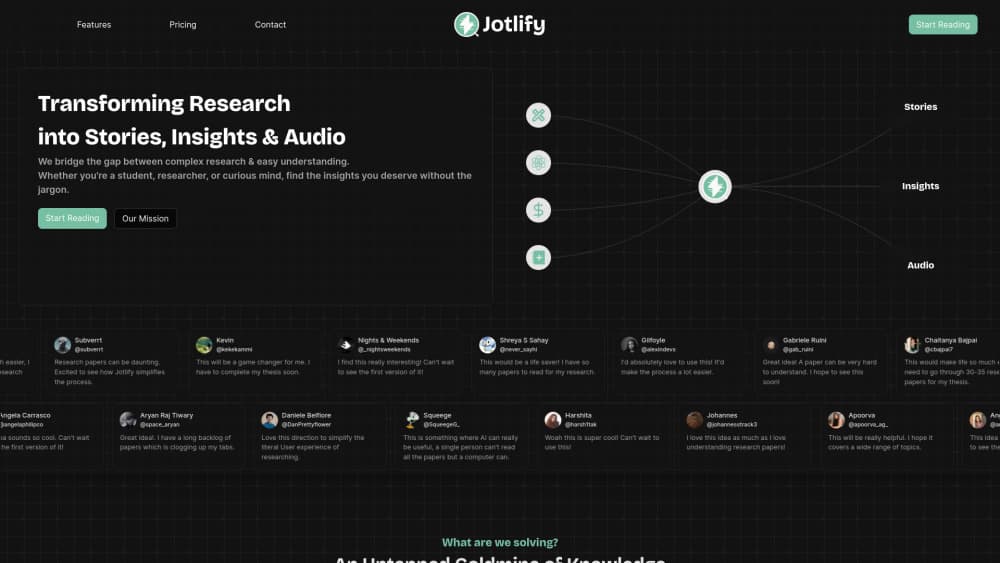
Jotlify turns dense research papers into plain-language stories, key insights, and audio you can play anywhere, then answers follow-up questions about the study.
About Jotlify
What Is Jotlify
Jotlify is an AI research paper summarizer that rewrites academic papers as short, readable stories. Pick a title from its library or upload your own PDF, and it returns a one-page brief, a handful of key takeaways, and an audio narration you can listen to on a commute or during a workout. The company is based in Jagadhri, India, and the product launched on Product Hunt in August 2024.
The problem it targets is familiar to anyone with a reading list. Most papers die at the abstract. Jotlify's answer is to rewrite rather than excerpt, pulling the so-what out of the methods section and putting it in plain sentences. The library covers more than 20 fields, draws from PubMed, arXiv, OSF, and publisher feeds, and adds roughly 5,000 new titles each week.
Two limits matter before you sign up. Summaries are AI generated, so you still need to check numbers and claims against the linked original, especially for anything you plan to cite. The public library leans on open-access work, so paywalled papers only reach the tool if you upload the PDF yourself.
Getting Started
- Create a free account with Google, Apple, or an email one-time code. New accounts get a 7-day all-access trial.
- Search by keyword, author, DOI, or the semantic filter, or upload a PDF from your own collection.
- Read the story summary, play the audio narration, and ask the AI assistant about any part you want explained.
- Save notes, export highlights to Notion, or share a brief link with a teammate.
Product Information
A quick look at Jotlify's pricing, supported platforms, and performance.
Best for
The users, tasks, and scenarios where this tool fits best.
Users
- Graduate students
- Busy professionals
- Curious readers
- Research teams
Tasks
- Skimming a stack of new papers
- Listening instead of reading
- Understanding a methods section
- Merging several studies
Scenarios
- Weekly journal scanning
- Thesis or grant preparation
- Cross-field reading
Key features
Story Summaries Instead of Excerpts
Each paper becomes a short narrative that leads with the result and explains why it matters. It reads like an article rather than a trimmed abstract, which is the main difference from a standard AI PDF summarizer that just shortens text. Every brief links back to the original PDF so you can verify a number in one click.
Audio Narration
Any paper in the library can be turned into podcast-style narration, and the app remembers your playback position. Free accounts get 5 papers a month, the Researcher plan removes the cap. It's the feature that lets you listen to research papers on days when you can't sit at a screen.
AI Q&A on a Paper
A chat panel sits beside the summary. You can ask what dataset the authors used, how large the effect was, or what the study doesn't cover, and get an answer with the relevant section quoted. The 50-question monthly cap on the free plan goes quickly if you use it as a study aid.
Search and Multi-Paper Merge
Search works by keyword, author, or DOI, and a semantic filter surfaces papers whose titles don't match your wording. The merge tool takes several selections and writes one combined synthesis, which is useful for a research paper summary across a whole subfield rather than a single study.
Upload Your Own PDFs
You can drop in a preprint, a thesis chapter, or an internal white paper and get the same summary, audio, and Q&A treatment. Free accounts get 5 uploads a month, Researcher gets 100, and Researcher Pro is unlimited. Private-share links keep an uploaded draft out of the public library.
Notes, Highlights, and Sharing
Highlights can be clipped, tagged, and revisited from any device, and exports push them into Notion. Shared link cards let you send a finding to a colleague, and the top plan adds 5 team seats for private workspaces. Authors can also publish papers through Jotlify to reach its reader base.
Pros and cons
Pros
- The story format keeps the finding and drops the jargon, so a paper takes minutes instead of an hour.
- Audio narration plus synced position makes a reading backlog usable during commutes and workouts.
- Uploading your own PDF covers paywalled and unpublished work that the public library misses.
- The free plan is genuinely usable, with unlimited reading and 5 audio papers a month.
- Yearly billing cuts the Researcher plan from $15 to $10 a month, which is low for a daily research habit.
Cons
- Summaries are AI generated, so statistics and causal claims need checking against the original before you cite them.
- The free plan's 5 uploads and 50 AI questions run out fast during a literature review.
- There's no mobile app, only a browser interface, which is awkward for offline reading.
- Collaboration stops at 5 seats and the API sits behind the $24 plan, so larger teams hit a wall.
Frequently asked questions
Jotlify summarizes research papers. It rewrites a study as a plain-language story with key insights and audio, then lets you ask questions about the paper. Students use it for literature reviews, and professionals use it to keep up with a field.
Related content
Explore related tools, skills, and articles for Jotlify.
Jotlify Alternatives

Google EmbeddingGemma 2
Google DeepMind · Writing · Image · CodingGoogle EmbeddingGemma 2 is a 740M-parameter open model that turns text, code, images, audio, and video frames into vectors in one 768-dimension space, running on phones and laptops.

MePersona
MePersona, Inc. · Writing · Productivity · MarketingMePersona is an AI unified inbox for creators. It learns your voice, drafts replies to fan messages from 12 platforms, and sends only what you approve.

Fluence
Yay Software (Yannick Huchard) · Writing · Voice & Language · ProductivityFluence is an Android app that reads PDFs, EPUBs, Word files and web articles aloud, follows each sentence as it speaks, and answers questions about the text on the phone itself.