
Jotterly
Jotterly · Writing · Productivity
Jotterly is an AI note-taking app that turns plain notes into interactive study guides for students and busy learners who want faster review.
About Jotterly
What Is Jotterly
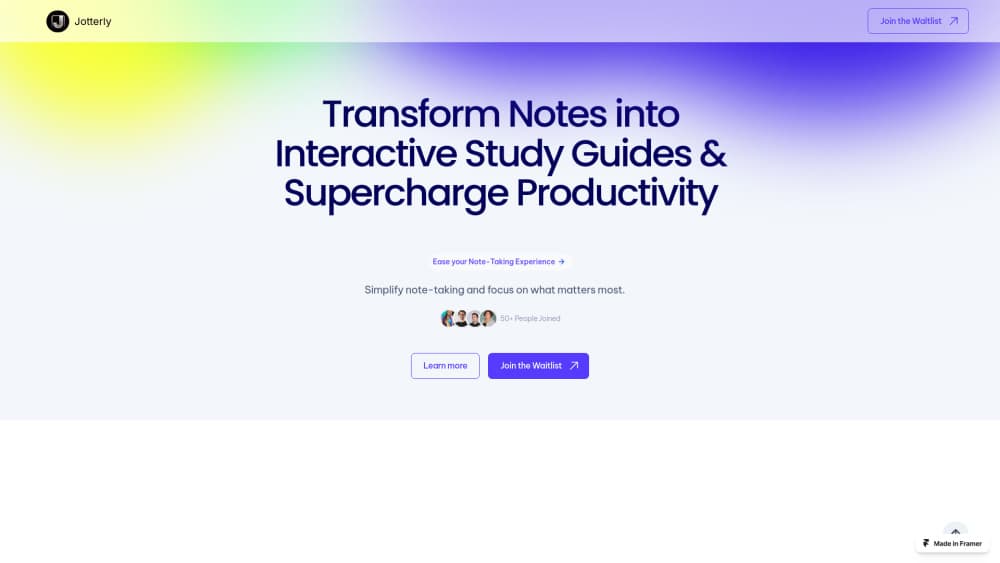
Jotterly is an AI-powered note-taking app built around one idea: notes should help you study, not just sit in a folder. Instead of leaving you with a wall of text after class, it reshapes what you wrote into interactive study guides. Think of it as an AI study guide generator that starts from your own notes. The pitch is simple. You take notes the way you already do, and the app does the boring conversion work.
Most note apps stop at storage and search. Jotterly pushes further by treating a note as raw material for review. The library describes the core promise as three things: turning notes into interactive study guides, smart organization that cuts down manual filing, and multilingual support so you can work in more than one language.
The catch is scope. So who shouldn't use it? This is a study and productivity tool, not a full document collaboration suite, so teams that need shared editing and enterprise controls should look elsewhere. It's also early, which means feature depth may still shift between updates. If you mainly need a place to archive meeting minutes, plain notes are enough. If your problem is remembering what you wrote, Jotterly is aimed at you.
Getting Started
- Go to the Jotterly website and create an account, or sign in if you already have one.
- Open a new note and type or paste the material you want to work with, such as lecture notes or a reading summary.
- Pick your languages if you're working across more than one, so the app handles the content in the language you wrote it in.
- Run the note through the study guide conversion and review what the AI produces.
- Organize the finished guide into your folders and return to it when you review.
Product Information
A quick look at Jotterly's pricing, supported platforms, and performance.
Best for
The users, tasks, and scenarios where this tool fits best.
Users
- Students
- Self-learners working in more than one language
Tasks
- Converting class notes into an interactive study guide
- Keeping notes organized
Scenarios
- The night before an exam
- Multilingual study
Key features
Notes to Interactive Study Guides
This is the feature Jotterly is built around. You feed it your notes and it produces an interactive study guide instead of a static block of text. That swap matters. Re-reading feels productive but does little; active recall is what actually moves material into memory. The value shows up when you have a lot of material and limited time before a test, which is when most students are stuck re-reading the same pages.
Smart Organization
Jotterly handles the filing that usually eats into your study time. This is the smart note organization side of the app at work. Instead of you building and maintaining a folder structure, the app groups related notes for you. Less sorting. It won't replace a deliberately designed system for a huge archive, but it removes most of the day-to-day upkeep.
Multilingual Notes
You can keep notes in the language you actually wrote them in. That makes Jotterly a practical multilingual note app for students reading in one language and studying in another, since it saves a translation pass. The library lists multilingual support as a core promise, not an add-on, so it's treated as part of the normal workflow. Not a minor detail if you study in a second language.
Study-First Workflow
The app treats review as the point, not an afterthought. Notes exist to be studied, so the output is shaped for that from the start. No reformatting. No rebuilding the page by hand. Practically, it means you spend less time reformatting and more time recalling, and over a semester that difference adds up.
Productivity Support
Beyond study guides, Jotterly markets itself as a productivity tool. The aim is a single place to capture and revisit material, so you don't bounce between a notes app and a separate study tool. The notes to study guide step is the whole point here. It's a reasonable setup for individual learners who want one tool instead of two, and power users with an existing system may find it light.
Pros and cons
Pros
- Turns existing notes into study guides instead of making you rewrite them.
- Multilingual support fits students who study across two languages.
- Smart organization reduces manual folder upkeep.
- Web-based, so nothing to install before you try it.
- Study-first design means the output is built for review.
Cons
- Early product, so features and limits may change between updates.
- Not a team collaboration suite, so shared editing isn't the focus.
- Fewer details are published about pricing tiers and API access.
- Best suited to individual learners rather than large institutions.
Frequently asked questions
Jotterly turns your existing notes into interactive study guides. You write or paste notes the way you normally do, and the app converts them into a format built for review, which saves the manual reformatting step.
Related content
Explore related tools, skills, and articles for Jotterly.
Jotterly Alternatives

Google EmbeddingGemma 2
Google DeepMind · Writing · Image · CodingGoogle EmbeddingGemma 2 is a 740M-parameter open model that turns text, code, images, audio, and video frames into vectors in one 768-dimension space, running on phones and laptops.

MePersona
MePersona, Inc. · Writing · Productivity · MarketingMePersona is an AI unified inbox for creators. It learns your voice, drafts replies to fan messages from 12 platforms, and sends only what you approve.

Fluence
Yay Software (Yannick Huchard) · Writing · Voice & Language · ProductivityFluence is an Android app that reads PDFs, EPUBs, Word files and web articles aloud, follows each sentence as it speaks, and answers questions about the text on the phone itself.