

Just Rewrite
Traxrift Pty Ltd · Writing · AI Detection
Just Rewrite is a browser-based AI writing assistant that rewrites, paraphrases, and fixes grammar in more than 100 languages, with tone controls, a caption generator, and a Chrome extension.
About Just Rewrite
What Is Just Rewrite
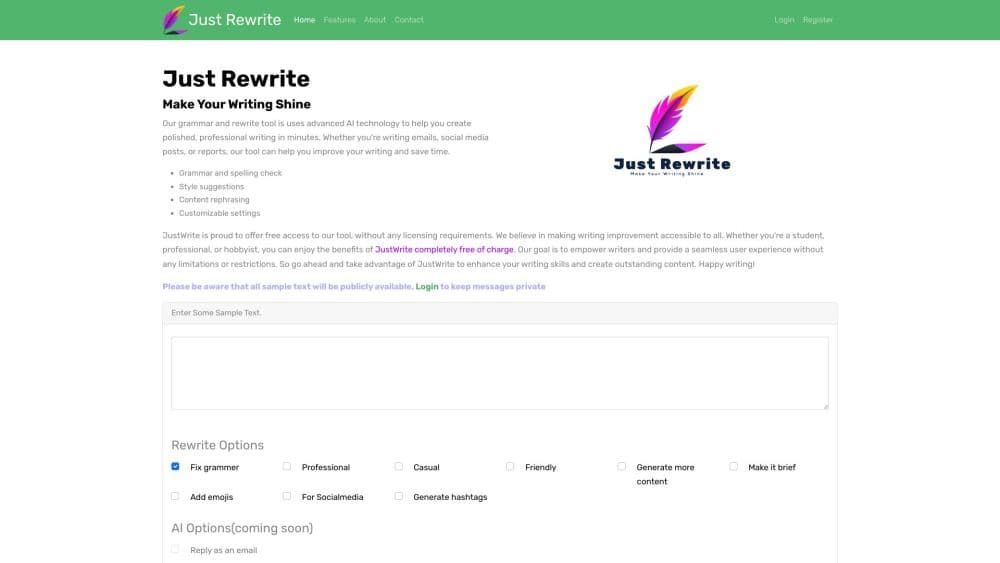
Just Rewrite is an AI paraphrasing tool that takes a block of text and gives you back a cleaner version of it. Paste a paragraph, pick an option such as Fix Grammar or Professional, and the tool returns a rewrite in a few seconds. The company behind it, Traxrift Pty Ltd, built it for people who write every day and don't want to open a full editor for a single awkward sentence.
The pitch is speed over depth. You won't find long-form document management or team workspaces here. What you get is a single box, a row of rewrite buttons, and a language menu with more than 100 entries, which is all most people need to rewrite text online. It runs on OpenAI models for the rewrite itself, and it leans on Google Translation Services for the language side, according to the company's own description of how the tool works.
The free tier tells you a lot about who this is for. It caps rewriting at 600 characters a day, which is roughly a short email or two social captions. That's enough to test the output on your own text, but not enough to run a blog on. Unlimited rewriting, the full set of tone styles, and the 12 caption styles sit behind the $10 monthly plan.
One more limit worth knowing before you start: there's no documented public API. Just Rewrite is built as a page you visit and a Chrome extension you install, not as a service you call from your own code.
Getting Started
- Open justrewrite.com and start typing in the input box. Guest mode lets you try a rewrite before you make an account.
- Sign up with an email address to keep your history and get the daily free allowance of 600 characters.
- Choose an option from the rewrite row: Fix Grammar, Professional, Casual, Friendly, Add Emojis, Hashtags, More Content, or Make It Brief.
- Pick the output language from the menu if you don't want the auto-detected one, then run the rewrite and copy the result.
- Install the Chrome extension if you'd rather rewrite inside Gmail, a social dashboard, or any other site with a text field.
Product Information
A quick look at Just Rewrite's pricing, supported platforms, and performance.
Best for
The users, tasks, and scenarios where this tool fits best.
Users
- Non-native English speakers
- Social media managers
- Small business owners writing their own copy
Tasks
- Cleaning up an email before sending
- Turning a stiff paragraph into a friendly one
- Shortening a bloated paragraph
- Writing captions in a second language
Scenarios
- Replying to messages all day
- Posting to several networks from one tab
- Rewriting inside a web app
Key features
Smart Rewriting Across More Than 100 Languages
The core rewrite is context aware rather than a synonym swap. It reads the sentence, keeps the meaning, and rebuilds the phrasing, which is why the output usually reads like a person edited it. The language menu lists more than 100 outputs, including regional variants such as Portuguese for Portugal or Brazil and both Chinese scripts. You can write in one language and paraphrase in 100 languages or more in the same pass, which turns the tool into a light translation helper as well.
Tone Controls for Professional, Casual, and Friendly
Three tone buttons sit in the main rewrite row, and each one changes register instead of just vocabulary. Professional tightens contractions and removes slang for client mail and reports. Casual loosens the sentence structure for blogs and social posts. Friendly warms the phrasing for customer messages. Tone of voice is the feature most people subscribe for, because the free plan leaves all three options locked.
Grammar and Spelling Correction
Fix Grammar is the one option free users get in full. It catches subject-verb disagreement, misplaced modifiers, punctuation errors, and spelling slips, then returns a corrected version you can copy straight into your draft. It works on the text you paste rather than scanning a whole document, so it suits short passages. For a long report you'd work through it in sections.
Caption Generator with 12 Styles
The caption generator produces short social copy from a prompt or from text you paste. Paid accounts get 12 styles, covering inspirational, humorous, travel, and foodie angles, and the free plan includes three of them. You can also write a custom instruction to steer the output when none of the presets fit. It's the newest part of the product and the one the site leads with.
Emojis, Hashtags, and Length Controls
Three smaller options round out the rewrite row. Add Emojis places emoji into the text rather than tacking them on the end. Hashtags generates tags matched to the content. Make It Brief compresses a long draft, and More Content expands a thin one with extra sentences. Together they cover most of the fiddly parts of posting, and all of them sit behind the paid plan except emojis.
Chrome Extension and AI Reply
The Chrome extension puts the rewrite buttons on any site with a text field, so you can fix a sentence in Gmail or a social dashboard without copying it into another tab. AI Reply uses the same idea in reverse: paste a message you received, and the tool drafts a reply you can edit. Both are convenience features, and both assume you're already signed in.
Pros and cons
Pros
- The free tier is usable without a card, with 600 characters a day and full grammar fixes.
- Tone control changes the register of a sentence, not just its word choice, which is rare at this price.
- More than 100 output languages in one box, so a single draft can become a caption in several markets.
- The Chrome extension removes the copy and paste step for anyone writing in a browser all day.
- Premium costs $10 a month or $99 a year, and the yearly plan works out about 17% cheaper.
Cons
- The free plan's 600-character daily cap is small, roughly one short email, and it resets rather than rolling over.
- There's no public API, so teams can't wire the rewrite into their own tools or publishing pipeline.
- Caption styles, hashtags, and the brief option are locked on the free plan, which makes the trial a narrow look at the product.
- Output is a rewrite of what you paste, so it can't research facts or check claims. Anything factual still needs your own review.
Frequently asked questions
Just Rewrite rewrites text you paste into it. You choose an option such as Fix Grammar, Professional, or Make It Brief, and the AI returns a revised version in a few seconds. It also generates social captions and can output the result in more than 100 languages.
Related content
Explore related tools, skills, and articles for Just Rewrite.
Just Rewrite Alternatives

Google EmbeddingGemma 2
Google DeepMind · Writing · Image · CodingGoogle EmbeddingGemma 2 is a 740M-parameter open model that turns text, code, images, audio, and video frames into vectors in one 768-dimension space, running on phones and laptops.

MePersona
MePersona, Inc. · Writing · Productivity · MarketingMePersona is an AI unified inbox for creators. It learns your voice, drafts replies to fan messages from 12 platforms, and sends only what you approve.

Fluence
Yay Software (Yannick Huchard) · Writing · Voice & Language · ProductivityFluence is an Android app that reads PDFs, EPUBs, Word files and web articles aloud, follows each sentence as it speaks, and answers questions about the text on the phone itself.