

KreadoAI
KreadoAI · Voice & Language · Video
KreadoAI is an AI video generator and avatar platform that turns text, links, and slides into localized clips in 140+ languages, built for marketers who need ads fast.
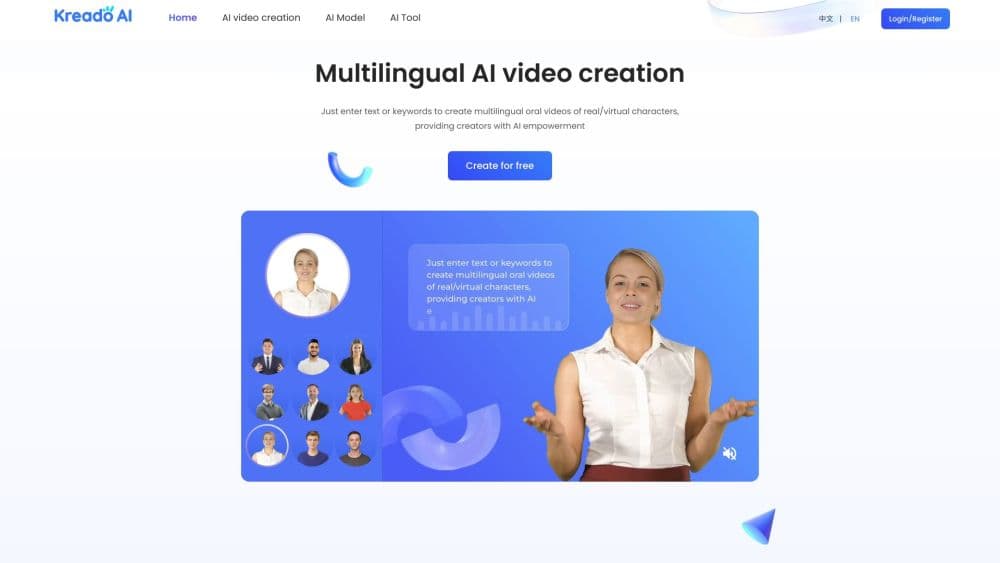
About KreadoAI
What Is KreadoAI
KreadoAI is a web based AI video creation platform and AI video generator built for marketing and localization work. You pick a digital presenter from a large library, paste a script or a product link, choose a voice, and the system returns a finished video with synced lip movement in minutes. The pitch is simple: skip the studio, the lighting, and the voice actors, and still get a spokesperson clip that fits the market you are selling to.
The problem it targets is multilingual content at scale. Hiring on camera talent and voice actors for every country is slow and expensive, and smaller brands often cannot afford it at all. KreadoAI replaces that pipeline with a text box and a 140+ language voice library, so a single script can become dozens of localized clips.
The main limits are on the creative side. Custom avatars and studio level output cost extra, output quality varies by input, and the deepest controls sit behind paid plans. Treat it as a fast production tool for marketing style video, not a filmmaking suite.
Getting Started
- Sign up at kreadoai.com with an email account. New users get 180 free K-coins on registration, no credit card needed, which covers roughly three minutes of video.
- Choose a starting point: text to video, URL to video, or a slides file. Paste your script, drop in a product link, or upload a PPT deck, then pick a language.
- Select a digital avatar from the library and match a voice. Filter voices by language, country, gender, and tone to land the delivery you want.
- Edit the draft with music, backgrounds, transitions, and text overlays, then set the aspect ratio for the platform you are posting to.
- Render, export, and share. Free renders carry a watermark, while paid plans remove it and unlock higher resolution output.
Product Information
A quick look at KreadoAI's pricing, supported platforms, and performance.
Best for
The users, tasks, and scenarios where this tool fits best.
Users
- Performance marketers
- Ecommerce sellers
- Content and social teams
- Trainers and educators
Tasks
- Turning a product URL into a video ad
- Localizing an existing video
- Cloning a presenter
- Generating ad creative at multiple sizes
Scenarios
- You are launching in five countries next week and have no local talent lined up
- You sell a niche product and a studio shoot costs more than the item
- Your regular host is unavailable but the backlog keeps growing
- You want to test ad angles cheaply
Key features
AI Digital Avatar Video
The core of the platform is a library of 1000+ digital avatars that speak your script with synced lip movement and gestures. You browse by age, ethnicity, and profession, or clone yourself into a digital twin from a short recording, so a single face can front an entire campaign without anyone on set.
Text, URL, and Slide to Video
KreadoAI accepts more than one starting point. Type a script, paste a product link, or upload a PowerPoint deck, and it builds a video around that input. The URL route is the standout for sellers, since a store listing becomes a draft ad in one move, and the slide route suits training and explainer content that already exists as a deck.
Voice Library and Cloning
Over 40,000 AI voices span 140+ languages, pulled from several speech providers and filterable by language, country, gender, age, and tone. You can clone your own voice for a one time fee and reuse it across languages, which keeps brand delivery consistent while reaching audiences that speak something other than your native tongue.
Multilingual Dubbing and Localization
A single script or clip can be translated and re-voiced across the full language range. It takes the place of hiring language specific voice actors. For brands running the same message in many markets, this turns localization from a bottleneck into a step you run in the editor.
Multi Size Ad Creative
Beyond avatar video, KreadoAI generates ad images and videos sized for the common placements, covering the ratios used by TikTok, Meta, and Google. You upload one concept and the platform reworks the composition for each format, which removes the manual resizing and recropping that eats design time.
AI Smart Canvas and Extra Tools
An AI editor handles trimming, transitions, stickers, and music, and a set of side tools round out the workflow. These include background removal, talking photo videos, face swap, and AI model shoots that generate commercial looking product images. A talking photo generator turns a still portrait into a speaking clip, and the AI model feature covers virtual try on and outfit swaps for fashion sellers in particular.
Pros and cons
Pros
- More than 1000 avatars and 40,000 voices in 140+ languages cover most markets, which is far more reach than a single talent pool.
- Video production drops from hours to minutes, and the brand reports around 70 percent time savings against a traditional shoot.
- A free plan with 180 K-coins and no credit card lets you test avatars and voices before committing to a subscription.
- Starting from a URL or PPT makes it easy to reuse content you already have, so a product page or deck becomes a video without rewriting.
- The built in editor and side tools, including background removal, mean most edits happen in one place instead of across apps.
Cons
- Studio quality custom avatars and full voice cloning cost extra, so high end output is not part of the base plan.
- Free videos carry a watermark and are capped at about three minutes of total video, which limits real project work.
- Output quality varies with the input script and avatar, so some clips need reworking, and rendering glitches are a known complaint.
- The K-coin system adds a layer of math, since different features burn different amounts, which makes cost harder to predict than a flat price.
Frequently asked questions
KreadoAI creates marketing and explainer videos with digital avatars. You feed it text, a product link, or a slide deck, and it produces a spokesperson video in one of 140+ languages, aimed at ads, localization, training, and social content.
Related content
Explore related tools, skills, and articles for KreadoAI.
KreadoAI Alternatives

Foley
Hanamori Labs, LLC · Voice & Language · Productivity · AI AssistantFoley is a voice to-do list that turns a spoken sentence into a filed task, complete with project, date and time, then helps you plan the day around what is already there.

HireKey
HireKey · Voice & Language · Productivity · LeaningHireKey is an AI job search copilot built by a former tech recruiter. It checks role fit, tailors resumes, runs interview practice and tracks every application.

Fluence
Yay Software (Yannick Huchard) · Writing · Voice & Language · ProductivityFluence is an Android app that reads PDFs, EPUBs, Word files and web articles aloud, follows each sentence as it speaks, and answers questions about the text on the phone itself.