

LALAL.AI
OmniSale GMBH · Voice & Language
LALAL.AI is an AI vocal remover and stem splitter that separates vocals, instruments, and noise from a track, then lets you download each piece as a clean, ready-to-use stem.
About LALAL.AI
What Is LALAL.AI
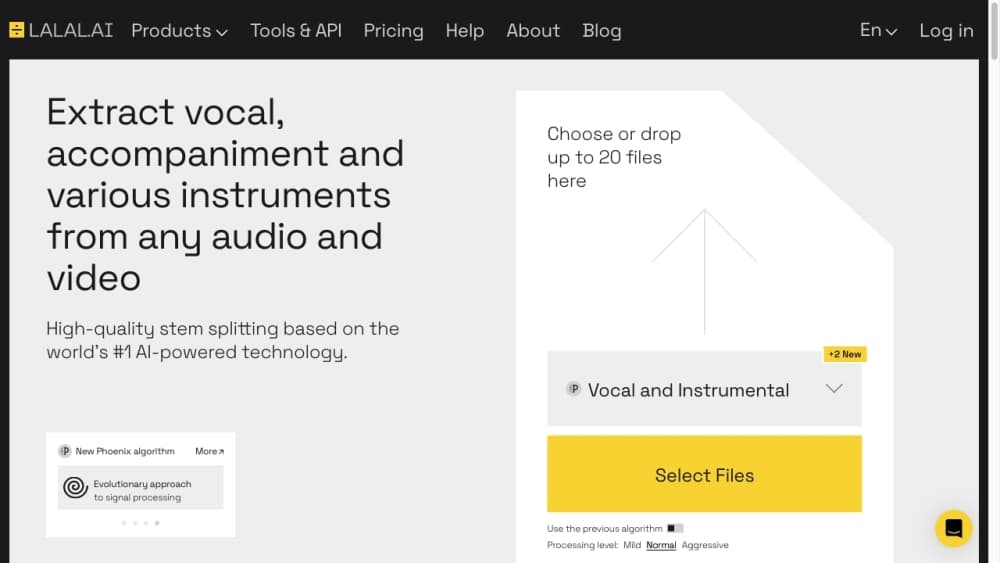
LALAL.AI is a web-based audio separation service built for musicians, producers, and content creators who need individual parts out of a finished track. It works as both a vocal remover and a stem splitter: upload a song, pick what you want pulled out, and the service returns separated tracks you can download. That covers most everyday jobs, from making a karaoke backing track to lifting a bassline for a remix.
The problem it solves is access. Multitrack files exist only if the artist released them, and pulling a clean instrumental out of a mixed master used to mean expensive software and steady hands. LALAL.AI instead runs the split in the cloud, so a phone or laptop is enough. The company says its neural networks, from Rocknet in 2020 up to Phoenix and newer models, handle this better than older tools, and it markets itself as the first service to offer 10 separate stems.
The limits matter for planning. The free Starter plan caps uploads at 200MB per file and gives only a short amount of relaxed queue time, so anything long runs faster on a paid tier. Fast queue minutes, batch processing, the VST plugin, and API access all sit behind paid plans too. Separation is also never perfect: dense mixes with heavy reverb can leave traces of the vocal in the instrumental, which you'll hear when you solo the stem.
Getting Started
- Create a free account at lalal.ai, which starts you on the Starter plan with a small relaxed-queue allowance.
- Drag in an audio or video file, or paste a link, and choose the quality you want from the preview settings.
- Pick the stem to extract, such as vocals or instrumental, and preview a short sample before committing.
- Run the full split, then switch to other stems like drums or bass without reuploading the file.
- Download the result, or upgrade to a paid plan for fast queue minutes, batch processing, and a higher upload limit.
Product Information
A quick look at LALAL.AI's pricing, supported platforms, and performance.
Best for
The users, tasks, and scenarios where this tool fits best.
Users
- Musicians and producers
- DJs and remixers
- Podcasters and content creators
- Music teachers and students
Tasks
- Making a karaoke or backing track
- Prepping a track for a remix or mashup
- Cleaning up a spoken recording
- Building a custom voice for narration or covers
Scenarios
- Producing content on a regular schedule
- Running a studio or agency workflow
- Practicing an instrument at home
Key features
Vocal Remover and Instrumental Extractor
The core job is pulling vocals from a track or stripping the instrumental so you can sing or play over it. Upload an audio file, video, or link, and the service returns the separated parts as downloadable tracks. This is the feature people mean when they search for a way to remove vocals from a song, and it is the fastest path to a karaoke version when no official one exists.
10-Stem Splitter
Beyond the basic two-way split, LALAL.AI separates vocals, instrumental, drums, bass, guitar, synth, strings, and wind instruments, along with lead and backing vocals. The company positions this as a 10-stem splitter, which is more granular than most tools that stop at four or five. You can generate one stem at a time and switch between them without reuploading, so the same track feeds every part of a project.
Multiple Neural Networks With Previews
The service runs several neural networks and lets you try more than one on the same track to compare output. You preview a short sample before running the full split, which saves minutes when you are testing which model handles a specific mix best. The newer networks, Phoenix among them, are the ones the company credits with its jump in separation accuracy.
Voice Cleaner and Noise Reduction
Voice Cleaner is a noise-canceling tool separate from stem splitting. It removes background music, mic rumble, vocal plosives, and other stray sounds from audio and video, which is what podcasters and journalists use to rescue a recording made in a noisy room. A newer network, Lynx, was added to this tool to improve results on harder material.
Voice Changer and Voice Cloner
Two voice tools round out the suite. The AI voice changer transforms your voice in music, recordings, or video, and it can shift the accent of a clone. The voice cloner builds a personalized voice model from your own recordings, which you save to your account and reuse any time, so narration, audiobooks, and cover vocals do not need you on the mic.
Apps, VST Plugin, and API
LALAL.AI runs in the browser and also ships as desktop apps for Windows, macOS, and Linux, plus iOS and Android apps. A VST plugin puts stem splitting and cleanup inside your DAW with local processing, so audio never leaves your computer. The API is built for developers and enterprise teams who want to automate separation at scale, and both the plugin and API sit on the Pro plan.
Pros and cons
Pros
- Splits a track into up to 10 stems, well past the four or five that most vocal removers manage, which gives remixers real parts to work with.
- Previews let you compare neural networks and hear the result before running a full split, so you waste fewer minutes on the wrong model.
- Works across web, desktop, mobile, and a VST plugin, so you can clean up audio in the studio or on a phone.
- Voice Cleaner, Voice Changer, and Voice Cloner turn a single-purpose splitter into a full voice toolkit.
- An API supports automated, large-volume processing for teams, not just one-off jobs.
Cons
- The free Starter plan gives only 10 minutes of relaxed queue time and a 200MB per-file upload cap, so longer or larger files push you toward a paid tier.
- Fast Queue minutes, batch processing, the VST plugin, and API access are hard-locked to paid plans, and the plugin needs Pro specifically.
- Heavy reverb or dense mixes can leak traces between stems, so the instrumental occasionally carries faint vocal bleed.
- Results depend on the network you pick, and the best-quality splits are not always the default one, which means some trial and error.
Frequently asked questions
LALAL.AI separates a song or recording into individual parts with AI. It pulls vocals from an instrumental, breaks a track into up to 10 stems like drums and bass, and cleans noise or background music out of spoken audio.
Related content
Explore related tools, skills, and articles for LALAL.AI.
LALAL.AI Alternatives

Foley
Hanamori Labs, LLC · Voice & Language · Productivity · AI AssistantFoley is a voice to-do list that turns a spoken sentence into a filed task, complete with project, date and time, then helps you plan the day around what is already there.

HireKey
HireKey · Voice & Language · Productivity · LeaningHireKey is an AI job search copilot built by a former tech recruiter. It checks role fit, tailors resumes, runs interview practice and tracks every application.

Fluence
Yay Software (Yannick Huchard) · Writing · Voice & Language · ProductivityFluence is an Android app that reads PDFs, EPUBs, Word files and web articles aloud, follows each sentence as it speaks, and answers questions about the text on the phone itself.