

Lara Translate
Translated · Writing · Voice & Language
Lara Translate is an AI translation service built by Translated that handles text, documents, images, and live audio across more than 200 languages. You paste a sentence or upload a whole file and get back a ready-to-use translation. Layout stays intact. That matters when an online document translation is meant to ship, not to be cleaned up by hand. So why not just use a free chatbot? The platform leans on a translation-tuned language model rather than a general-purpose chatbot. It also ships with a free tier plus an API for teams that need translation inside their own apps.
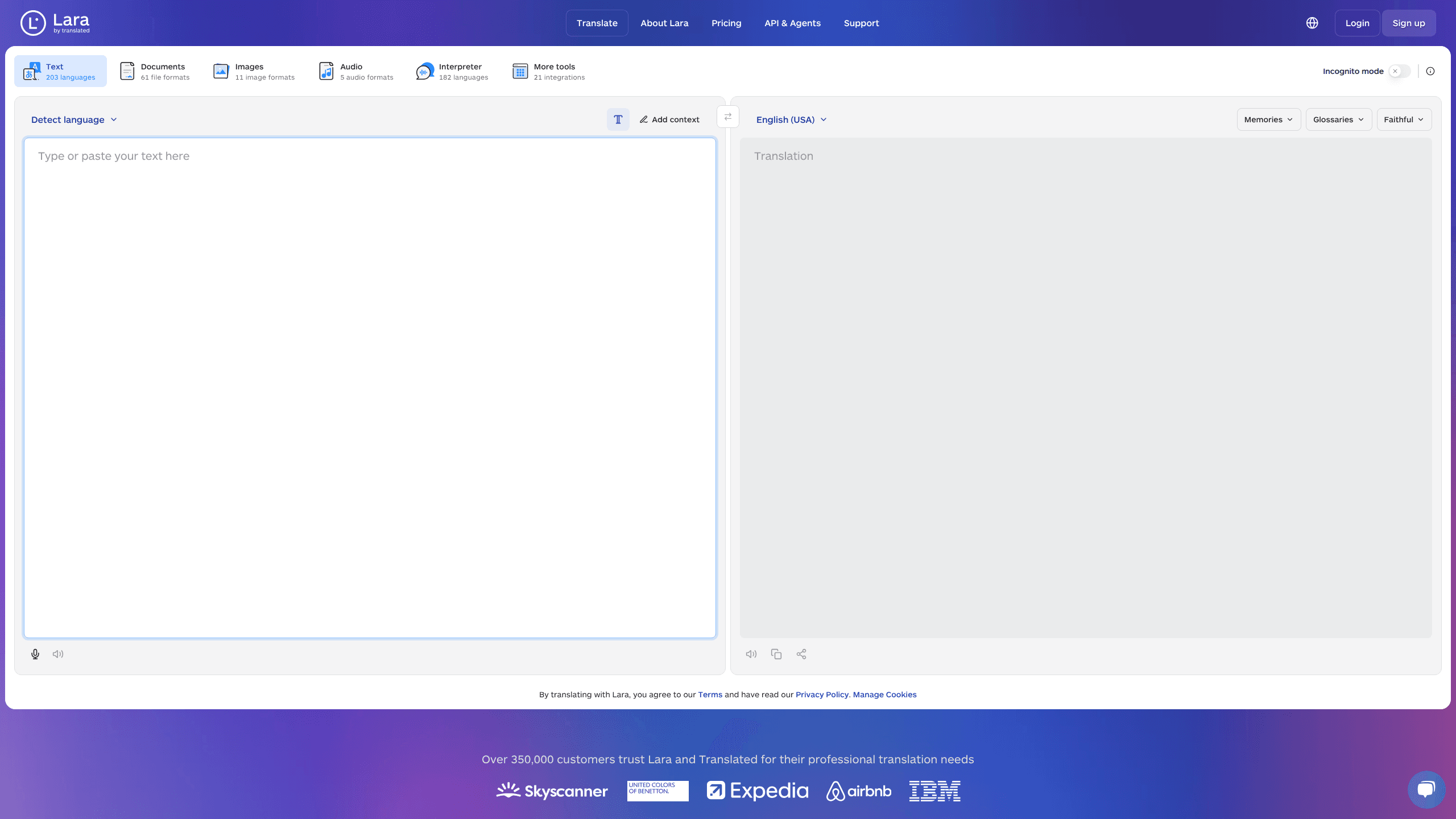
About Lara Translate
What Is Lara Translate
Lara Translate is the AI translator that Translated, a language services company, built for people who need professional-grade output without hiring a linguist for every page. It goes past plain text: the same workspace translates whole documents with their formatting intact, reads words off an image, and turns an audio recording into a translated file.
The core promise is accuracy over novelty. Lara runs on a language model trained on billions of professionally translated segments, so it handles industry terms and regional phrasing better than tools that treat translation as a side feature. That's the whole pitch. If your work involves contracts, manuals, or marketing copy that has to read naturally, that difference matters.
The biggest limitation is quota. Free users get a small monthly allowance. Heavy use of documents, images, or audio burns through characters fast. Serious users end up on a paid plan, and the most sensitive features, like human review, sit behind a sales conversation.
Getting Started
- Open laratranslate.com/translate and create a free account with your email or a Google login.
- Pick a mode: Text for quick phrases, or Documents, Images, Audio, and Interpreter for files and live speech.
- Set your source and target languages, then choose a translation style such as Faithful, Fluid, or Creative.
- Paste your text or upload a file, and optionally add context or a glossary term to guide the output.
- Review the result, then copy it or download the translated file in its original format.
Product Information
A quick look at Lara Translate's pricing, supported platforms, and performance.
Best for
The users, tasks, and scenarios where this tool fits best.
Users
- Freelance translators
- Product and support teams
- Researchers and students
Tasks
- Translating contracts and manuals
- Reading foreign menus, signs, or screenshots
- Sitting in on multilingual meetings
- Shipping localization at scale
Scenarios
- Preparing a multilingual product page
- Handling a client's mixed-language inbox
- Publishing subtitles or voiceovers
Key features
Translation Language Model
Lara runs on a model tuned specifically for translation rather than a general chatbot stretched to cover it. Translated claims the engine is twice as accurate as large generic LLMs and five times faster on the same material. Everyday content hides the gap. On technical or legal text, the difference in terminology handling shows up fast.
Style and Context Controls
You can pick between Faithful, Fluid, and Creative styles depending on how literal the output should be. It's a small choice with a big effect. The Add Context box lets you tell the engine what the text is about, which cuts down on the wrong-sense mistakes that plague translation tools on short or ambiguous phrases.
Document and Image Translation
Document mode handles 61 file formats and keeps the original layout, fonts, and images in place. You don't rebuild a slide deck after translation. If you translate documents online for a living, that's the feature you notice first. Image mode reads text out of 11 picture formats, which covers screenshots, photos of signage, and scanned pages.
Audio and Voice Interpreter
Audio translation converts recordings into a translated version you can share, across five audio formats. Handy for podcasts and training clips. The interpreter goes further and translates live speech in 182 languages. It's built for meetings and in-person conversations where you can't wait for a transcript.
Glossaries and Translation Memory
Teams can build shared glossaries that lock in how product names and technical terms get translated, plus a translation memory that reuses past work. That consistency is the part generic tools usually miss, and it's what keeps a large localization project from drifting apart across languages. Skip it and the drift is real.
Incognito Mode and Security
Incognito mode means your content is never stored, logged, or used for training. For anyone translating confidential material, that's the difference between a usable tool and a compliance problem. It's not a minor setting. Enterprise plans add data residency options and SSO on top.
API, SDK, MCP, and CLI Access
Every plan includes API access, with SDKs, an MCP server for AI clients, and a CLI for developers who want translation in a script or pipeline. Teams that outgrow the web interface can move the same engine into their own products without switching providers.
Pros and cons
Pros
- Handles text, documents, images, and audio in one place, so you rarely need a second tool.
- Document translation keeps layout and formatting, which saves hours of manual rebuilding.
- Incognito mode and enterprise security make it usable for confidential material.
- 350,000+ customers already rely on Translated, giving the platform a track record behind it.
- Free tier and a free API allowance let you test real work before paying.
Cons
- The free plan is limited to a few documents and 10,000 API characters a month, so anyone with regular volume hits the ceiling quickly.
- Human review, the most accurate option for legal or financial content, sits behind a sales contact instead of a self-serve button.
- The interface has a lot of modes and settings, which can feel crowded for someone who just wants to translate a sentence.
Frequently asked questions
It translates full documents while keeping the original design, reads text from images, and converts audio recordings into translated files. A live interpreter mode handles real-time conversation in 182 languages.
Related content
Explore related tools, skills, and articles for Lara Translate.
Lara Translate Alternatives

Google EmbeddingGemma 2
Google DeepMind · Writing · Image · CodingGoogle EmbeddingGemma 2 is a 740M-parameter open model that turns text, code, images, audio, and video frames into vectors in one 768-dimension space, running on phones and laptops.

MePersona
MePersona, Inc. · Writing · Productivity · MarketingMePersona is an AI unified inbox for creators. It learns your voice, drafts replies to fan messages from 12 platforms, and sends only what you approve.

Fluence
Yay Software (Yannick Huchard) · Writing · Voice & Language · ProductivityFluence is an Android app that reads PDFs, EPUBs, Word files and web articles aloud, follows each sentence as it speaks, and answers questions about the text on the phone itself.