

Lattice
Lattice · Writing · Voice & Language
Lattice is a free AI humanizer that rewrites stiff or template-sounding text by routing it through other languages and back, so the result reads like a person wrote it.
About Lattice
What Is Lattice
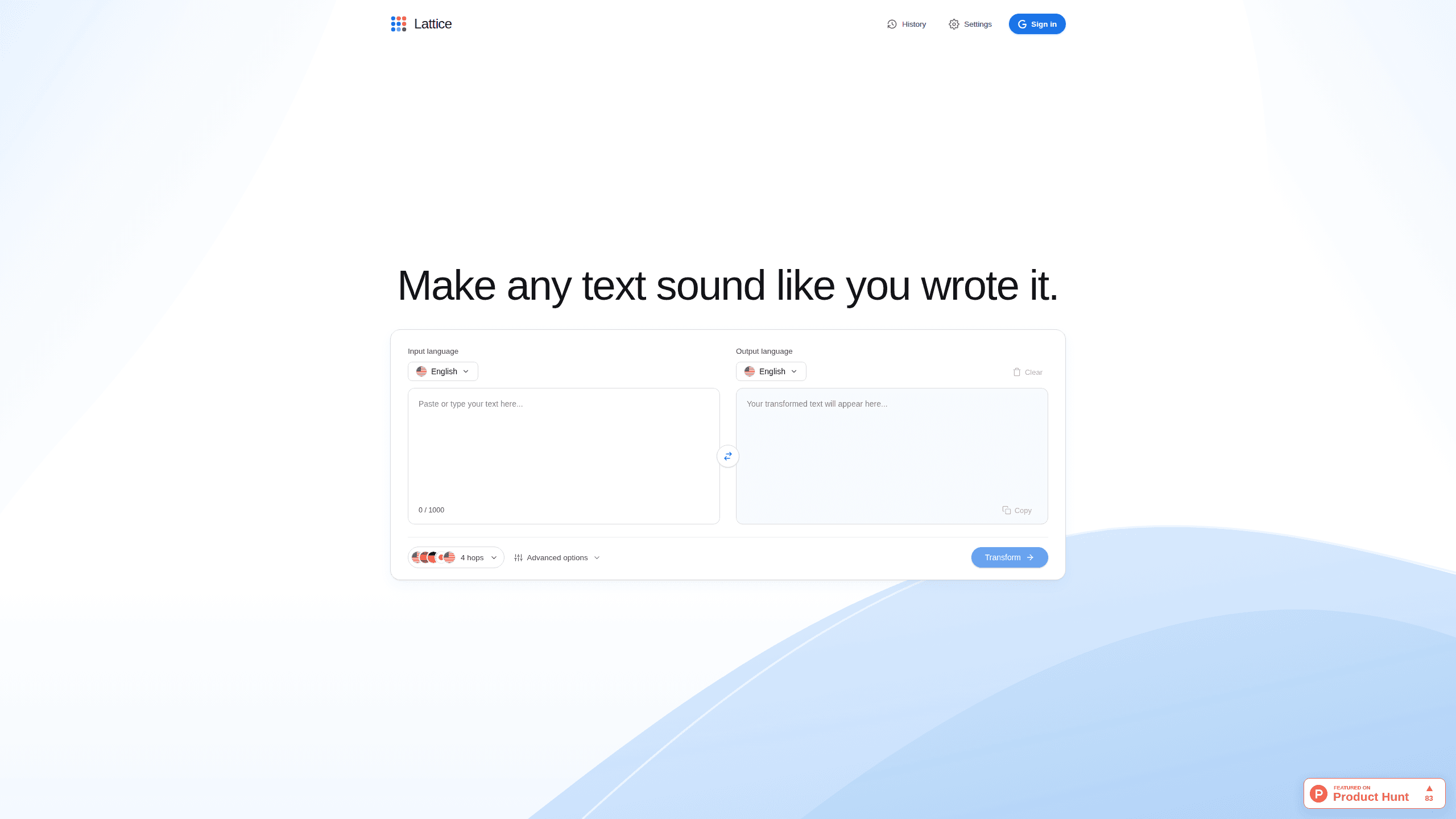
Lattice is a browser-based rewriting tool for anyone who has to send writing that sounds like themselves. You paste a draft into one box, choose a route of languages, and get a new version with the same facts in looser phrasing. Nothing is installed and there is no editor to learn, so you can try it on a single email before trusting it with anything longer.
The method differs from most rewriting tools. Rather than swapping words for synonyms, Lattice translates your text into another language, then another, then back into the one you wrote in. A sentence that survives that trip has to be rebuilt from meaning instead of habit, which is where the stock openers and filler transitions fall away. The example on the site runs English to Spanish to German to Japanese and back to English, and you can change the route. Think of it as an AI text rewriter that shifts the shape of a sentence rather than its vocabulary.
Two limits matter before you paste anything confidential. Each rewrite stops at 1,000 characters, so long documents take several passes, and the daily free allowance is not published as a fixed number. Sign-in goes through Google. Rewrite history stays in your own browser, and the company says text is used only to run the request. Read the output before you send it, because idioms and jokes are the first things a round trip bends.
Getting Started
- Open lattice.aryy.in and sign in with a Google account. The tool runs in the browser, so there is nothing to download.
- Paste up to 1,000 characters into the input box. A paragraph or two works best; a full report has to be split into sections.
- Check the language path. The default route passes through several languages, and you can edit it using the 16 available.
- Run the rewrite and compare both versions. Look at names, figures and technical terms first, since those are what a round trip is most likely to disturb.
- Copy the version you want. Earlier rewrites sit in your browser history until you clear it.
Product Information
A quick look at Lattice's pricing, supported platforms, and performance.
Best for
The users, tasks, and scenarios where this tool fits best.
Users
- Students and applicants
- Non-native English speakers
- Freelancers and consultants
- Support and internal comms teams
Tasks
- Making an AI draft sound like you
- Rewriting stiff emails
- Smoothing academic prose
- Paraphrasing for clarity
Scenarios
- A message you have rewritten three times and still sounds off
- Writing in a second language against a deadline
- A short bio or post that reads like everyone else's
Key features
Rewriting that passes through other languages
Lattice sends your text along a chain of languages and returns it to the original. Each hop forces the sentence to be phrased from meaning, so predictable wording gets replaced by whatever the last language would naturally use. The result is a paraphrase with a different cadence, not a synonym swap. People reach for it to rewrite AI text that has the telltale evenness of a generated first draft.
A language path you can edit
Sixteen languages are available: English, Spanish, German, Japanese, French, Italian, Portuguese, Dutch, Korean, Chinese (Simplified), Swedish, Russian, Arabic, Hindi, Polish and Turkish. You can accept the suggested route or build your own, which lets you steer the tone. A path through Japanese tends to produce shorter clauses than one through German.
Meaning kept while the phrasing changes
The company says names, numbers, technical terms and your actual point come through untouched, and only the wording around them moves. Treat that as a design goal rather than a guarantee. Skim the output for proper nouns and figures before you paste it into anything official.
Free daily rewrites, one thousand characters each
You sign in with Google and get a set of rewrites every day at no cost. Each run handles up to 1,000 characters, roughly a long paragraph or a short email. The exact daily count is not published, so plan on a few passes rather than a full afternoon of editing.
A pass built for academic writing
The site describes research writing as a use case: Lattice smooths clunky sentences and repeated transitions while leaving citations and subject terminology in place. That makes it useful for a discussion section that reads like a first draft, provided you check the result against your sources.
History that stays in your browser
Past rewrites are stored locally, not in an account dashboard, and you can clear them whenever you like. That keeps the tool light. It also means the history does not follow you to another device or browser.
Pros and cons
Pros
- Free to use, with no card and no paid tier to upgrade into.
- Changes sentence rhythm instead of swapping vocabulary, so the output sounds different rather than thesaurus-edited.
- You pick the pivot languages, which gives some control over the tone you get back.
- Short enough to test on one paragraph before you commit a real document to it.
Cons
- The 1,000 character cap means long documents need several runs and manual stitching.
- A Google account is required, and the size of the daily free allowance is not stated anywhere on the site.
- A round trip can bend idioms, humor and nuance, so the output always needs a read before it goes out.
- No API, no file upload and no team workspace; the whole tool is a single page in a browser.
Frequently asked questions
Yes. You sign in with Google and get a set of rewrites each day at no charge, with each rewrite limited to 1,000 characters. The site does not publish a paid plan or a daily cap.
Related content
Explore related tools, skills, and articles for Lattice.
Lattice Alternatives

Google EmbeddingGemma 2
Google DeepMind · Writing · Image · CodingGoogle EmbeddingGemma 2 is a 740M-parameter open model that turns text, code, images, audio, and video frames into vectors in one 768-dimension space, running on phones and laptops.

MePersona
MePersona, Inc. · Writing · Productivity · MarketingMePersona is an AI unified inbox for creators. It learns your voice, drafts replies to fan messages from 12 platforms, and sends only what you approve.

Fluence
Yay Software (Yannick Huchard) · Writing · Voice & Language · ProductivityFluence is an Android app that reads PDFs, EPUBs, Word files and web articles aloud, follows each sentence as it speaks, and answers questions about the text on the phone itself.