

LaunchForge
Launch Kit Generator · Coding
LaunchForge is a free browser-based AI marketing kit generator that turns a short product pitch into a full set of launch materials. You describe your product, pick a tone and layout, and it produces a landing page, a Twitter thread, and a Product Hunt draft in one pass. It's built for solo founders and small teams who need launch copy fast, without hiring a copywriter or wrestling with a design tool.
About LaunchForge
What Is LaunchForge
LaunchForge solves a narrow, familiar problem: you've built something and now you have to write about it. Most founders stall here. Writing a landing page, then a social thread, then a Product Hunt listing means switching between three different formats, each with its own conventions.
Why is that so painful? Each format wants different things. A landing page wants structure and proof. A thread wants a hook and momentum. Product Hunt wants a tagline and a maker story.
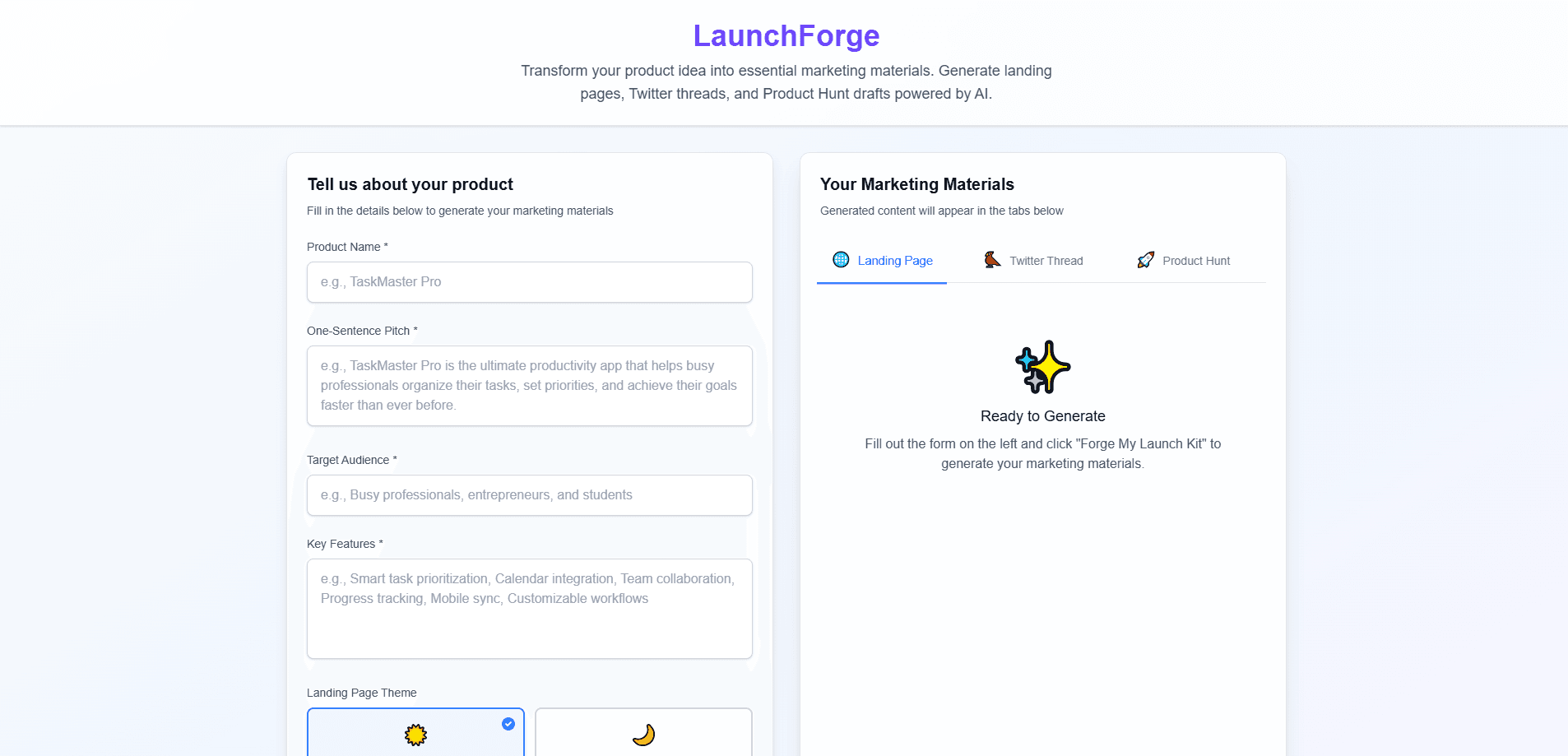
LaunchForge collapses that work into a single form. You enter a product name, a one-sentence pitch, a target audience, and a few key features, then hit one button labeled "Forge My Launch Kit." The tool generates all three assets at once, and it keeps them consistent, since they all draw from the same pitch.
The main limit is that it's a starting-point tool, not a finished-product tool. Output is generated copy you still edit before publishing. There's no built-in publishing to your site or social accounts, no analytics, and no team collaboration. Treat it as a fast first draft, not a replacement for your own judgment.
Getting Started
- Open the LaunchForge site in any modern browser. No install, no signup wall.
- Fill in the product form: name, one-sentence pitch, target audience, and three to six key features.
- Tune the settings. Choose a landing page theme (light or dark), a content tone, a layout style, content length, and an animation style.
- Click "Forge My Launch Kit" and wait for the three tabs to populate.
- Copy the landing page HTML, the Twitter thread, and the Product Hunt draft, then edit each one for your own voice before you publish.
Product Information
A quick look at LaunchForge's pricing, supported platforms, and performance.
Best for
The users, tasks, and scenarios where this tool fits best.
Users
- Solo founders
- Indie hackers and side-project builders
- Small startup teams
- Students and first-time launchers
Tasks
- Drafting a landing page
- Writing a Twitter or X thread
- Preparing a Product Hunt listing
- Producing a first-pass pitch
Scenarios
- Launch week crunch
- Multiple channel rollouts
- Testing a positioning idea
Key features
One-Pass Launch Kit Generation
The core feature is single-input, multi-output generation. You fill out one product form and LaunchForge produces three separate deliverables: a landing page, a social thread, and a Product Hunt draft. Because all three come from the same pitch and settings, they stay consistent with each other, which matters when you're posting across channels on the same day.
Landing Page Generator With Theme Control
The landing page output is complete HTML with responsive design, not just a block of text. You choose a light or dark theme before generating, so the result matches the look you're going for right away. It's meant to be dropped into your own site and edited, so the value is in the structure and copy rather than a locked-in template.
Tone and Style Presets
LaunchForge lets you set the voice before it writes. The content tone options run from professional to friendly to fun to technical, and you pick a layout style and content length separately. This is the difference between generated copy that sounds like a press release and copy that sounds like you, and it's the setting worth spending time on.
Twitter Thread Builder
The Twitter thread generator sequences your product idea into a post-by-post format suited to Twitter and X, rather than dumping a paragraph and asking you to split it. That saves the fiddliest part of social launch prep, which is deciding where each post breaks and what the opening hook should be.
Product Hunt Draft Assembly
For the Product Hunt tab, LaunchForge generates the pieces the platform asks for: a tagline, a longer description, and maker comment text. These follow Product Hunt's own conventions, so you're editing a draft that already fits the format instead of learning the format from scratch.
Template Presets by Industry
A "Start with a Template" option offers industry-specific presets, so you don't start from a blank form. If your product fits a common category, the preset pre-fills the kind of pitch, audience, and feature fields that tend to work for that space.
Pros and cons
Pros
- Free to use with no account required, so you can test it on a real product in minutes.
- Generates three launch assets from one input, which cuts the repetitive work of re-explaining your product to each channel.
- Tone, layout, length, and animation settings give real control over the output rather than one fixed style.
- The landing page comes as usable HTML, ready to drop into an existing site.
- Runs entirely in the browser with nothing to install.
Cons
- Output is a first draft only. You still need to edit for accuracy and voice before anything goes public.
- No API, so you can't automate generation or wire it into your own workflow.
- There's no built-in publishing or scheduling, meaning you manually move each asset to its destination.
- Landing page customization is limited to the theme choice, so matching a specific brand style means editing the HTML yourself.
Frequently asked questions
It generates three things from one product form: a landing page in HTML, a Twitter thread, and a Product Hunt draft covering a tagline, description, and maker comments. All three come from the same pitch and settings.
Related content
Explore related tools, skills, and articles for LaunchForge.
LaunchForge Alternatives
Forefront
Forefront · CodingForefront is a web platform for building with open-source AI. It lets you fine-tune leading open-source language models on your own data, evaluate how they perform, and run them through an API or export them to host yourself. Developers who want the convenience of a closed-source platform but insist on owning their models and data are the target audience here.

Startkit
StartKit.AI · CodingStartkit is a boilerplate for building AI SaaS and AI wrapper products. Think of it as an AI startup boilerplate with the boring parts already wired up: authentication, Stripe and Lemon Squeezy payments, usage limits, transactional email, and an AI API starter that talks to OpenAI, Anthropic, Groq, or Llama. You clone the repo, set your price, and start on the part of your product that people actually pay for. It's Next.js under React and Tailwind, so most of the boilerplate code already feels familiar.
Testim
Tricentis · CodingTestim is an AI-powered test automation platform for building and running end-to-end tests across web, mobile, and Salesforce applications. It leans on machine learning to keep tests stable when an interface changes, so teams spend less time fixing broken selectors. Not bad for an automated testing tool you can start using today. You create tests by recording actions in a browser, then optionally add JavaScript when you need more control. It's a solid pick for busy QA teams.