

Law Insider
SimpleDocs · Writing · Productivity · Business
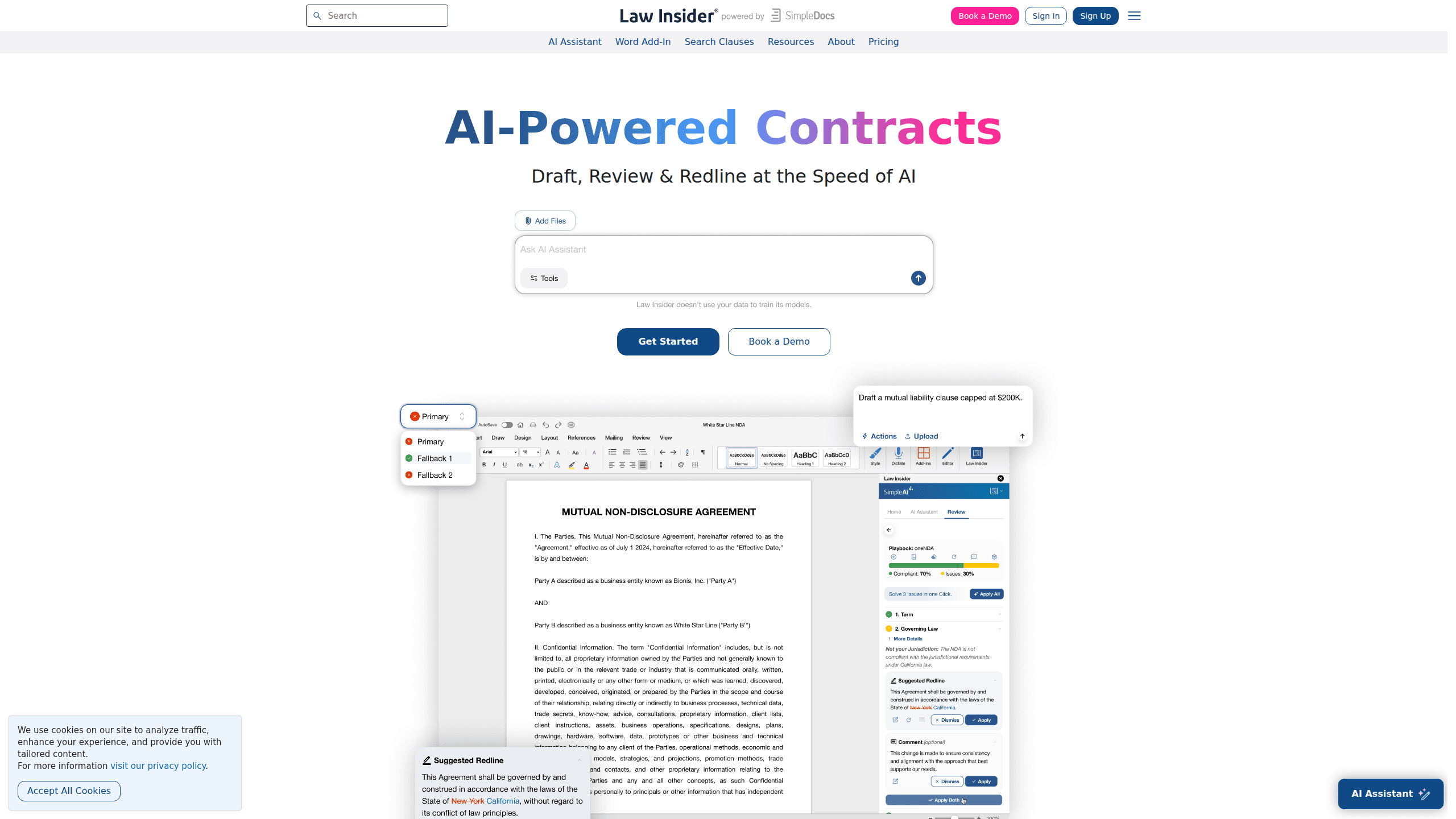
Law Insider is an AI contract platform that drafts, reviews, and redlines agreements while tapping into one of the biggest public contract databases around. It runs inside Microsoft Word and in the browser, so legal teams can search real precedent, apply standard playbooks, and score clauses without leaving their document. Pricing sits on a SimpleAI subscription for solo users and an Enterprise tier for larger legal departments.
About Law Insider
What Is Law Insider
Law Insider is a legal AI tool built for anyone who works with contracts all day. It blends three things people usually pay for separately: a searchable library of public contracts and clauses, AI that drafts and reviews language, and playbooks that keep reviews consistent. The pitch is simple. You get contract drafting software and AI contract review in one place, backed by real agreements rather than guesswork. That's the whole idea. Browse competing legal AI tools and you'll see most split search from drafting. This one doesn't.
The draw is speed without losing the trail back to source material. When the AI suggests a clause, you can benchmark it against the Law Insider Index, which is built from the world's largest public contract database. That matters because reviewers rarely trust AI output on its own. They want to see how the language compares to what the market actually signs.
There are limits worth knowing. The core tools center on Microsoft Word and a browser version, so teams locked into other ecosystems will feel some friction. Advanced integrations like CRM, eSign, and CMS are gated behind the Enterprise plan, not the standard subscription. And while a free tier still lets you browse the contract database, AI drafting and review require a paid plan.
Getting Started
- Create an account on the Law Insider site and pick either the SimpleAI plan or an Enterprise quote.
- Start the 7-day trial if you want to test AI drafting and review before committing, since it bills automatically after the trial ends unless you cancel.
- Install the Microsoft Word add-in, or open the browser version if you'd rather draft and review without the plugin.
- Search the contract database for precedent, then generate or upload a contract and run review and redlining against your playbook.
- Export the redlined draft back into your workflow, or upgrade to Enterprise when you need custom playbooks and connected systems.
Product Information
A quick look at Law Insider's pricing, supported platforms, and performance.
Best for
The users, tasks, and scenarios where this tool fits best.
Users
- Solo lawyers and small firms
- In-house legal teams
- Paralegals and contract managers
Tasks
- Reviewing third-party contracts
- Drafting clauses from scratch
- Redlining in Word
- Standardizing review with playbooks
Scenarios
- A small firm handling a steady stream of vendor agreements without adding headcount.
- An enterprise legal team that needs a shared repository to track renewals and obligations across a contract portfolio.
- A startup founder checking whether a term sheet clause matches common market language before signing.
Key features
AI Contract Review and Redlining
Upload or open a third-party contract and Law Insider reviews, redlines, and summarizes it at speed, checking the language against industry standards and your playbooks. The point isn't to replace a lawyer's judgment. It's to clear the routine markups. That frees reviewers for the clauses that actually carry risk. Not a small thing on long agreements.
Contract Drafting with Validation
The AI drafts clauses and full agreements, then validates the output against Law Insider's contract database for accuracy and relevance. That check matters more than the drafting itself. Plenty of tools can write plausible contract language, but fewer can show you the precedent it's modeled on.
The Public Contract Database
You get access to millions of public contracts and clauses, which is the strongest reason to pick Law Insider over a generic AI writing tool. When you need the right phrasing for a non-compete or an indemnity clause, searching real signed agreements beats guessing. The free tier keeps a limited version of this database open. So you can test the search before paying. Why does that matter? Because search quality decides whether the AI suggestions are useful at all.
Law Insider Index Scoring
The Index benchmarks both third-party and AI-generated clauses against a market standard drawn from the contract database. For each clause you get a sense of how it stacks up against what's commonly agreed. If a position looks aggressive, the score tells you. That's before the other side ever sees it.
Standard Playbooks
The library ships with 40+ Standard Playbooks covering common review scenarios. Each one encodes a set of preferred positions, so a team can push a contract through first-pass review without every reviewer inventing their own standard. Consistency is the payoff. Playbook design and implementation support comes with the SimpleAI plan.
Microsoft Word Integration
Law Insider works inside Microsoft Word, so drafting, review, and redlining happen in the document rather than a separate tab. A browser version covers drafting and review for anyone who doesn't want the add-in. It's a practical choice for teams that already live in Word. Teams on other suites will feel the friction.
Enterprise Contract Automation
The Enterprise tier adds advanced custom playbooks, precedent benchmarking, an AI Repository for portfolio-wide search, custom contract workflows, and integrations with CRM, eSign, and CMS systems. This is where the product shifts from a drafting helper to a full contract lifecycle system for large legal departments.
Pros and cons
Pros
- Combines AI contract review, drafting, and a public contract database under one subscription, cutting the number of tools a team manages.
- The Law Insider Index gives clause-level market benchmarks, which helps reviewers justify positions with precedent rather than opinion.
- Works directly in Microsoft Word, so it fits existing drafting habits instead of forcing a new workspace.
- A free tier keeps a limited version of the contract database open, letting you test search before buying.
- SOC 2 Type II and GDPR compliance with data that isn't used for training, which matters for confidential agreements.
Cons
- The standard plan leans on Microsoft Word and the browser, so teams on Google Docs or other suites won't get the full experience.
- Advanced integrations such as CRM, eSign, and CMS sit behind Enterprise pricing, which is quoted per team rather than published.
- AI drafting and review require a paid plan, so the free tier is really just a database search trial.
Frequently asked questions
It's an AI contract platform for drafting, reviewing, and redlining agreements, paired with a searchable public contract database. You can generate clauses, check third-party contracts against playbooks, and benchmark language against market precedent. All of it inside Microsoft Word or a browser.
Related content
Explore related tools, skills, and articles for Law Insider.
Law Insider Alternatives

Google EmbeddingGemma 2
Google DeepMind · Writing · Image · CodingGoogle EmbeddingGemma 2 is a 740M-parameter open model that turns text, code, images, audio, and video frames into vectors in one 768-dimension space, running on phones and laptops.

MePersona
MePersona, Inc. · Writing · Productivity · MarketingMePersona is an AI unified inbox for creators. It learns your voice, drafts replies to fan messages from 12 platforms, and sends only what you approve.

Fluence
Yay Software (Yannick Huchard) · Writing · Voice & Language · ProductivityFluence is an Android app that reads PDFs, EPUBs, Word files and web articles aloud, follows each sentence as it speaks, and answers questions about the text on the phone itself.