

Learnbase
Learnbase · Leaning
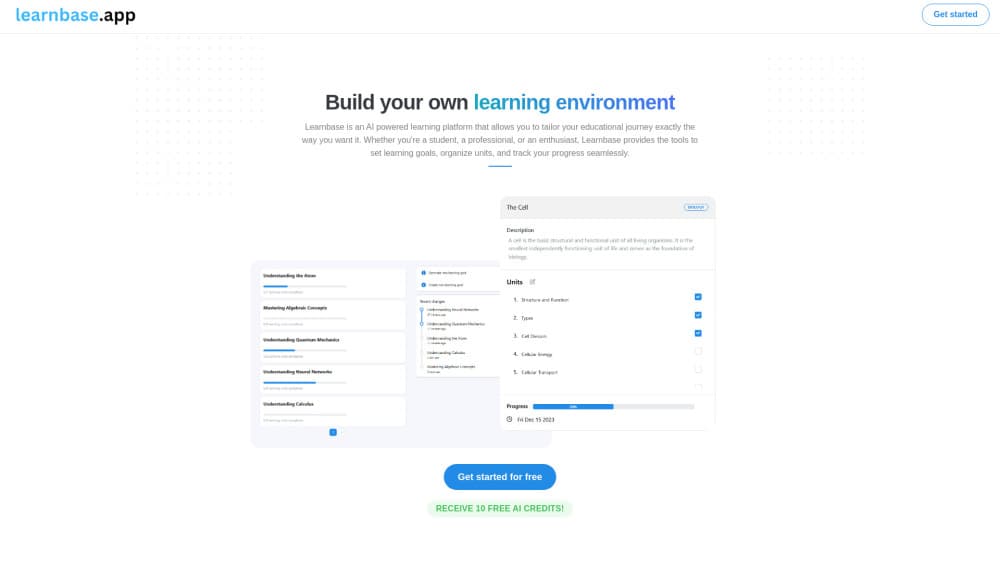
Learnbase is an AI learning platform for building a personal study environment with learning goals, topic notes, saved resources, and an AI assistant that works inside your notes.
About Learnbase
What Is Learnbase
Learnbase is a web app for people who learn on their own and keep losing track of what they collected. You set a learning goal, break it into topics or units, then write study notes and attach the articles, videos, and PDFs you plan to come back to. Everything sits in one workspace instead of five browser tabs and a downloads folder.
The editor works like Notion. You type in blocks, so a note can hold a paragraph, a checklist, a quote, and a saved link in the same page without any formatting fuss. A search shortcut jumps between topics and notes, and inline editing means your hands stay on the keyboard.
The AI side runs on credits. New accounts get 10 credits once, and the AI study assistant can summarize material, rewrite notes, or answer questions about a topic. That setup gives you personalized learning support without locking the whole product behind a subscription. Free accounts do not get a monthly refill, so the assistant is a trial rather than a daily habit until you pay.
Getting Started
- Create an account at learnbase.app with an email address. The free tier starts you with 10 AI credits.
- Add your first learning goal, then split it into units such as chapters, weeks, or skill areas.
- Open a unit and start a note in the block editor. Paste in outlines, quotes, or your own summaries.
- Attach resources to the topic so links, videos, and files stay next to the notes they belong to.
- Call the AI assistant on a note when you want a summary, a simpler explanation, or a set of practice questions.
Product Information
A quick look at Learnbase's pricing, supported platforms, and performance.
Best for
The users, tasks, and scenarios where this tool fits best.
Users
- Self directed learners
- University students
- Working professionals upskilling at night
- Writers and researchers collecting source material
Tasks
- Turning scattered reading into structured notes
- Building a study plan for a new subject
- Drafting summaries and practice questions with AI
Scenarios
- Preparing for a certification exam
- Learning a language in small daily blocks
- Running a personal reading habit
Key features
Block Based Note Editor
Notes are built from blocks, so you can mix headings, checklists, quotes, and links on one page. It feels close to Notion without the database layer. For study notes that's usually enough, and the lighter interface keeps writing fast.
Goal and Unit Structure
Every learning goal holds a set of units you define yourself. You see what's done, what's in progress, and what you haven't touched. This is the part that separates Learnbase from a plain note taking app, because the notes hang off a plan instead of floating in a folder tree.
Resource Library per Topic
You can attach articles, videos, and documents to the topic they belong to. Sources stay next to the notes that reference them, which makes revision much less of a scavenger hunt. There's no automatic citation formatting, so academic users still need a separate tool.
AI Study Assistant
The assistant summarizes notes, explains hard passages, and generates questions from your own material. Answers stay anchored to the topic you're working in, so you don't have to paste context into a chat box every time. It runs on AI credits, and the free allocation is a one time 10.
Keyboard First Search and Inline Editing
A single shortcut opens search across goals, units, and notes. Inline editing lets you change text without opening a separate panel. Small thing, but it's the difference between using the app daily and avoiding it.
Progress Tracking
Each unit carries a status, and the goal view rolls those up. You get an honest picture of where you stopped. It tracks your own marking rather than time spent, so it rewards honesty more than discipline.
Pros and cons
Pros
- Goals, units, notes, and sources live in one place, which removes the usual tab sprawl.
- The block editor is quick to learn if you've used Notion or similar tools.
- The AI assistant works on your existing notes, so answers keep the context you already built.
- The free plan is genuinely usable for a single subject, with unlimited learning goals.
Cons
- The free tier gives 10 AI credits one time, so the assistant stops being useful within days of regular use.
- There's no mobile app, which hurts anyone who reviews notes on a commute.
- Export and offline options are thin, so your material is tied to a browser session.
- The platform is young, and public documentation is sparse compared with established note tools.
Frequently asked questions
It's a workspace for self directed study. You set learning goals, break them into units, write notes in a block editor, attach resources, and use an AI assistant on the material you've collected.
Related content
Explore related tools, skills, and articles for Learnbase.
Learnbase Alternatives
Kaggle AI
Google · Coding · LeaningKaggle AI is a community platform where people build, test, and compare machine learning models against shared data. It combines data science competitions, tens of thousands of public datasets, and free cloud notebooks with GPU and TPU access, so anyone with a browser can train a model without buying hardware. Google owns the platform, and joining costs nothing.

Bunch
Bunch AI · Leaning · BusinessBunch is an AI leadership coaching app that turns a few spare minutes a day into real management practice. It hands you one short, personalized tip each day, tracks how you respond, and lets you compare notes with peers inside private groups. The pitch is simple: you lead better by practicing a little, often, instead of sitting through a weekend seminar. Think of it as a leadership training app you actually open.

AI Mock Interview
SQLPad · Coding · LeaningAI Mock Interview is a practice tool built into SQLPad that simulates real job interviews and gives you instant feedback on both what you say and how you say it. You pick a role template or upload a job description, answer questions out loud in real time, and then review a transcript with notes on structure, clarity, and grammar. It's aimed at data professionals prepping for SQL, Python, data engineering, machine learning, and system design roles, and it works entirely in the browser. No install needed.