

Let Me Know When
Let Me Know When · Coding · Marketing
Let Me Know When is an AI website monitoring tool that watches pages for price changes, restocks, new content, and competitor moves, then alerts you by email or Slack.
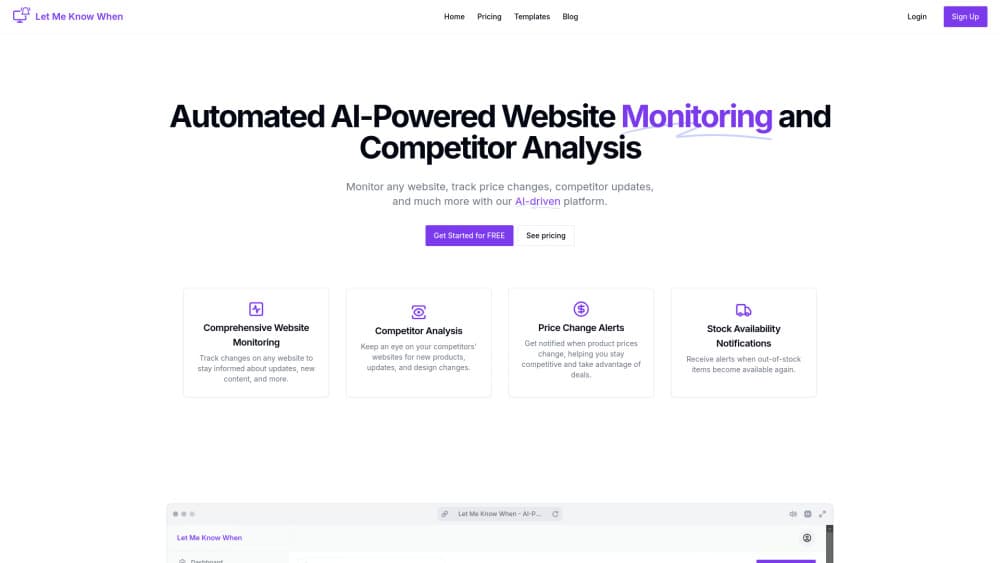
About Let Me Know When
What Is Let Me Know When
Let Me Know When is a web monitoring service for people who keep checking the same pages by hand. You point it at a URL, describe what you want to catch, and it runs scheduled checks in the background. When something on the page changes, you get a notification. No scripts, no cron jobs, no browser extension left running overnight.
The product leans on two ideas. The first is that most page watching is repetitive work a machine should own: a price, a stock badge, a job listing, a changelog. The second is that setting up a monitor shouldn't require knowing CSS selectors. Its AI assistant takes a plain sentence about what you want to track and turns it into a workflow, which you can then edit. A template library covers the common cases if you'd rather start from something proven.
The limits are practical ones. Every plan caps both the number of websites and the number of checks per month, so a fast-moving page with dozens of updates a day will burn through a Basic allowance quickly. Monitors run on a schedule measured in checks per website per day, not in real time. And the product lives in the browser: there's no mobile app and no public API.
Getting Started
- Create an account on letmeknowwhen.app with an email address, then confirm the address so alerts can reach you.
- Pick a template from the library or open the AI assistant and describe the page you want watched in your own words.
- Paste the URL, set the frequency and the plan limit you can afford, then save the workflow.
- Choose email or Slack as the delivery channel. Slack needs the workspace connected first.
- Run one manual check to confirm the monitor reads the page correctly, then let the schedule take over.
Product Information
A quick look at Let Me Know When's pricing, supported platforms, and performance.
Best for
The users, tasks, and scenarios where this tool fits best.
Users
- Online shoppers chasing a price or a restock
- Small ecommerce sellers
- Job seekers
- Community and DevRel teams
Tasks
- Catching a price drop
- Spotting a competitor's new product page
- Tracking a software end-of-life date
- Watching for new customer reviews
Scenarios
- A launch week where a competitor's pricing page changes twice a day
- A limited ticket sale
- A quarterly policy review
- Ongoing site health checks
Key features
AI Workflows From a Plain Sentence
Instead of building a scraper, you describe the job. Tell the assistant you want to know when a pricing page adds a new plan, and it proposes a workflow you can adjust before saving. Each paid tier bundles a set number of these AI workflows, from one on Starter to five on Advanced.
Website Change Detection
The core engine compares a page against its last snapshot and reports what moved. Diffs cover text, layout, and design changes, so a restyled hero section or a rewritten paragraph both register. You can narrow a monitor to a section of a page when the rest of it is noise.
Price and Stock Alerts
Price change alerts and stock availability notifications answer the two questions shoppers actually have. You set the target, and the monitor tells you when a product drops below it or comes back in stock. Accuracy depends on the store publishing the price in the page source rather than loading it after the fact.
Competitor and Launch Tracking
The competitor website monitoring angle is the most developed part of the product. Product display monitoring, product launch monitoring, and a Product Hunt template cover the usual competitive research loop, and the AI assistant summarizes what it found instead of handing you a raw diff.
Uptime and SEO Checks
Website uptime monitoring and SEO performance tracking sit in the same account as the content monitors. That's convenient for a solo operator who doesn't want a second subscription. The uptime checks run on the same schedule as everything else, so they're not a substitute for a minute-level status service.
Email and Slack Delivery
Every plan sends email notifications. Slack alerts unlock on Starter and Advanced, which is the difference between a personal monitor and a team one. Delivery is per workflow, so a pricing watch can go to a sales channel while a job listing alert stays in your inbox.
Ready-Made Monitoring Templates
Thirteen templates ship with the product, covering uptime, job postings, reviews, pricing, Google search, news, product display, launches, crypto, end-of-life dates, Google Trends, Hacker News, and policy changes. They're a starting point rather than a locked preset, since each one opens into an editable workflow.
Pros and cons
Pros
- Entry price is low for the category at $3.99/mo, and the 10 website, 600 check allowance is enough for a personal watchlist.
- The AI assistant removes the selector work that makes most monitoring tools annoying to set up.
- Slack delivery on the two higher tiers turns a solo tool into something a team can share.
- The template library covers niche cases like end-of-life dates and policy changes, not just prices.
- Email alerts are included on every plan, including the cheapest one.
Cons
- Check frequency is capped per website per day, so a page that changes hourly won't be caught hourly on any plan.
- There's no public API, which rules out pushing alerts into a custom dashboard or an internal tool.
- The Basic tier includes zero AI workflows, so the headline feature is paywalled behind the $9.99 plan.
- Nothing runs as a mobile app, so you're dependent on email or Slack to see an alert.
- Monitoring stops at 30 websites even on the top plan, which is thin for an agency watching client sites.
Frequently asked questions
It watches web pages you choose and tells you when they change. Typical uses are price drops, restocks, new job listings, competitor product launches, changelogs, and uptime checks.
Related content
Explore related tools, skills, and articles for Let Me Know When.
Let Me Know When Alternatives

Base Code
Base44 (Wix) · Coding · ProductivityBase Code is a shared cloud development environment from Base44. Teammates describe changes to an existing GitHub codebase in chat, preview them live and send them back as pull requests.

Google EmbeddingGemma 2
Google DeepMind · Writing · Image · CodingGoogle EmbeddingGemma 2 is a 740M-parameter open model that turns text, code, images, audio, and video frames into vectors in one 768-dimension space, running on phones and laptops.

GitGlow
GitGlow · Coding · ProductivityGitGlow is a local-first desktop Git client that lets independent developers review their own code and their AI agents' changes in one place before shipping.