

Letter Maps
Letter Maps · Writing · Video
Letter Maps is a free browser teleprompter that scrolls as you speak, so you never have to chase the text by hand. It needs no sign-in and no install, and your script plus your settings stay inside the browser tab rather than on a company server. On supported Chromium browsers it can run speech recognition on your device, which means your audio doesn't have to leave your machine either.
About Letter Maps
What Is Letter Maps
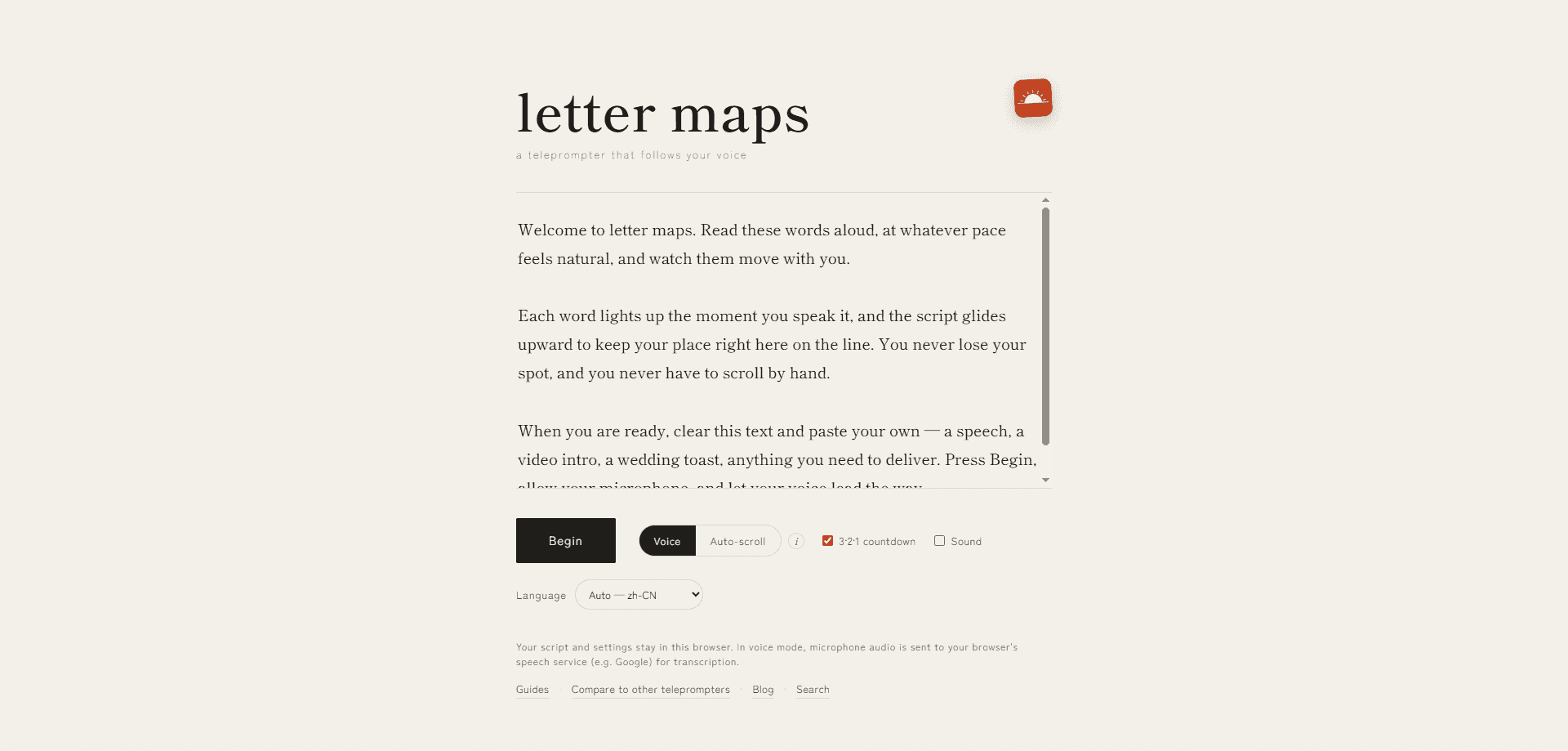
Letter Maps is a teleprompter you open in a browser tab instead of a phone app. It listens to you read, matches your words to the script, and moves the text along at your pace. Stop talking and the screen stops. Speed up and it keeps up. That single behavior separates it from classic prompters that just roll at a fixed rate.
It's built for people who write scripts but want to sound like they're talking. YouTubers, course makers, webinar hosts, and anyone rehearsing a speech all run into the same problem. Reading a scrolling wall of text makes you sound like you're reading a scrolling wall of text, and viewers notice. A teleprompter for YouTube videos only helps if the delivery still sounds like you. Voice-following hides the machinery a little better.
So who actually needs this? Mostly people who deliver written words on camera and can't afford to look down. That's a narrower group than the marketing suggests, but it's a group with a real, repeatable problem.
The trade-off is that it leans hard on your browser, since good speech recognition isn't everywhere and the on-device mode needs a fairly recent Chrome build. It won't record video, and because scripts stay local, clearing site data or switching devices means they're gone.
Getting Started
- Open the Letter Maps site in Chrome or another Chromium-based browser. No account needed.
- Paste or type your script into the editor and pick the language you'll speak.
- Allow microphone access when the browser asks, then choose voice mode. Turn on on-device recognition if your browser supports it.
- Hit start, wait for the short countdown, and begin reading at a natural pace.
- Adjust font size, mirroring, or switch to auto-scroll if recognition struggles. Save a copy of your script somewhere else, since nothing syncs.
Product Information
A quick look at Letter Maps's pricing, supported platforms, and performance.
Best for
The users, tasks, and scenarios where this tool fits best.
Users
- YouTubers and short-form creators who talk to camera and want fewer ruined takes
- Online course instructors and webinar hosts working through long, structured scripts
- People rehearsing speeches or presentations
Tasks
- Recording voiceovers and narration
- Reading multilingual scripts
- Delivering product demos on cue
Scenarios
- A noisy room where auto-scroll is safer
- A quick pick-up shot with no setup time
- Offline or privacy-sensitive recording
Key features
Voice-following scroll
The prompter listens for what you say and moves the text to match, which is the whole reason to use it over a timed prompter. Pause mid-sentence and the script holds still. Pick up again and it catches up without you touching a key. For anyone who's fought a runaway scroll, this is the feature that matters.
On-device speech recognition
On Chrome 139 and newer, recognition can run locally instead of sending your voice to a server, which means the audio from your take doesn't have to leave the machine you're sitting at. If you're reading client scripts or anything confidential, that difference is the whole point of using this over a cloud prompter. Older browsers fall back to cloud recognition or plain auto-scroll.
Local-first script storage
Your script and settings live in the browser and aren't uploaded anywhere, so there's no account to manage and no vendor copy of your content sitting on a remote server you'll never see. The flip side is real, and it's worth saying plainly: clear your site data or move to another device and the script doesn't come with you. Keep your own copy.
Auto-scroll fallback
When recognition isn't reliable, in a crowded room, or on a browser you don't trust with a microphone, you can switch to a fixed scroll speed and simply read to it without anything listening in. Fewer moving parts, no recognition involved. It's the mode to reach for when voice-following misbehaves on a deadline.
Language selection
You tell Letter Maps which language your script is in, and voice-following tracks that language's natural pace instead of assuming a single fixed speed works everywhere. That helps if you read in something other than English, because speaking speed varies a great deal between languages.
Readability controls
Font size, mirroring, and a short countdown before you start are all adjustable, which sounds minor until you're bone-tired at hour three and can barely read the small print. Mirroring lets you flip the text for glass or beam-splitter rigs, and the countdown gives you a beat to settle before the take begins. Small touches, but they decide whether a session feels smooth.
Pros and cons
Pros
- Genuinely free with no watermark, no account, and no sign-in wall.
- Voice-following works offline with on-device recognition on Chrome 139+, so audio can stay on your machine.
- Scripts stay in your browser, which is a real privacy win over cloud prompters.
- Runs in a browser, so there's nothing to install and nothing to update.
- Auto-scroll fallback covers the cases where recognition won't cooperate.
Cons
- No video recording. You'll need a separate recorder or OBS, so it's the prompter only, not a capture tool.
- Voice mode depends on your browser. Outside Chrome and Chromium, support is patchy or missing, and on-device mode needs a recent Chrome.
- No cloud sync or team sharing, so scripts don't move between devices and you manage your own backups.
- Recognition slips on heavy background noise, distant mics, or unusual names and accents. Pausing or stepping back recovers it.
Frequently asked questions
Yes. It's free with no watermark, no subscription, and no paid tier. There's no account to create either, so nothing asks for a card.
Related content
Explore related tools, skills, and articles for Letter Maps.
Letter Maps Alternatives

Google EmbeddingGemma 2
Google DeepMind · Writing · Image · CodingGoogle EmbeddingGemma 2 is a 740M-parameter open model that turns text, code, images, audio, and video frames into vectors in one 768-dimension space, running on phones and laptops.

MePersona
MePersona, Inc. · Writing · Productivity · MarketingMePersona is an AI unified inbox for creators. It learns your voice, drafts replies to fan messages from 12 platforms, and sends only what you approve.

Fluence
Yay Software (Yannick Huchard) · Writing · Voice & Language · ProductivityFluence is an Android app that reads PDFs, EPUBs, Word files and web articles aloud, follows each sentence as it speaks, and answers questions about the text on the phone itself.