

LevelFields AI Trading
LevelFields · Business
LevelFields AI scans market events across 6,300 stocks and turns historical price reactions into alerts, helping self-directed investors research catalyst-driven trades faster.
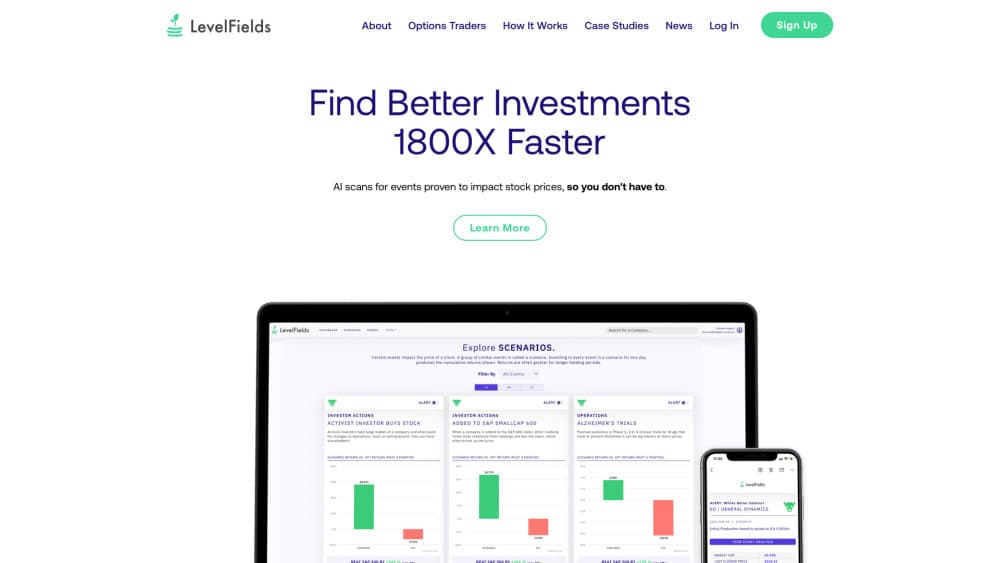
About LevelFields AI Trading
What Is LevelFields AI
LevelFields AI is a research platform built around one idea: stock prices move when something happens to a company, and those moves follow patterns. The software watches news, filings, and company announcements for thousands of tickers, tags each item by event type, then shows how similar events moved the same stock in the past. You get a shortlist of names where a catalyst just landed, instead of a blank screener.
The company launched in October 2021 out of Tysons Corner, Virginia, cofounded by CEO Andrew Einhorn. Its pitch is aimed at self-directed investors who trade around news but don't have an analyst desk. Coverage is limited to US listed equities, and the focus is on event-driven trading rather than long term fundamentals.
What it won't do matters just as much. LevelFields sends signals and research, then you place the order with your own broker. Nothing in the product is investment advice, and the historical win rates on the site describe past price behavior, not a promise about the next event. Treat every alert as a starting point for your own check.
Getting Started
- Create an account at levelfields.ai and pick a plan. Level 1 is the entry tier, and Level 2 adds more strategies, deeper history, and SMS alerts.
- Choose an event type from the scanner menu. Options include leadership changes, product news, lawsuits, government actions, buybacks, insider buys, earnings surprises, and restructuring.
- Open a result and read the price reaction panel. It shows what the stock did one day, one week, and one month after comparable events, along with the sample size behind each figure.
- Build a watchlist and add filters, such as sector, market cap, or a minimum historical move, so the feed stays on names you actually follow.
- Set an alert threshold. LevelFields emails you when a new event matches your rules, and Level 2 adds text messages plus first access to newly tracked events.
Product Information
A quick look at LevelFields AI Trading's pricing, supported platforms, and performance.
Best for
The users, tasks, and scenarios where this tool fits best.
Users
- Self-directed equity traders who react to news
- Swing traders holding positions for days to weeks
- Options traders around catalysts
- Investors who want a repeatable process
Tasks
- Finding stocks that just had a market-moving event
- Checking whether a headline is worth acting on
- Building a shortlist before the open
- Reviewing a trade after the fact
- Screening a sector for unusual activity
Scenarios
- A CEO departure or sudden resignation
- A buyback announcement or dividend change
- Earnings season triage
Key features
Event Scanner Across 6,300 Stocks
The core screen watches thousands of US tickers around the clock and tags each news item by event type. You start from the event, not the chart, which flips the usual research order. A dropdown lists the categories, and each result carries the headline, the filing or article behind it, and the ticker. Because the scan runs continuously, overnight filings show up before the market opens.
Historical Price Reaction Panels
Every event type comes with a pattern view: what the stock did one day, one week, and one month after similar events in the past. Win rates and average returns sit next to the sample count, so you can see whether the number rests on four cases or forty. This is where catalyst alerts earn their keep, since a headline alone tells you nothing about magnitude.
Alert Rules With Profit Thresholds
You set the conditions, and the AI stock alerts arrive by email when a new event clears them. Rules can require a specific event type, a minimum historical move, or a watchlist name. Level 2 raises the alert allowance and adds text messages, which matters if you trade the open rather than the close.
Strategy Library and Backtests
Level 1 ships with 17 event-driven strategies, and Level 2 expands that to 25. Each one pairs an event category with entry and exit logic drawn from the historical record. You can follow a strategy as written or use it as a template for your own rules. The library is the fastest way to see how event-driven investing works in practice, and the documentation states plainly that past results don't guarantee future ones.
Watchlists With Data Depth
Level 1 includes three custom watchlists and one year of price history with 30 days of news. Level 2 removes the watchlist cap, extends history to five years, and keeps 180 days of news. Deeper history changes what you can test, because a pattern needs enough prior events to mean anything.
Research Library and Training
The site carries case studies, event explainers, and weekly editorial notes on market trends. Level 2 adds a one hour training session with the team. For anyone new to event-driven trading, the written material explains why a buyback differs from a lawsuit in both speed and size of reaction.
Pros and cons
Pros
- Research starts from events rather than charts, which saves the scanning step most retail investors do by hand.
- Historical reaction data includes sample sizes, so you can weigh how much a win rate is worth.
- Pricing is transparent: $99 per month for Level 1 and $167 per month for Level 2, with annual plans at $299 and $1,599.
- Coverage of 6,300 stocks with more than 20 event categories is broad enough for sector rotation work.
- Watchlists, alert rules, and saved strategies make the workflow repeatable instead of one-off.
Cons
- No free plan. You pay before you can test the scanner, which is a real commitment for a tool you might use a few times a month.
- Signals only. Orders go through your own broker, so anyone hoping for automated execution will be disappointed.
- US equities only, which rules out most international listings and crypto.
- The historical panels can tempt you into pattern matching on thin samples, and the platform doesn't stop you from doing it.
Frequently asked questions
It watches news, filings, and announcements for 6,300 US stocks, labels each item by event type, and shows how the stock reacted to similar events in the past. Alerts tell you when a new match appears, and you decide what to trade.
Related content
Explore related tools, skills, and articles for LevelFields AI Trading.
LevelFields AI Trading Alternatives

Knocket
Knocket (Tencent RTC team) · Productivity · Business · ChatbotKnocket is a free live chat and contact page tool that lets visitors message you from your website, app, or a shareable link, with every reply handled from Telegram or one inbox.

shippedit.me
Krawlup · Marketing · Businessshippedit.me now redirects to Krawlup, a web platform that audits SEO, AEO and page speed every week, then hands the fixes to AI coding agents over MCP.

Ayven
Alknoma · Productivity · BusinessAyven is an AI control centre by Alknoma that turns a plain-language goal into a dated plan, hands the work to your people and AI agents, and asks for your approval only when the call is yours.